
 |
 |
1. Introduction |
| 2. Rules Setup | ||
| 3. The Quarantine database |
1. Introduction |
|
|
 Back to Top
Mail Rules are setup documents stored in the MailFlowCollect databases on all of the infrastructure's mail servers. These documents are used by the MailFlowLib library to modify the routing of messages traversing the Domino server, when they are transferred to the mail.box of the server. There are two types of actions performed by Mail Rules on messages:
- Blocking the message and transferring it to a quarantine database (Quarantine DB).
- Change the adress of the message, whether it be the sender or the recipients.
The Mail Flow Engine (Mail Flow Engine) is responsible for processing incoming messages in the Quarantine database in order to send notifications of distribution failure to the senders of blocked messages. It also supports the regular purge of messages stored in the Quarantine database.
Architecture diagram with all the components involved in setting up Mail Rules:
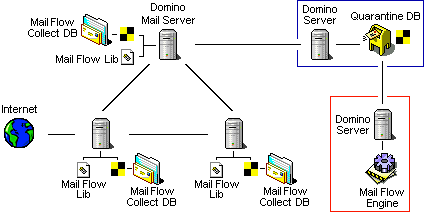
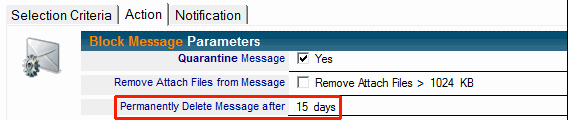
Blocked messages are sent to the Quarantine database where they are kept for a few days before being deleted. This delay allows Mail Flow application administrators to manually free the messages blocked by mistake.
Some messages are only blocked for a few hours and are automatically released at the scheduled time. This temporary retention makes it possible, for example, to respect the right to disconnect users by preventing the delivery of mails outside working hours (night, weekend, public holidays).
Permanently blocked messages are usually those whose content can damage the messaging infrastructure (messages too large, files attached dangerous).
The Mail Rules also make it possible to conceptualize the processing that is done on the messages by reserving for example the only HR people the use of a broadcast group containing all the people of the address book of the company. If a lambda user tries to use this group as the destination of one of his messages, the mail will be blocked. If it is a human resources person, the message will be delivered.
2. Rules Setup |
|
|
Configuring Mail Rules
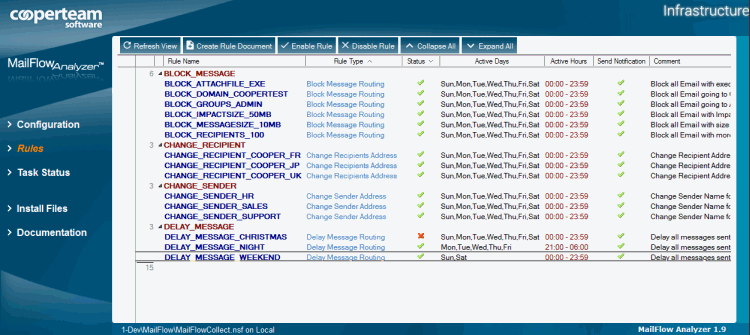
You can activate  or deactivate
  the existnig Rules by using the buttons
  and
and  from the view.
To create a new Mail Rule in the MailFlowCollect.nsf database, simply click on the button  and fill in the following fields:

Declaration of Mail Rules
For a Mail Rule to be active on a server, it must be explicitly declared on the Mail Flow Rules tab of the Server Configuration document in the MailFlowCollect.nsf database:
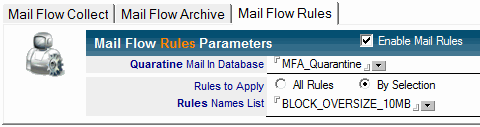
To apply all the Rules, without having to explicitly name them, simply select the All Rules option.
Mail Rules Statistics
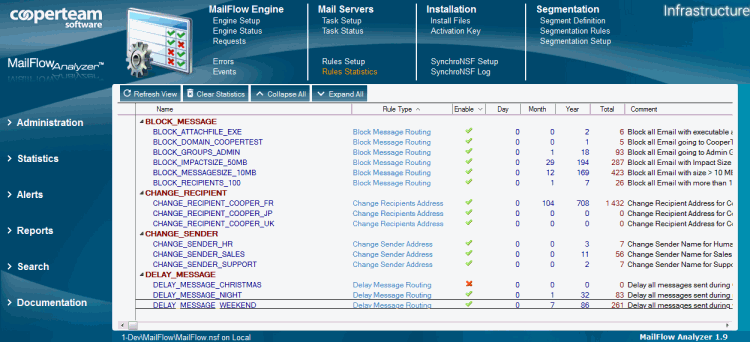
These Rules Statistics documents can be opened to access the details of the statistics on rolling periods (last 7 days, last 4 weeks, last 12 months, last 5 years) and get a graph of evolution over the last months:
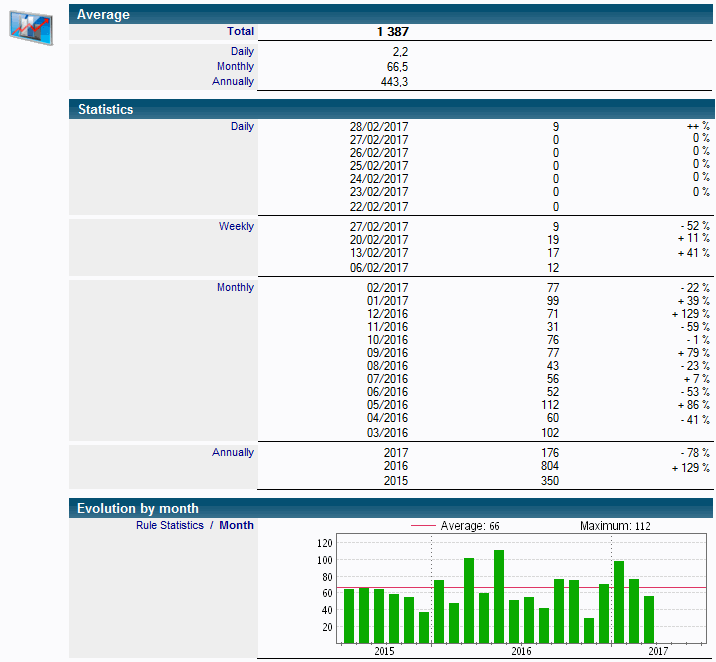
They can be used in Reports to include information about the number of times a rule has been applied over a period.
3. The Quarantine database |
|
|
The Mail Flow Quarantine database is usually found in the Domino server which hosts the data processing engine. However, it may also be located on any Mail server of the company. When you are facing a large messaging infrastructure, you may have to install several Quarantine databases. By example, we can install one Quarantine database per geographic area. The Quarantine database should inherit of the MailFlowQuarantine.ntf template, attached in the Mail Flow Databases document, located in the Install / Install Files view of the Mail Flow database. The Quarantine databases can be accessed with a Notes client :

The Quarantine databases are registered in the Company's Address Book as Mail-In databases. These databases receive all mails blocked by the Mail Rules defined in the MailFlow Collect databases. There are two types of blocked messages :
- Blocked Messages are permanently blocked.
- Delayed Messages are temporarily blocked & will be unblocked after few hours of retention.
The navigator on the left of the Mail Flow Quarantine database shows all the views used for the different steps of the Workflow that the messages go through :
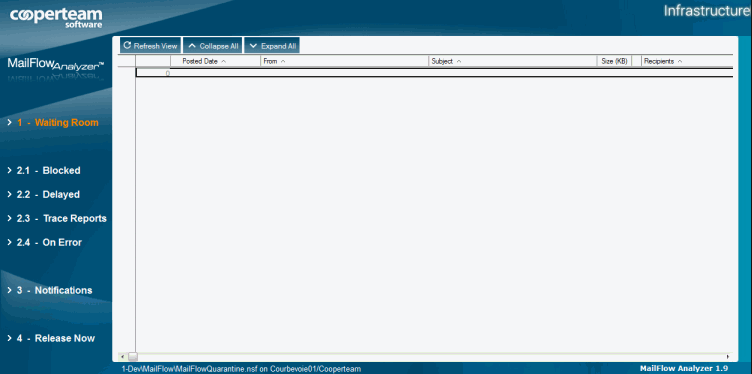
1 - Waiting Room
The Waiting Room view displays every message sent in the Quarantine database by the Mail Rules of Domino servers. It can either be messages permanently blocked or temporary delayed messages. The Mail Flow engine analyzes, on a regular basis, all the Waiting Room views for all Quarantine databases. It then processes messages found in order to redirect them in the appropriate views (Blocked or Delayed), depending on their nature. The processing engine is furthermore in charge of sending Notification messages to the original senders and of suppressing potential files attached in the message, based on the following option :

The operation performed on the message are displayed in the Status area of the mail, stored in the Quarantine database:
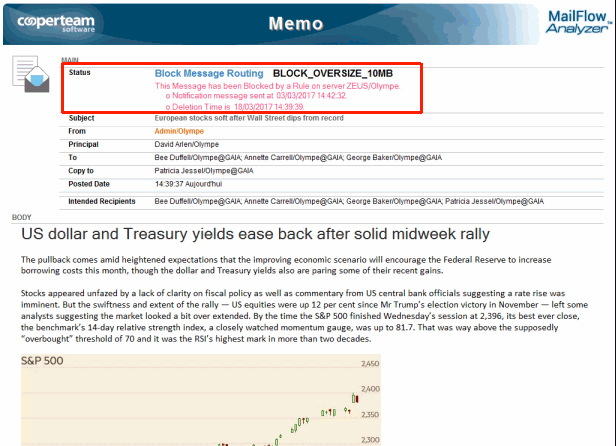
In theory, the Waiting Room view should be empty of any document since the processing engine clears it out on a regular basis. Only a extended stop of the processing engine can allow to visualize all the mails stored in this view.
2.1 - Blocked
The Blocked view displays all messaged permanently blocked by the Mail rules. You can immediately release a blocked message by selecting the message and by using the  button, located in this view. This action can't be done for messages whom attached files have been removed.

The duration of retention for all messages stored in the Quarantine database is defined in Mail Rule documents:
2.2 - Delayed
button, located in the view.
The duration of retention for all messages stored in the Quarantine database is defined in Mail Rule documents :
2.3 - Trace Reports
If the Delivery Report option is enabled on a message delivered in the Quarantine database (blocked by a Mail Rule), the router of the Domino server will notify the sender of the message. We want to prevent that so we are also blocking the delivery of such Delivery Report messages. They are kept in the Trace Reports view of the Quarantine database.
These messages will be deleted from the Quarantine database after 15 days.
2.4 - On Error
If an error occurs during the processing of a message in the Quarantine database (i.e. sending a notification, Workflow steps progress...), this message will be displayed in the On Error view. The origin of the error will be stored in the document.
3 - Notifications
The Notifications view contains a copy of the notification messages sent to senders having their mails blocked by a Mail Rule. The notifications will only be sent if the Rule allows it :

The formatting of the notification message depends on the options selected in the Mail Rules document:
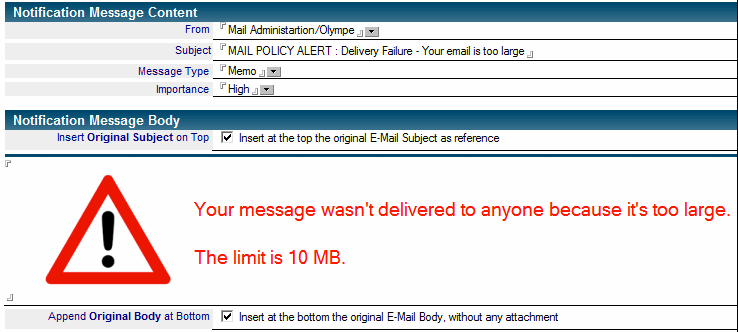
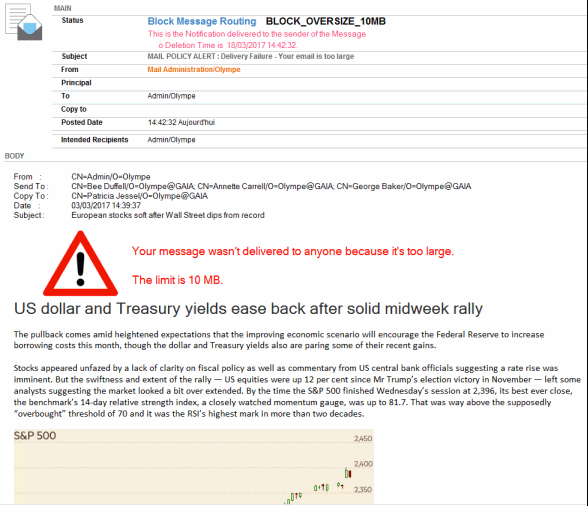
The Notification message sent to the user usually contains the body of the initial message (without any attached files) followed by information of the blocked message (Sender, Recipients, Date, and Subject) as well as some text of notification explaining the reason of the blocking. It can be seen in the document Rules of the Messaging system:
The duration of retention for all Notification messages stored in the Quarantine database is defined in Mail Rule documents:

4 - Release Now
The Release Now view displays all blocked messages (temporarily or permanently) which have been manually released from Blocked or Delayed views, using button. They will be removed from this view once their retention period is over.
Comments
0 comments
Article is closed for comments.