
 |
 |
1. General Principles |
| 2. Data Processing | ||
| 3. Data Access | ||
| 4. Architectural Choices | ||
| 5. Collecting Data on Messaging Servers | ||
| 6. Quarantine messages |
1. General Principles |
|
|
 Back to Top
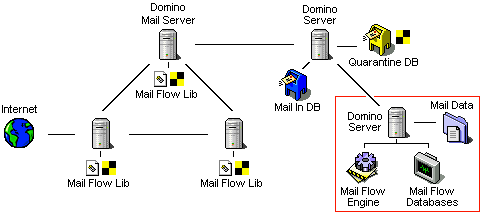
MailFlow Analyzer is an application solution that analyzes the messaging flow within an IBM Domino architecture. The solution requires installing a first component (Mail Flow Lib) on messaging servers, such as gateways, relay servers, servers hosting mail databases. This component will collect information related to the messages sent from and received by the server (name of sender and recipients, message subject and size, etc.). These data are aggregated into a file and sent on a regular basis to a Mail In Database (Mail In DB) to be centralized there. This way, the information related to all messages passing through the servers within the Domino infrastructure ends up as files stored into a single Mail In Database. All data is discarded from the messaging servers.
The module used to process the collected data is installed on a dedicated machine (either a workstation or a server). This machine hosts the application engine (Mail Flow Engine), aimed at retrieving the message-related data into the Mail In database (Mail In DB), processing them (statistics computing) and storing the results as a file tree structure on the device disk (Mail Data). The data produced by the components installed on enterprise messaging servers ‘feeds’ the application engine. At a given time, the Mail in Database only contains files that have been received from servers and that have not been processed by the engine yet. This is why its size is relatively small.
The statistical information resulting from the data processing is published by the MailFlow Analyzer application (Mail Flow Engine) as Notes documents in a database (Mail Flow Stat), hosted by one of the enterprise Domino servers. This Notes database can be accessed through both a Notes client and a Web interface.
On the top of the traffic analysis done trought the Domino servers, Mail Flow Analyzer has an active routing control module that provides the ability to create Messaging Rules ( ) on servers where the data collectors are installed. Thes rules have the ability to block unwanted messages by sending them in quarantine (Quarantine DB). The data processing engine regularly analyzes the content of the quarantine database and notify senders about the lack of delivery. The block can be either temporary (mail releases after a couple of hours) or permanent. It will be then purged from the quarantine database within a few days.
The different elements at work when Mail Flow Analyzer is running can be represented as below:
Messages tracking
As messages may pass through several Domino servers between their sending and their delivery (internally or Internet-bound), it is important to track them throughout their routes. Any new message entering the mesh constituted by Domino servers that host Mail Flow Analyzer is immediately identified and given a unique key (a $MailInfoID field is added to the message). This unique key allows detecting the application-controlled servers by which the message went through, and thus, tracking its route and measuring transfer times between the different mesh branches. If Mail Flow Analyzer is installed on the messaging server providing gateway facilities with the Internet environment, any message output towards Internet will be recorded, so it will be possible, upon request, to confirm the proper message delivery along with the delivery time.
As it is important to detect any new message as soon as possible, it is essential to select the right servers on which to install the message data collection module. These are primarily mailbox-hosting Mail servers, gateway servers (to Internet or to other Notes domains), but also servers whose applicative databases are capable of sending messages.
If Mail Flow Analyzer is directly installed on the message-sending server, it will be able to identify the process responsible for message-sending. For instance, on a Mail server, the program can differentiate messages sent by users through their Notes clients, from a message sent by a scheduled agent (Forward) in one of the mailboxes. This fine-tuned analysis of messaging flows enables to create statistics that would be impossible to obtain with standard procedures (Notes Log analysis).
2. Data Processing |
|
|
The MailFlow Analyzer-dedicated machine hosts the data processing engine (statistics computing) and the message data after processing (storage for future querying). Therefore, it is used both for its CPU processing power and for its disk storage capacities. The ‘dedicated’ term is particularly appropriate for large companies, where messaging flows are so important that the data volumes to process and to store will take up all available resources on the computer. As regards small and medium-sized businesses, the statistics computing engine and the data files may be installed on one of the Domino servers or, if need be, on a computer equipped with a Notes client. The latter solution may be considered, for instance when testing the application for evaluation.
The following diagram presents the different data processing steps on the dedicated machine:
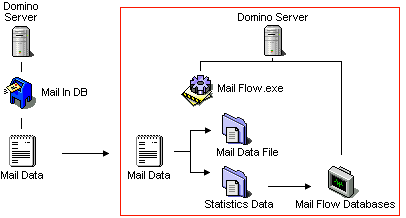
First, the application engine (MailFlow.exe) extracts the files containing the data collected in messages (Mail Data) from the Mail In Database (Mail In DB). They are then moved to the application-hosting computer and deleted from the Mail in Database. This is why this database is nearly empty most of the time.
Each message’s data are processed in order to extract useful information for user and server statistics. Then they are stored in text files for future use, in case of uncertainty concerning message routing or export to XML files. As a message may have passed through different messaging servers, the application engine gets, among the data to process, a message trace for every server passed through (time of passage of the message on the server and name of this server). The data related to a given message should therefore be grouped together using the $MailInfoID unique key, in order to provide reliable statistics. This is why the Mail Data File, stored on the computer, consists in an aggregation of the different data related to a given message. Due to performance reasons, the data related to 1000 messages are stored in one Mail Data File. In addition, this Data file is zipped to save some disk space.
Statistics computed for servers and users are stored in distinct files (Statistics Data). At this time, they are still raw data. These data are displayed in standard statistic formats (percentages, variance, tables, graphics, etc.) in Notes documents according to a frequency that is defined at application setup. All of these Notes-formatted data may be accessed in Notes databases that are present on the application-hosting machine. A part of these documents is replicated outside the application-hosting computer, on one of the enterprise servers (Mail Flow Stat). It is not necessarily useful to publish all statistics in the Mail Flow Stat database. For instance, as regards user statistics, one may prefer to display only the 100 top-consuming users of the messaging tool, and not necessarily all entries. It is also possible to select the statistics to publish from the all the ones that will be stored on the statistics-producing computer. For instance, one may prefer not to publish some personal information regarding users, such as the names of Internet domains to which they send mails.
The statistics creation engine provides a whole range of every possible statistics, and the selection of display options for external use is done when publishing data in the Mail Flow Stat database.
The application should be installed on a Windows computer, equipped with a Domino server (recommended) or with a simple Notes client (product evaluation, small data volumes, etc.). When installing the application on a computer only equipped with one Notes client, one should have a Notes ID with rights to access the documents in the Mail in Database and rights to delete these documents. The various Mail Flow Analyzer components installed on the dedicated computer are the following:
-
In the (client or server) Notes program folder:
-
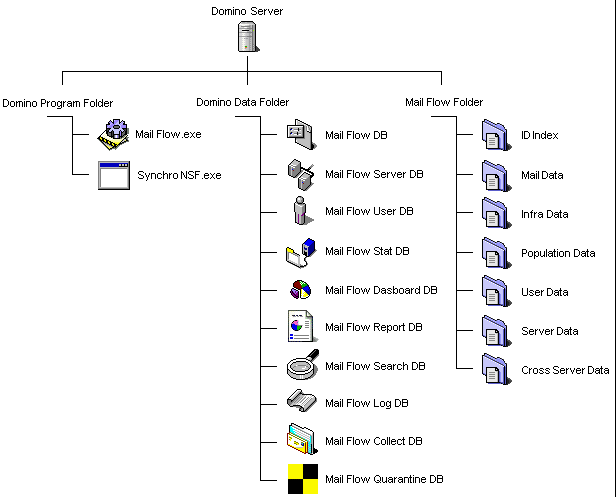
The application engine, namely the MailFlow.exe executable file. It can behave like a Domino task if installed on the server, or like a simple Windows executable file if installed on a Notes client. This program permanently scans the Mail In Database. It extracts data files, and then processes information in order to create statistics related to the infrastructure, servers, flows between servers, populations, flows between populations, users and user groups. These statistics are stored as compressed files (Infra, Population, Server, Cross Server and User files) on the computer disk. Once the statistics are computed, the message data are stored on the computer disk (Mail Data Files). Statistics are regularly laid out and inserted into Notes documents (Infra, Population, Cross Population, Server, Cross Server and User documents), in Mail Flow Analyzer Notes databases on the machine.
-
Optionally, a SynchroNSF.exe executable file, that will help fine-tune statistics publishing or merge different Notes phone books and databases used to generate user groups statistics.
-
-
In the (client or server) Notes Data folder:
-
A MailFlow.nsf Notes database, allowing to set up the application, to monitor its execution status and to run queries on it (rebuilding server statistics, restart, stop, search, data export). This database includes all the application components (executable file, Notes databases, documentation). It is also used when deploying the application. It is the main database of the application.
-
A MailFlowServer.nsf Notes database, containing all Notes documents displaying statistics about the infrastructure, population, flows between population, servers and flows between servers (Infra, Population, Cross Population, Server and Cross Server documents).
-
A MailFlowUser.nsf Notes database, containing all Notes documents displaying statistics about users and user groups (User documents).
-
A MaiIFlowLog.nsf Notes database, collecting information about the application functioning (errors and miscellaneous events).
-
A MailFlowSearch.nsf Notes database, providing a multicriteria query interface used to locate the messages that went through the infrastructure.
-
A MailFlowReport.nsf Notes database, providing a module of automatic scheduled generation of reports as Word ou Excel files format.
-
A MailFlowStat.nsf Notes database (Mail Flow Stat), containing selected User, Infrastructure, Population, Cross Population, Server and Cross Server documents coming from the MailFlowUser.nsf and MailFlowServer.nsf databases. This database will be replicated on one of the enterprise servers and it will be accessible through a Notes client or a Web browser. It is the place where statistics are published. In this database, documents may be created and updated through the MailFlow.exe (native) application engine or through SynchroNSF.exe (for a more accurate management).
-
A MailFlowDashboard.nsf Notes database, providing dashboards for mail infrastructure via a Web access.
-
A MailFlowCollect.nsf Notes database, which is a replica of the ones installed on the messaging servers. This database contains the Messaging Rules involves to block messages as well as the settings to collect data on each Domino server.
-
A MailFlowQuarantine.nsf Notes database installed on one of the messaging servers of the company (does not necessarily installed on the data processing machine) which receives all bocked messages done via the Messaging Rules.
-
-
The following tree structure of data files is located on the computer hard drive:
-
An IDIndex directory, hosting IDFiles files that store the unique keys of all processed messages ($MailInfoID).
-
A MailData folder, hosting Mail Data Files containing the data retrieved in messages. One "Mail Data File" stores the data for 1000 messages.
-
A InfraData folder, hosting Infrastructure files containing the Global infrastructure statistics and any defined sub-infrastructures in the main Setup document of the application (1 file per Infrastructure, might be more in rolling periods).
-
A PopulationData folder, hosting the Population files containing the statistics for the populations and cross-populations which are defined in the main Setup document of the application (1 file per population, might be more in rolling periods).
-
A UserData folder, hosting the User files containing the statistics for each user or groups of users (1 file per user or group of user).
-
A ServerData folder, hosting the Server files containing the statistics for each IBM Domino servers of the company (1 file per server, might be more in rolling periods).
-
A CrossServerData folder, hosting the CrossServer files containing the statistics of the flows between servers (1 file per data for the flow between a server A to a server B, might be more in rolling periods).
-
The following diagram shows how Mail Flow Analyzer files can be installed on the data processing machine:
The volume of data hosted in Notes databases (Infrastructure, Population, Cross Population, Server, Cross Server and User documents) will quickly stabilize since the number of documents globally remains the same. Statistics displayed in these documents will always have the same size. This is also true for files containing all the statistics (Infra, Population, Server, Cross Server and User files). Their size will slightly increase as time goes by, but the expansion is limited by the systematic compression of their content.
As regards elements that provide statistics on rolling periods (yearly, monthly, weekly, daily), such as Infrastructure, Population, Cross Population, Server and Cross Server documents, the application stores as many Infrastructure, Population, Cross Population, Server and Cross Server documents as there are processed periods. Therefore, in the Server Data folder, there may be up to 29 files per server, namely:
| ALL | The Global Statistics file containing the overall cumulated statistics (no time limit). | |
| YEAR | 5 files corresponding to the 5 latest rolling years. | |
| MONTH | 12 files corresponding to the 12 latest rolling months. | |
| WEEK | 4 files corresponding to the 4 latest rolling weeks. | |
| DAY | 7 files corresponding to the 5 latest rolling days. |
A sub-tree structure is provided under the ID Index, Mail Data, CrossServer Data and User Data folders, so that folders are not overloaded with too many files. As regards the first two files, a monthly divide is also provided in order to ease the backing up or the purging of data.
The Mail Data folder is the only data container whose size grows constantly. It contains the Mail Data Files that host the data retrieved in messages passing through the infrastructure. Therefore, the Mail Data folder size will be proportional to the number of messages passing through. Restricting the data storage period is the only way to limit the space taken by message data. The following metrics based on production data help measure the space needed to store this information:
- 1 Mail Data File contains data related to 1000 messages.
- The average size of message data is 1 KB.
- The systematic compression of the Mail Data File allows to get its size down to 150KB (instead of 1000 KB).
The following table extrapolates the daily disk space usage of the Mail Data folder over several years, in function of the number of daily messages: These volumes have been computed for the most unfavorable cases, namely by extracting all available information from messages (subject, name of attached files, list of recipients, etc.) and assuming that the number of daily messages was constant all year long. This number is actually lower during weekends and legal holidays.
3. Data Access |
|
|
As the message data arrives on the machive hosting the application engine, the statistics are calculed in real time by the application. In order to ensure a correct processing, the minimum mandatory storage life of these data in the form of Mail Data File is about 2 days. This delay is made necessary by the fact that a message may take several hours between the time it is issued and the moment when it is delivered. As it is also likely to cross different time zones or a day change, it can be delivered on the next day, even if its delivery time was only few minutes. After this retention period of 2 days, it would be possible to delete all files in the Mail Data directory without affecting the quality of the statistics produced. However, doing so, this would obviously prohibit any search for information on messages older than 2 days.
The choice of keeping the data beyond the time required for the construction of the statistics makes it possible to exploit the information coming from the messages to carry out searches or interrogation of these data to obtain, for example, the routing of a message in the Domino infrastructure, to make sure of its proper routing (Mail Tracking). The company's Help Desk is able to respond immediately to a person asking if their message has been sent to the Internet. By searching in its data using the interface offered in the Mail Flow Search database, Mail Flow Analyzer will display the list of messages sent by that person in the specified time slot, and for each of them, will indicate the servers by which the message is routed (with timestamp information). In order to preserve the confidentiality of certain exchanges, it is possible not to take into account the messages sent or distributed to certain persons of the company (Direction, Human Resources, etc..).
The retention of all these data also permits their retroactive processing, optionally, you will be able to remove statistics not taken into account on the day of their storage, in particular using the interface for extracting the data in XML format.
4. Architectural Choices |
|
|
Data Collection
Placing a component on the messaging servers you want to analyze guarantees the quality of the information retrieved. By being physically present on the server, it captures the source of all the information necessary for the establishment of detailed statistics. Other methods available for capturing information about mail flows such as log file analysis (Log.nsf) do not allow for a sufficient level of detail (types of attached files, proportion of encrypted messages, signatures , etc.) for the construction of reliable statistics or do not provide sufficient element to allow searches based on advanced criteria (name of the attached parts, subject of the message, etc.).
The other advantage of being present on the mail servers and of capturing the data in real time allows not to have to activate a significant level of Log on the servers. Increasing the level of Logs is usually required by tools based on the content of Log documents to compile their statistics. This severely penalizes the server both in terms of performance but also in volume of stored data. Installing the Mail Flow Analyzer on the servers does not require any changes to their configuration. The information retrieval module is transparent to the server, it does not overload its CPU or its disk space.
Data Storage
Keeping message data outside the Domino infrastructure under a file tree is dictated by both volumetric, security, and operational constraints. As in large enterprises, the number of messages transmitted daily through the Domino infrastructure can exceed 100,000 messages / day, it is not possible to store such a volumetry in one or more Notes databases.Particularly in the case where, as for MailFlow Analyzer, we would like to be able to keep a history spanning several years of messages. From a security / confidentiality viewpoint, for the information collected in the messages, it is easier to ensure the security of a dedicated server rather than a set of machines. The note also applies to the archiving and backup of this data (Mail Flow Analyzer keeps information on messages by organizing its files by year / month / day).
Domino (Mail Tracking) native processes that try to keep track of messages that have transited on mail servers over the last X days are not able to support 100,000 message days volumetries without corruption of the databases hosting the data (MTStore.nsf) and the loss of data for the corresponding period. The search for messages over a long period (several months), based on a set of criteria (name of the sender, recipients, subject of the message, the name of the attached documents, etc.) is not possible via the native processes (Mail Tracking). On the other hand, this is possible for Mail Flow Analyzer, which has been able to store and organize all data in a format compatible with volume constraints.
The use of a proprietary solution for storing message data (zipped file tree) instead of a more conventional solution such as a database management system (SQL Server, DB2, Oracle, etc.) is guided by technical and financial constraints. The volumetry required to store the data of all the messages in a relational database would have been much greater than that set up in our architecture, where we systematically zip all the information. The cost savings are felt both in terms of the number of hard drives required for storage but also in terms of the license price of the database. Moreover, where a database has to guarantee an identical access time to all its records, the very nature of the information that we store allows us to establish a hierarchy: the data of the recent messages must be immediately available because they are used to create statistics, whereas the data of the messages of the previous days will be accessed only when searching or exporting data. The buffer management (memory cache) can therefore be optimized to favor recent data, which limits the memory consumption of the machine.
The granularity of data storage in a set of files that are organized according to today's date makes backup operations easier because files containing data from messages that last a few days are never changed again. The volume of data to be backed up at each session simply corresponds to the new data. This organization also has a definite advantage for purging operations because it can be done directly at the level of the files in the tree, eliminating the files based on their names (which contain the date corresponding to the stored information.
Data Processing
The volume of data to be processed and the number of statistics to be computed for each of the messages is such that it is better to deport to a dedicated Domino server the processing of this information. The CPU load of this machine can remain high during the day without disrupting the messaging infrastructure. The continuous increase of the volumes of messaging supports us in the idea that it is better not to install anything on the mail servers that is likely to overload them as would an antivirus whose engine analyzes the contents of attached files of messages routed through the mail server. It is therefore by limiting the processing carried out on the messaging servers, that at the same time the risks of instability.
Publication of statistics
The volume of published information about mail flows for servers and users is consistent with the storage capacity in a Notes database (Mail Flow Stat db), as it consolidates data in Notes documents and its total number is independent from the number of messages routed in the infrastructure. For a given period (1 day, 1 week, 1 month or 1 year), the base will host:
- A Notes document describing the Global Infrastructure.
- A Notes document per Population group requested in the global Setup document.
- A Notes document for Cross Population (flows between desired Populations groups).
- A Notes document for statistics of each messaging Servers of the company,
- Two documents for Cross Server statistics describing the flows between a couple of A and B servers (a document for the A --> B flow and a document for the B-->A flow).
- If you wish to publish the User statistics, a document by utilisateur, by Mail-In database or by group of users (it is possible to group information by Organization Unit (OU), by Mail server, by certificate, by organization, etc).
The Notes database contains only the data that you want to see published, both in terms of the type (infrastructure, population flow between populations, servers, flows between servers, users, user groups) and content (nature of the statistics exposed). This is a subset of the complete statistics available at the server hosting the Mail Flow Analyzer application and message data. Since this information is stored in an open format (Notes documents in a Notes database), it is entirely possible for a third-party process to connect to it in order to collect statistics information.
The opening to the outside world of the data extracted from the messages, in the form of a search interface and an export module in XML, allows interactive access to the data (search based on multiple selection criteria) and their exploitation outside the scope of the application (export to a database, transfer to a graphical management engine such as Crystal Report or Excel). Even if the message data is stored in a proprietary format (text files) at the machine dedicated to the application, it remains available in open formats.
Daily Operations
This distributed architecture ensures great flexibility in the implementation and operation of the solution. It is not necessary to place the component collecting information on all servers in the enterprise to start getting statistics. If the component is installed on only one server, the statistics will concern that server as well as the users who have their mailboxes on this server. If the component is installed on at least 2 servers, the tool will be able, in addition, to provide information on the mail flows between these two servers. The higher the number of points collecting data, the more precise the statistics provided.
Since the collection of data is independent of processing (both are normally performed on different machines), it is possible to put the collectors in place before starting the data analysis module. The information retrieved from the messages is sent to the Mail In Database and remains there until the analysis module retrieves it. This intermediate storage area, the Mail In Database, allows the data processing process and the machine hosting it to be stopped for operational reasons (daily backup, reboot of the machine, software update, etc.) without this disrupting the overall functioning of the solution. As soon as the data processing module restarts, it will process all the Mail Data files in the Mail In Database.
Updating the Mail Flow Analyzer application to a higher version is facilitated by hosting it at a single location, outside of production servers. The choice of the Windows operating system allows to associate, on the same machine, all the engines of creation of files of the market (Word, Excel, PDF, Crystal Report ...).
5. Collecting Data on Messaging Servers |
|
|
The component that collects information on passing-through messages should be installed on all mailbox-hosting servers or on servers through which mail is passing. On all Domino servers that send or receive messages, messages are copied to the server Mail.box database, before the Router task either transfers them onto another Notes server, or delivers them on local mailboxes of recipients. The component will be able to retrieve message data precisely at the time when the message is created in the Mail.box database. This component consists in:
- A DLL (Mail Flow Lib), stuck to the core of Domino and able to have memory access to the content of messages created in the Mail.box database, even before they are processed by the Router. In the message, the DLL code retrieves useful information for producing statistics (sender name, list of recipients, message type and size, list of attached files, message subject, etc.) and stores it in memory. As soon as its memory buffer is full, it transfers the message data to a file on the server disk (Mail Data file). When this file has reached a limit size, the code present in the DLL closes it (by adding a specific line at the end of it) and transfers the remaining data to a new file.
In addition to capturing message data across the server, the DLL can also scan message content and edit on-the-go the sender's name, the names of the destinations, or even block the message by sending it to a quarantine database. Changing message routing is controlled by Mail Rules documents in the MailFlowCollect database.
This DLL should be declared in the server's Notes.ini file, so it can stick to the Domino server’s core. Here, the 'DLL' term refers to a shared library (Dynamic Link Library). This file may have different names (DLL in Windows, Library in Unix, etc.), depending on the OS on which the Domino server exists. - A server task (Mail Flow Task) only used to send the data files (Mail Data) created by the DLL to the central Mail In database (Mail In DB). The task only transfers files whose status is completed.
- A Notes database (Mail Flow Collect) containing the setup data required to run the Library and the Task. This database is replicated on all servers that host the data collector. Also found in this database are the Mail Rules documents used to modify the routing of messages by sending them to a quarantine database. This database is replicated to all servers hosting the data collector. This allows a centralized set up of the module.
The following diagram shows an installation of the data retrieval module on a mail server:
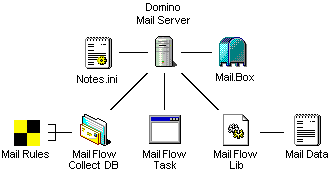
The Mail Flow Collect database is a neutral component in the system. Its role just consists in providing the DLL and the Task with parameters such as the Mail Rules documents used to modify the routing of messages, the location for creating Mail Data files on the disk, or the list of data to be extracted from the messages. It is indeed possible to limit the type of collected information (excluding the message subject and only getting the list of attached files’ extensions without their name, etc.).
The Mail Flow DLL and Task that are used on messaging servers depend on the server’s operating system. The right component should therefore be selected when installing the application (.dll and .exe in Windows, .so in Unix, etc.)
Transferring the collected data to the Mail In Database
The DLL is the main component in the system, as it can access the message in memory and extract the information. In addition, it creates Mail Data files. It plays a data ‘producer’ role, where as the Task acts like a data 'consumer'. Once Mail Data files are sent to the Mail In Database (Mail In DB), they are deleted from the server disk. Stopping the task for a few minutes does not prevent the data retrieval system from running. Mail Data files will continue being created on the server disk. They will all be sent when the Mail Flow Task starts. Files usually stay on the server only for a few minutes before being transferred to the Mail In Database.
The DLL buffers data in order to limit write access to the disk, and the task only sends the file when it has reached a given size, or after a given amount of time: this is why it takes about 20 minutes (scalable duration) between the time when an email passes through the server and the time when the Mail Flow engine processes this information on its dedicated computer. Therefore, data are not processed immediately after they arrive in the application-hosting computer, but 20 minutes later. This delay is necessary to prevent any disruption in the messaging server, as it is most unlikely to write into the Mail Data file on the disk as soon as a message passes through the server: it would not make sense to send too many ‘small’ data mails to the Mail In Database, for the message traffic would be disrupted in that case.
Impact on the messaging server
Mail Flow Analyzer does not disrupt message routing, unlike antiviruses that also use a DLL and a task to process the messages passing through a server. As a rule, antiviruses use their DLL's code to block a message in the server Mail box, by modifying its RoutingState field (setting it to 'DEAD') so that the router ignores it. The antivirus task scans the Mail.box database in order to retrieve the messages blocked by the DLL, and it then processes the blocked message by analyzing its content (attached files). If this content is valid, the task 'frees' the message by reinitializing the RoutingState field content, so that the router can deliver the message.
This technique obviously slows down the message routing process, because of the time spent in analyzing the message (several seconds), but also because it hinders the router that is notified by the server when new messages arrive in the Mail.box. In that case, the router is unable to process any of the messages, as these are set to 'DEAD'. In addition, this blocking may lead to desynchronizing the router, which sometimes fails to process freed messages, causing undelivered messages to pile up in the server's Mail.box.
MailFlow Analyzer does not block messages from the server when they are analyzed, thus leaving the server/router dynamic completely unchanged. It just retrieves the relevant message data in memory. There are no time-consuming processes, such as analyzing the message body or the contents of its attached files.The Mail Rules are applied in real time on messages in memory and they are not likely to slow the routing of messages (except those sent to the quarantine database).
While the architecture proposed for messaging servers and for antivirus software are seemingly the same (one DLL and one task), the operating mode and the impacts on the infrastructure are completely different.
6. Quarantine messages |
|
|
Scanning messages through mail servers allows Mail Flow Analyzer to provide a real-time message analysis service, based on the defined Mail Rules, to change the routing of the message by sending it to a quarantine database.
Components involved in setting up Mail Rules on a messaging server are those already in place for capturing message data. There is nothing more to install on mail servers, you only need to update the settings from the Mail Flow Collect database. The components that come into play when setting up Mail Rules on a Mail Server are those already in place for capturing message data. There is nothing more to install at the level of the mail servers, just the setting to be done in the Mail Flow Collect database.
At the messaging server level, we use:
- A DLL file called Mail Flow Lib, which is also used to collect the message data, it will perform the job of analyzing the content of the message and will modify the destination address of the message if it is to be sent to the quarantine database.
- A Notes database called Mail Flow Collect which host the Messaging Rules documents defining the criteria for blocking messages. It also contains the settings information for the Mail Flow Lib DLL file.
At the infrastructure level, we use:
- A Quarantaine database (Quarantine DB) which is installed on one of the company's server. It is declared as a Mail-in database in the Address Book and receives all the messages that have been re-routed.
- The Mail Flow Engine of the application that runs on one of the Domino servers. It will regularly analyze the contents of the Quarantine database to process the received messages.
The following diagram shows the components used to control the routing of messages in the messaging infrastructure:
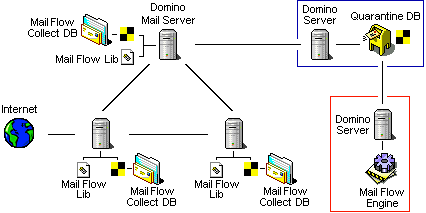
The Mail Flow Engine treats the messages stored in the quarantine database (Quarantine DB) in order to notify the sender of the message that his mail has been blocked. For messages that have been blocked for only a few hours (respect of working hours), the engine releases them after the retention period. The processing engine also performs the necessary purges for permanently blocked mails.
Comments
0 comments
Article is closed for comments.