

The Desktop Manager database may be used as an ECL (Execution Control List) container. These data structures are used to define execution rights on client desktops for Design elements including code according to their signature. Theoretically, the server’s Address book includes an ECL, defined as the administration ECL. When users ask for an ECL refresh, this ECL will be applied on their desktop.
It is possible to define ECLs other than the administration ECL during the refresh process (see Tasks or Profile), including the ones defined in the Desktop Manager database.
To create an ECL document, it is necessary to use the  button in the Templates, Hooks, ECLs view of the Desktop Manager database. It is possible to create as many ECL documents as required.
The ECL document includes several mandatory fields:

 : This is the ECL name. This name will be used while refreshing the ECL on the desktop. It must be unique in the database.
 : Free text edit box, where the ECL type or any information about it can be mentioned.
 : Release number of the document. This number is incremented every time the document is updated
 : Name of the person that last modified the document. Creation time/date and latest modification time/date of the document.
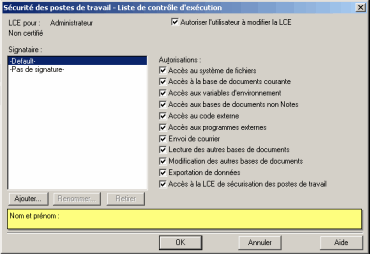
Defining entries and related rights can be done by pressing the button. The Notes edit window is displayed immediately afterwards :
Comments
0 comments
Article is closed for comments.