
 |
 |
1. Overview |
| 2. @ keywords | ||
| 3. # keywords | ||
| 4. % keywords |
1. Overview |
|
|
 Back to Top
In order to modify the client desktop configuration, it may be is necessary to modify or create new local databases (replicated or not), to delete some files, and to locate some resources. As the database path name can be user-dependent (the name of the mail database on the Mail server), the creation of a generic modification script could become a complex process.
To avoid this problem, Desktop Manager knows how to use keywords whose value is calculated only when the application is running on the client desktop, in a specific user environment. For instance, using the keyword @MailFileName will be sufficient to name a user Mail database on its server. Keywords may be used in all the settings fields of Tasks, Profiles, Templates and Script files, and they also may be mixed with constant fields (Mail\@MailFileName).
There are three types of keywords: @ (from Desktop Manager), # keywords (Notes-related), and % keywords (coming from operating system environment variables).
2. @ keywords |
|
|
@ keywords involve user-related values in the Notes environment (Notes username, Mail server name, Internet address, etc.). Replacement values of @ keywords initially come from the users' Person entry in the Notes address book, from their Notes.ini file and from their mail database Profile document. To speed up the process of replacing keywords with their values, these values are collected in the User document of the Desktop Manager database.
NB: For a proper processing of Archive database related keywords, the analysis of Profile documents stored in the user mail database should be required in the Setup document (Get Mail Profile documents).
Here is the list of authorized @ keywords :
| @UserName | User's FullName. | ||
| @LastName | User's LastName. | ||
| @FirstName | User's FirstName. | ||
| @ShortName | User's ShortName. | ||
| @CommonName | Canonical part (@Name([CN];) of the user's FullName. | ||
| @AbbreviateName | Short version of the user name (@Name([Abbreviate];)) | ||
| @NotesProgramFolder | Notes client Program folder. | ||
| @NotesExePath | Notes client Program executable path. | ||
| @NotesDataFolder | Notes client Data folder. | ||
| @UserIdPath | ID file path on the user desktop (as defined on the KeyFileName line in the Notes.ini file). | ||
| @UserIdName | ID file name on the user desktop (as defined on the KeyFileName line in the Notes.ini file). | ||
| @CachePath | Cache.ndk file path on the user desktop. | ||
| @CacheName | Cache.ndk file name on the user desktop. | ||
| @DesktopPath | Desktop.ndk file path on the user desktop. | ||
| @DesktopName | Desktop.ndk file name on the user desktop. | ||
| @NotesIniPath | Notes.ini file path on the user desktop. | ||
| @InternetAddress | User's Internet address (address featured on the NAB Person entry). | ||
| @MailServer | User's Mail server name (name featured on the NAB Person entry). | ||
| @SametimeServer | User's Sametime server name (name featured on the NAB Person entry). | ||
| @Domain | User's messaging domain (domain featured on the NAB Person entry). | ||
| @MailDbName | User's mail file path on the server (server path, related to the data folder). | ||
| @MailFileName | User's Mail database name on the server (without subfolders). | ||
| @MailReplicaID | User's Mail database Replica ID (e.g. C12573F7:0030A318). | ||
| @MailLocalReplica | User's local Mail database replica path (related to the data folder), if exists. | ||
| @ArchiveServer | Name of server hosting the Mail archive database (empty if the archive database is local or if no archive has been declared). | ||
| @ArchiveDbName | User's mail archive file as defined in the Archive Profile document. | ||
| @ArchiveFileName | User's Archive database name (without sub-folders). | ||
| @User1, @User2, ... | These keyword values are defined in the User document. | ||
| @Setup1, @Setup2, ... | These keyword values are defined in the Setup document. | ||
| @DskMgrDatabase | Desktop Manager database path for the user. | ||
| @DskMgrServer | Name of the server hosting the Desktop Manager database for the user. | ||
| @DskMgrDllPath | DskMgr.dll file path on the user desktop. | ||
| @DskMgrExePath | DskMgr.exe file path on the user desktop. | ||
| @DskMgrTaskPath | DskMgrTask.exe file path on the user desktop. | ||
| @DskMgrHookPath | nDskMgrHook.dll file path on the user desktop. | ||
| @BackupFolder | Backup folder path for the user. | ||
| @RoamingFolder | Roaming folder path for the user. | ||
| @Year | Current year (4 digits). | ||
| @Month | Current month (01-12). | ||
| @Day | Current day (01-31). | ||
| @Hour | Current hour (00-23). | ||
| @Minute | Current minute (00-59). | ||
| @Second | Current second (00-59). | ||
| @WeekDay | Week day (Sunday,Monday,Tuesday,...). |
Example :
For a user with the following data coming from the User entry and from the Notes.ini file:
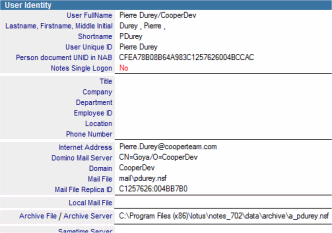
KeyFileName=d:\Lotus\Notes\Data\rjohnson.id
The evaluation of the various @ keywords results in:
| @UserName | CN=Richard Johnson/OU=PARIS/OU=FR/O=Cooperteam | ||
| @LastName | Johnson | ||
| @FirstName | Richard | ||
| @ShortName | rjohnson | ||
| @CommonName | Richard Johnson | ||
| @AbbreviateName | Richard Johnson/PARIS/FR/Cooperteam | ||
| @NotesProgramFolder | c:\Program Files\Lotus\Notes\ | ||
| @NotesDataFolder | d:\Lotus\Notes\Data\ | ||
| @UserIdPath | d:\Lotus\Notes\Data\rjohnson.id | ||
| @UserIdName | rjohnson.id | ||
| @CachePath | d:\Lotus\Notes\Data\Cache.ndk | ||
| @CacheName | Cache.ndk | ||
| @DesktopPath | d:\Lotus\Notes\Data\Desktop8.ndk | ||
| @DesktopName | Desktop8.ndk | ||
| @NotesIniPath | c:\Program Files\Lotus\Notes\Notes.ini | ||
| @InternetAddress | Richard.Johnson@cooperteam.com | ||
| @MailServer | CN=King/O=Cooperteam | ||
| @SametimeServer | CN=Sametime/O=Cooperteam | ||
| @Domain | Cooperteam | ||
| @MailDbName | mail\rjohnson.nsf | ||
| @MailFileName | rjohnson.nsf | ||
| @MailReplicaID | C12573F7:0030A318 | ||
| @MailLocalReplica | MailCooper\rjohnson.nsf | ||
| @ArchiveServer | |||
| @ArchiveDbName | ArchiveP\Mail.nsf | ||
| @ArchiveFileName | Mail.nsf | ||
| @DskMgrDatabase | DskMgr\DskMgr.nsf | ||
| @DskMgrServer | CN=SrvAppl1/OU=Server/O=Cooperteam | ||
| @DskMgrDllPath | d:\Lotus\Notes\Data\DM\DskMgr.dll | ||
| @DskMgrExePath | d:\Lotus\Notes\Data\DM\DskMgr.exe | ||
| @DskMgrTaskPath | d:\Lotus\Notes\Data\DM\DskMgrTask.exe | ||
| @DskMgrHookPath | d:\Lotus\Notes\Data\DM\nDskMgrHook.dll | ||
| @BackupFolder | u:\Data\Notes\Backup\ | ||
| @RoamingFolder | u:\Data\Notes\Roaming\ | ||
| @Year | 2009 | ||
| @Month | 09 | ||
| @Day | 10 | ||
| @Hour | 15 | ||
| @Minute | 13 | ||
| @Second | 09 | ||
| @WeekDay | Tuesday |
In order to locally replicate a user's mail database located on the server in a Task created for this user, the Create Local Replica section fields must simply be filled in as follows:

Replacements will be done when the Task is running on the user desktop:
@MailServer!!@MailDbName CN=King/O=Cooperteam!!mail\rjohnson.nsf
MailCooper\@MailFileName MailCooper\rjohnson.nsf
Constants (MailCooper\) may be mixed with @ keywords (@MailFileName). In such a case, the use of the @MailFileName keyword is a way to only collect the mail file name (file name .nsf), which leaves the choice for local file location. If the @MailDbName keyword had been used in the field including the local file path, it would have been the same as the server path. (mail\rjohnson.nsf).
3. # keywords |
|
|
# keywords stand for values linked to the user's Notes.ini variables. You can get the list of available variables (and their value) by opening the Notes.ini file. The list of variables depends on the Notes client version, on user preferences and on used Notes applications. However, some values are always present and it is possible to use them.
[Notes]
KitType=1
Directory=D:\Notes853us\data
InstallType=2
FaultRecovery_Build=Release 8.5.3
Timezone=-1
DSTLAW=3,-1,1,10,-1,1
DST=1
MailType=0
$$HasLANPort=1
WWWDSP_SYNC_BROWSERCACHE=0
WWWDSP_PREFETCH_OBJECT=0
EnableJavaApplets=1
EnablePlugins=1
In order to use one of the Notes.ini variables in Task, Profile, Template document fields or in Script files, the variable name should be placed between two # characters (ex: #MailType#). Unlike @ keywords whose list is definite, there is no limitation as regards the use of # keywords. If the Notes.ini variable mentioned between the two # characters is not defined, an empty value will be sent back. So it will be necessary to check if the variables whose value would be used in the user's Notes session are actually there.
As folders present in Notes.ini values (#Directory#) do not always end up with the \ separator character, make sure this character is added when defining paths using # keywords.
Example:
If, in a Script file created for an user, we want to test the local usage of the Mail database, the Notes.ini's MailType variable should be analyzed (0=On Server, 1=On Local)
## Get Backup folder path
backup_folder$ = "@BackupFolder"
If backup_folder$ = "" Then Goto END

## Backup local Mail Replica Database
mail_type$ = "#MailType#"
If mail_type$ = "0" Then Goto END
error_code$ = CopyFile("MailCooper\@MailFileName","backup_folder$/@MailFileName")
The replacement takes place when the Script file is created on the user desktop:
## Get Backup folder path
backup_folder$ = "u:\Data\Notes\Backup\"
If backup_folder$ = "" Then Goto END

## Backup local Mail Replica Database
mail_type$ = "0"
If mail_type$ = "0" Then Goto END
error_code$ = CopyFile("MailCooper\rjohnson.nsf","backup_folder$\rjohnson.nsf")
4. % keywords |
|
|
% keywords stand for user desktop-related values, including environment variables for user sessions. The list of available variables (along with their values) may be displayed by typing the set command from a DOS window. The list of variables depends on both the OS version and the programs installed on the computer. However, some values are always present and it is possible to use them in order to build file paths. Some of these values are user-dependent (Temp folder), while others are linked to the system installation (SystemRoot):
ALLUSERSPROFILE=C:\Documents and Settings\All Users
APPDATA=C:\Documents and Settings\Richard JOHNSON\Application Data
CHIPNAME=LC868700
CLASSPATH=d:\notes5\notes.jar;c:\notesutils\jdk118\lib
CommonProgramFiles=C:\Program Files\Fichiers communs
COMPUTERNAME=PORTABLE
ComSpec=C:\WINNT\system32\cmd.exe
HOMEDRIVE=C:
HOMEPATH=\Documents and Settings\Richard JOHNSON
LOGONSERVER=\\PORTABLE
NUMBER_OF_PROCESSORS=1
OS=Windows_NT
Os2LibPath=C:\WINNT\system32\os2\dll;
Path=C:\WINNT\system32;C:\WINNT;C:\WINNT\System32\Wbem
PATHEXT=.COM;.EXE;.BAT;.CMD;.VBS;.VBE;.JS;.JSE;.WSF;.WSH
PROCESSOR_ARCHITECTURE=x86
PROCESSOR_IDENTIFIER=x86 Family 6 Model 8 Stepping 6, GenuineIntel
PROCESSOR_LEVEL=6
PROCESSOR_REVISION=0806
ProgramFiles=C:\Program Files
PROMPT=$P$G
SystemDrive=C:
SystemRoot=C:\WINNT
TEMP=C:\DOCUME~1\RICHAR~1\LOCALS~1\Temp
TMP=C:\DOCUME~1\RICHAR~1\LOCALS~1\Temp
USERDOMAIN=PORTABLE
USERNAME=Richard JOHNSON
USERPROFILE=C:\Documents and Settings\Richard JOHNSON
windir=C:\WINNT
Variable names should be framed with the % character (ex: %USERPROFILE%) in order to use one of the environment variables in Tasks, Profiles,Template document fields or in Script files. Unlike @ keywords whose list is set, there is no restriction as regards the use of % keywords. If the environment variable mentioned between the two % characters is not defined, the returned value will be empty. It will be necessary to check the effective presence of variables whose value will be used in the environment of a user desktop session.
As folders present in the environment variable values do not end with the \ separator character, make sure this character is added when defining paths using % keywords.
Example :
In a Task created for a user, in order to detach a file to the desktop's temporary folder, the File Local Path in the Install Files on disk section should simply be filled in as follows :

Replacements will be done when the Task is running on the user desktop:
| %TEMP%\command.bat | C:\DOCUME~1\RICHAR~1\LOCALS~1\Temp\command.bat |
Comments
0 comments
Article is closed for comments.