
 |
 |
1. Overview |
| 2. Actions performed by Desktop Manager during the Notes session | ||
| 3. Single database architecture / Multi-database server architecture | ||
| 4. Reference document |
1. Overview |
|
|
 Back to Top
The Desktop Manager application uses two kinds of Notes databases:
- The Desktop Manager database (DskMgr.nsf) is hosted on a Domino server. It's a container for both Parameters and Audit Results documents for all users.
- The Desktop Manager Start database (DskMgrStart.nsf) is a local database installed on every user's desktop. It normally runs every time a user starts its Notes client.
The following scheme shows the different people accessing the Desktop Manager application:
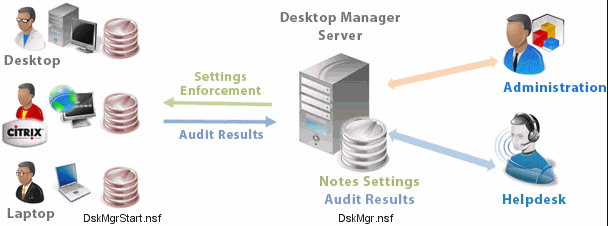
The Desktop Manager Notes database (DskMgr.nsf) is installed on one of the company's Domino servers (shown in the center of the diagram above). This database is accessed by application Administrators and Helpdesk staff. The database contains the application Parameter documents (Reference, Setup, Profile, Template, Hook, Task, binary files...) and the Audit Result documents for all users. Administrators manage application settings (Setup, Profile, Template, Hook...) and the Helpdesk staff create Tasks for users. They can access the audit results of all users.
The Desktop Manager Start database (DskMgrStart.nsf) is installed on User desktops. Each time the Notes client starts up, Desktop Manager also runs : the local Desktop Manager Start database opens and runs on the user desktop. Any pending Tasks are processed on the user desktop, and if Profiles have been associated with the user, they are also applied. The Desktop Manager application ends with a desktop audit and writes the audit results in the local Desktop Manager Starter database. The whole process (Task + Profile + Audit) takes a few seconds, and the user might have to wait for the end of Desktop Manager execution prior to using the Notes client.
The local Desktop Manager Start database IS NOT a local replica of the server Desktop Manager database. It only contains user's audit results documents and users' parameter documents.
The data exchange between the local database (DskMgrStart.nsf) and the server database (DskMgr.nsf) normally runs as background process every 3 hours (although, the frequency can be defined in Setup document) :
- The local database receives user's parameter documents from the server database (Setup, Task, Profiles, Templates, Hook, Agents, binary files...).
- The local database sends user's audit result documents to the server database.
2. Actions performed by Desktop Manager during the Notes session |
|
|
A Notes session, for a user, includes the following steps:
| Startup | the user starts his Notes client by clicking on a Notes shortcut. |
| Authentication | the user enters his password (not necessary with Single Sign On). |
| Work | the user works with his Notes client, opens applications, uses his messaging system... |
| Session ending | the user closes his Notes client. |
Desktop Manager will perform actions all along the user's Notes session (before, during the session and after):
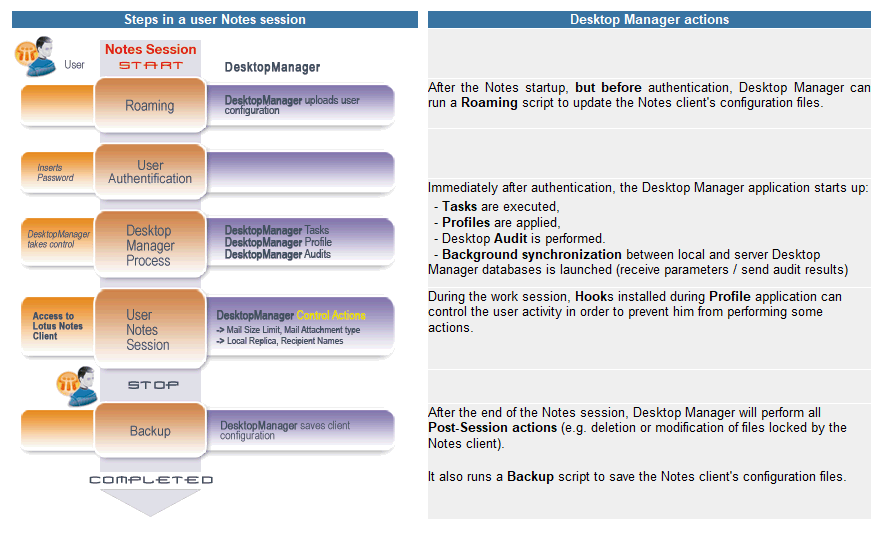
After authentication, the opening of the local Desktop Manager Start database triggers the execution of the code stored in the database. This code runs on the user desktop, according to the context of his Notes identity. Any pending tasks on his desktop are performed with his ID and, consequently, with his rights. If the administrator has scheduled, for a user, the creation of a Notes database replica on his desktop, this replica is initiated with the user ID, as if the user himself had manually requested the database replication. The Notes security model is preserved, because any action performed depends on the user's access level to the resources.
3. Single database architecture / Multi-database server architecture |
|
|
The Desktop Manager's single database architecture consists of having a single Notes database (DskMgr.nsf), replicated to the various company servers. Because the local database (DskMgrStart.nsf) exchanges data with server database (DskMgr.nsf), it is recommended to get the user as close as possible to the Desktop Manager database in order to optimize the network traffic).
The first decision about architecture consists of determining the list of servers on which the Desktop Manager database should be replicated. The Desktop Manager database should theoretically be replicated on all geographical locations hosting users. The database may be placed on the users' Mail servers or application servers.
In a Desktop Manager single database architecture, the DskMgr.nsf database includes both settings items (Reference, Setup, Task, Profile, Template, Hook...) and users' audit documents. If the number of users is high (> 10,000) or if users are distributed on several remote geographical locations, replication traffic between servers can be high and the administrative separation of user management cannot be guaranteed (e.g. a Desktop Manager database administrator in charge of a region could modify client configurations belonging to another region). For larger Notes environments with user populations higher than 50,000, large database sizes can cause application slowdown due to delays caused by view indexing triggered on access.
In order to solve these issues, Desktop Manager can be configured to run in a multi-database architecture. In this model, Desktop Manager uses 2 Notes databases on the server: a DskMgr.nsf database and a DskMgrUser.nsf database. The DskMgr.nsf database is configured to contain all application settings documents (Reference, Setup, Task, Profile, Template, Hook...) and the DskMgrUser.nsf database is configured to contain the users' audit results. From the user's perspective, nothing changes. They still open the local Desktop Manager Start database (DskMgrStart.nsf) and the application (using the Reference document) will find which server databases (DskMgr.nsf and DskMgrUser.nsf) should be used. Every DskMgr.nsf database is connected with a single DskMgrUser.nsf database.
In a multi-database architecture, there is only one DskMgr.nsf database (replicated on all servers), but there can be several DskMgrUser.nsf databases, that are not necessarily replicas. Therefore, if the application is deployed on 3 different geographical areas (USA, EMEA and APAC), the DskMgr.nsf database will be replicated on the 3 geographical areas, but each area will have its own DskMgrUser.nsf database that will only replicate within the area. Therefore, US audit results will never be present in EMEA's DskMgrUser.nsf database. Desktop Manager's multi-database architecture supports the sharing of settings and the restricted distribution of audit data.
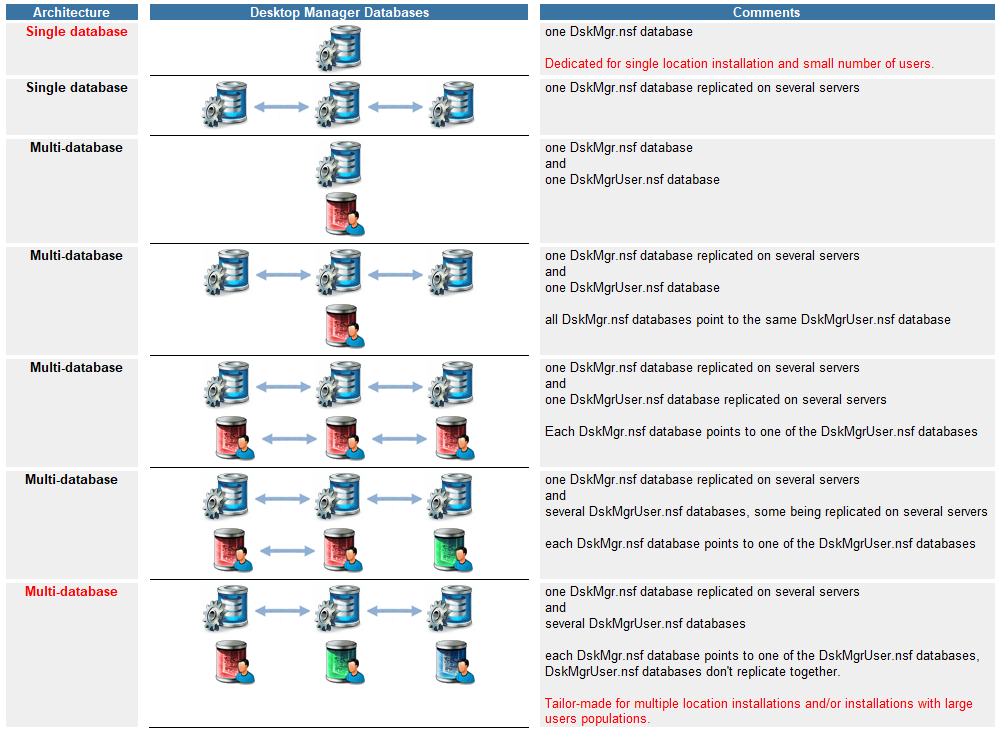
The following table sums up the possible architectures. The most commonly used are labeled in red:
4. Reference document |
|
|
The Desktop Manager database includes a settings document called the Reference document. This document can be found in the Administration / Architecture / Reference view. It is created and updated every time a parameter document is created or updated in the database (Setup, Profile, Template, Preference, ECL, Hook, Activation key, Binaries...). The Reference document may also be recomputed by clicking on the  button available in the Setup / Setup Documents and Administration / Architecture / Reference views.
The Reference document contains references to all parameter documents of the Desktop Manager database (Setup, Profile, Template, Preference, ECL, Hook, Binaries, Activation key, User database, Agent Script, LotusScript Library...) in order to speed up the access. Even if the content of the Reference document is automatically updated, you will have to click on button Refresh Reference as soon as new Script Agents will be created in the database or if the Script Libraries are updated. If you copy / paste new parameter documents into the Desktop Manager database, you will have to open & save the documents or click once on the Refresh Reference button.
Reference document content
Main
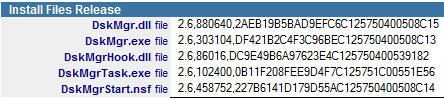 : Binary files (Release number, Size and UNID).
 : Script Libraries (Last modification date and Size).
 : User interface pictures.
 : Activation key.
User Database
 : List of Desktop Manager databases (DskMgr and DskMgrUser).
Setup
 : Setup documents (Name, Release number and UNID).
Profile
 : Profile documents (Names, Release number and UNID).
Template
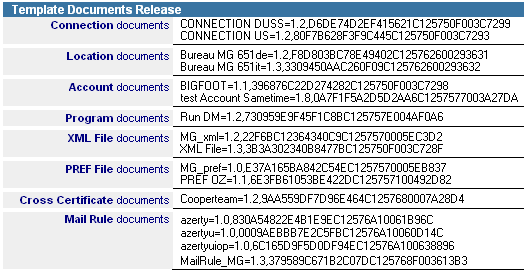 : Template documents (Connection, Location, Program, Account, XML, PREF, CrossCertificate and Mail Rule).
Preference
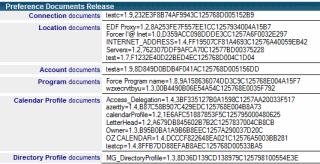 : Preference documents (Connection, Location, Program, Calendar Profile and Directory Profile).
ECL
 : Named ECL documents (Name, Release number and UNID).
Hook
 : Hook documents (Name, Release number and UNID).
Agent Script
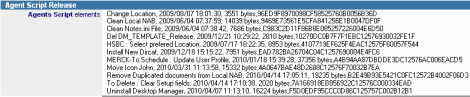 : LotusScript Agents (Name, Last modification date, Size and UNID).
Comments
0 comments
Please sign in to leave a comment.