
 |
 |
1. Overview of the Desktop Manager API Script |
| 2. List of Desktop Manager API Script functions | ||
| 3. Example of Script |
1. Overview of the Desktop Manager API Script |
|
|
 Back to Top
API Script of Desktop Manager let you run some code BEFORE or AFTER the beginning of the Notes session. One of the well known usage of Script is the setup of backup procedures for user Notes configuration files (names.nsf, bookmark, workspace, etc.) in order to restore them when corrupted or to copy them to a new desktop (roaming). As each organization needs customizable backup, restore, and roaming procedures, the most flexible solution is to provide a complete file-handling API (copy, delete, etc.).
There are 3 types of Script files:
- Pre-Session Script files (DskMgrPre.ini)
The Pre-Session Script file is run from the Hook, at Notes client startup, before password prompting. This script is typically used for roaming, in order to copy user files (names.nsf, bookmark, workspace, id file, notes.ini, etc.) to the current Notes folder before he accesses to this folder. As this script is run in a Lotus Notes environment, it can use the functions that handle Notes resources (change Notes.ini variables, create/modify documents in Notes databases, etc.).
- Post-Session Script files (DskMgrPost.ini)
The Post-Session Script file is run by DskMgr.exe, after the end of the Notes session and after the DskMgr.ini file commands have been run (post-actions). This script is typically used to backup user files (names.nsf, bookmark, workspace, id file, notes.ini, etc.) to a dedicated folder. As it runs after the changes have been made on Notes files, the file status is stable and they can be safely moved. As there is no active Notes session when running this script, Notes functions are unavailable.
- Script files
The functions available in the Desktop Manager API Script can also be used out of the Pre- and Post-Session files. Just create a text file with code lines and let the DskMgr.exe program run the command file, using the -SCRIPT command (with progress window display) or the -SCRIPTNW command (without progress window display: NoWindow):
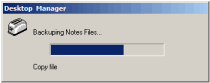
DskMgr.exe -SCRIPT <Script File Path>
This running mode can be used to perform operations on files, in parallel with Notes running (copy of large files), if the command file is started from a Task- or Profile-related Script.Agent. Such command Scripts may also be used to run the silent installation of a Notes client or a version upgrade.
This starting method can also be very convenient to debug Pre- or Post- Script files.
Pre-Session and Post-Session Script files are created from command lines entered in the Action Script section of Task or Profile documents:
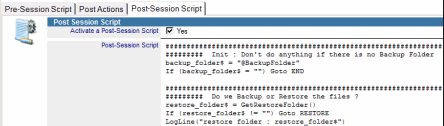
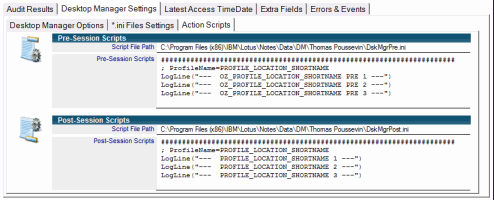
As soon as the Task or Profile document containing command lines is applied to the user, Pre-Session (DskMgrPre.ini) and Post-Session (DskMgrPost.ini) Script files are created on the disk, in the folder hosting the DskMgr.ini file. @, # and % keywords are replaced with their respective values, and the file created on the disk will return the user-related paths and data. It is possible to view the file generated for the user in the Desktop Manager Settings / Action Script section of the User document:
If the Script installed on the PC comes from a Profile document, it will run everyday, while the Profile stay linked to the user. As soon as the Profile is removed from the user Profiles list, the Script file linked to this Profile will be removed automatically from disk. If the Script installed on the PC comes from a Task document, it will run only once and will be removed from disk. If the Task is recurrent, the Script file will be re-created / deleted as many times as the Task runs.
If several Script files are installed by several Tasks or Profiles, the execution order of the Scripts files will be the same than the Tasks / Profile (Tasks first, so the Profiles, in the proper order).
When running Scripts, a Log file records the actions performed by the file command lines. This Log file is always located in the user's Temporary Windows folder. Its name depends on the Script file type:
| Pre-Script : | DskMgrPreLog_date_pid.txt | ‘date’ is the Script’s start date, ‘pid’ is the process ID |
| Post-Script : | DskMgrExeLog_pid.txt | data is located at the end of the file, as its beginning matches Post-Actions in the DskMgr.ini file |
| Script : | DskMgrExeLogScript_pid.txt |
Information may be written in the Log file using the API Script’s LogLine function, thus allowing to efficiently debug the execution of Scripts.
2. List of Desktop Manager API Script functions |
|
|
In order to simplify the reading of the functions of the API, they have been grouped into categories (all functions handling files are together).
Then, in each category, the tables quickly show the functions available in the Script API of Desktop Manager, indicating in which type of script file they can be called:
Catégories |
|
|
Langage Structure and operators |
|
|
| Function Name | Definition | Pre Script | Post Script | Script | ||||
| ExitScript | Stops Script execution. |  |
|
|
Comment
Any line in the file, beginning with the ';' or '#' characters, or any empty line.
Example:
### Copy the file
Variable assignment
variable = constant
variable = variable
By convention and in order to improve code readability, it is recommended to end up variable names with a ‘$’and to frame constants with "".
Example:
data_path$ = "d:\Lotus\Notes\data"
file_name$ = "names.nsf"
notes_names_path$ = data_path$\file_name$ ' Implicit concatenation => notes_names_path$ = "d:\Lotus\Notes\data\names.nsf"
String concatenation
String concatenation is implicit (no dedicated operator), thus enabling to build strings by combining variables and constants. Evaluation is made when the function is called. During evaluation, ‘\’ duplicates are removed ("d:\lotus\notes\data\\names.nsf" becomes "d:\lotus\notes\data\names.nsf").
Example:
data_path$ = "d:\Lotus\Notes\data"
file_name$ = "data_path$\names.nsf"         ' "d:\Lotus\Notes\data" + "\names.nsf" = "d:\Lotus\Notes\data\names.nsf"
error$ = DeleteFile("data_path$\cache.dsk") ' "d:\Lotus\Notes\data\cache.dsk"
Elements List
A list is a string containing elements separated by a specific character (separator). You can manipulate the elements using the dedicated functions (add element, remove element, get nth element...).
Example:
data_path_list$ = "c:\Program Files\Lotus\Notes\data\-c:\Lotus\Notes\data-d:\Lotus\Notes\data-u:\Notes\data\"
path_1$ = GetNthElement(data_path_list$,"-","1")       ' "c:\Program Files\Lotus\Notes\data"
new_list$ = RemoveElement(data_path_list$,"-","c:\*\") ' "d:\Lotus\Notes\data-u:\Notes\data\"
Numeric Expression
Authorized characters : + - * / ( )
The evaluation of numeric expression returns an integer.
Example:
file_size$ = GetFileSize("data_path$\names.nsf")
new_file_size$ = (2*(file_size$-10)) + 1024
Label
Label name immediately followed by the : character.
Example:
Exit_Process:
Jump
GOTO followed by the label name, without the ‘:’ character.
Example:
Goto Exit_Process
Conditional Jump
IF (variable operator variable|constant) GOTO label
Possible operators are:
| = | equal | ||
| != | different | ||
| > | strictly superior | ||
| >= | superior or equal | ||
| < | strictly inferior | ||
| <= | inferior or equal |
Example:
If (data_path$ = "") Goto Exit_Process
If (file_name$ != data_path$\file_name$) Goto Exit_Process
If (file_size$ > "1500") Goto Exit_Process
Conditional bloc
IF (variable operator variable|constant) THEN
...
ENDIF
IF (variable operator variable|constant) THEN
...
ELSE
...
ENDIF
Possible operators are:
| = | equal | ||
| != | different | ||
| > | strictly superior | ||
| >= | superior or equal | ||
| < | strictly inferior | ||
| <= | inferior or equal |
You can insert IF THEN / ELSE / ENDIF within other IF THEN / ELSE / ENDIF.
Example:
If (backup_folder$ != "") Then
 CopyFile("data_path$\names.nsf","backup_folder$\names.nsf")
 CopyFile("data_path$\bookmark.nsf","backup_folder$\bookmark.nsf")
 CopyFile("data_path$\headline.nsf","backup_folder$\headline.nsf")
EndIf

If (backup_folder$ != "") Then
 CopyFile("data_path$\names.nsf","backup_folder$\names.nsf")
 CopyFile("data_path$\bookmark.nsf","backup_folder$\bookmark.nsf")
 CopyFile("data_path$\headline.nsf","backup_folder$\headline.nsf")
Else
 CopyFile("data_path$\names.nsf","z:\Backup\names.nsf")
 CopyFile("data_path$\bookmark.nsf","z:\Backup\bookmark.nsf")
 CopyFile("data_path$\headline.nsf","z:\Backup\headline.nsf")
EndIf
Loop
FOR variable = variable|constant TO variable|constant
...
NEXT
You can insert FOR = TO / NEXT within other FOR = TO / NEXT.
Example:
For counter$ = 1 To 10
 MessageBox("Test Windows","This is popup : counter$","OK")
Next

#### Copy all dictionary files (*.dic) from data folder to backup folder
file_list$ = SearchMultiFile("data_path$\","*.dic","","1")
file_number$ = GetElementNumber("file_list$","|")
For counter$ = 1 To file_number$
 file_path$ = GetNthElement("file_list$","|","counter$")
 file_name$ = RightStringBack("file_path$","\")
 CopyFile("file_path$","backup_folder$\file_name$")
Next
Stop Execution
EXITSCRIPT keyword.
Example:
ExitScript
Getting external parameters
You can send external parameters to the Script. Those parameters are written as extra arguments at the end of the command line used to run DskMgr.exe :
DskMgr.exe -SCRIPT <chemin du fichier Script> <param 1> <param 2> ...
Example:
DskMgr.exe -SCRIPT "C:\Temp\Script.ini" "CN=ServerMail1/O=Coooperteam" "c:\Install\Files"
In the script, those parameters are referenced through the keywords ARG1$, ARG2$, ARG3$... The maximum number of parameters is 10 (ARG10$).
Example:
server_name$ = ARG1$
install_path$ = ARG2$
SetFilePrefVar("install_path$\setup.ini","SERVERNAME",server_name$)
Using Quotes in strings
If you need to use the Quote character (") in a string, define a variable (quote$), set its value to """ and use it as follow:
quote$ = """
command_line$ = "192.168.12.25 quote$C:\Program Files\Lotus\Notes\Notes.iniquote$" => 192.168.12.25 "C:\Program Files\Lotus\Notes\Notes.ini"
error$ = RunSequenceProgram("d:\Tools\FtpFile.exe","command_line$")
Writes in the Log file
You can stop writting in the Log file (created in %TEMP%\DskMgr\) using keyword STOPLOG. You can write again in the log file using keyword STARTLOG.
Example:
StopLog
...
StartLog
File management functions |
|
|
| Function Name | Definition | Pre Script | Post Script | Script | ||||
| CopyFile | Creates a copy of an existing file to a new location. |  |
|
|
||||
| CopyLargeFile | Creates a copy of a large existing file to a new location. | |
|
|
||||
| UpdateFile | Updates a copy of file only if the source one has been modified. | |
|
|
||||
| CopyDeltaFile | Perform a incremental copy of file (minimize network traffic). | |
|
|
||||
| CopyMultiFile | Copies a set of files to a new location. | |
|
|
||||
| UpdateMultiFile | Synchronizes a set of files to a new location. | |
|
|
||||
| MoveFile | Moves an existing file to a new location. | |
|
|
||||
| DeleteFile | Deletes one or more files from the disk. | |
|
|
||||
| ZipFile | Zips an existing file. | |
|
|
||||
| ZipMultiFile | Zips a set of files / folders. | |
|
|
||||
| UnzipFile | Unzips a zipped file. | |
|
|
||||
| CreateFile | Creates a new empty file. | |
|
|
||||
| SearchReplaceFile | Search / Replace values in a text file. | |
|
|
||||
| ModifyFile | Modifies the contents of an existing file. | |
|
|
||||
| AddLineFile | Adds line in a text file. | |
|
|
||||
| GetFileSize | Gets the size of a file. | |
|
|
||||
| GetFileLineNumber | Gets the line number of a text file. | |
|
|
||||
| GetFileNthLine | Gets the Nth line from a text file. | |
|
|
||||
| GetFileLastModifDate | Gets the latest modification date of a file. | |
|
|
||||
| GetFileChecksum | Computes the checksum for a file. | |
|
|
||||
| GetProductVersion | Gets the product version information of a file. | |
|
|
||||
| IsFileExist | Checks if a file exists on the disk. | |
|
|
||||
| SearchMultiFile | Search for files paths on the disk. | |
|
|
||||
| GetShortPath | Get short file path (8.3 dos style). | |
|
|
||||
| GetLongPath | Get long file path (without ~). | |
|
|
||||
| MountVolume | Creates a mounting point for a volume. | |
|
|
||||
| CreateShortcut | Creates a shortcut to a file or to an executable. | |
|
|
error = CopyFile("source file path","new file path")
source file path: path of the source file
new file path: path in which to create the copy.
error: "" if the copy succeeded, error message otherwise.
Create a copy of an existing file.
Example:
error$ = CopyFile("notes_data_folder$\names.nsf","backup_folder$\names.nsf")
If (error$ != "") Goto END
result = CopyLargeFile("source file path","new file path","quota")
source file path: path of the source file
new file path: path in which to create the copy.
quota: maximum size (in MB) to copy whenever the function is called. "0" to mention that all data must be copied at a time.
result: "0" if the copy is completed, "1" if the maximum size has been copied during the call, "2" or more in case of errors.
Creates a copy of a large size file. Copy can be staggered over several days (only copying X MB of data at each call).
Example:
result$ = CopyLargeFile("u:\package.msi","temp_folder$\package.msi","50")
If (result$ > "0") Goto END
error = UpdateFile("source file path","new file path")
source file path : path of the source file.
new file path : file path where to copy the file.
error : "" if the copy succeeded, error message otherwise.
Update the copy of a file only if the modification date of the soruce file > modification date of the destination file (or if the destination file does not exist).
Example:
error$ = UpdateFile("roaming_folder$\names.nsf","notes_data_folder$\names.nsf")
If (error$ != "") Goto END
error = CopyDeltaFile("source file path", "local copy file path", "network copy file path")
source file path : path of the source file.
local copy file path : path of the local copy of the file.
network copy file path : path of the network copy of the file.
error : "" if the copy succeeded, error message otherwise.
Copy a file or Update the copy of a file on a network drive, minimizing the writes (only what has been modified since the latest copy is updated). This incremental copy is tailor made for daily files backup to a network drive (usually in roaming process). In order to minimize the writes in the file hosted on the network drive (network copy file), a copy of the file is kept on the local drive (local copy file). This is used to compute what has been modified in the source file (source file) since the lastest backup. In order to not interfere with the Lotus Notes client behavior, it is better to change the extension of the local copy (add extension .bck at the end of the file name).
Example:
error$ = CopyDeltaFile("notes_data_folder$\names.nsf", "backup_local_folder$\names.nsf.bck", "network_roaming_folder$\names.nsf")
If (error$ != "") Goto END
result = CopyMultiFile ("src_folder_path", "dst_folder_path", "copy_list", "exclusion_list", "recursive")
src_folder_path : Full path of Source folder.
dst_folder_path : Full path of Destination folder.
copy_list : Files or folders list to copy (wildcard character '*' may be used). The multi-value separator character is ',' (comma).
exclusion_list : Files or folders list NOT to copy (wildcard character '*' may be used). The multi-value separator character is ',' (comma).
recursive : "1" if the seach of files or folders to be copied is performed under the sub-folders of the Source folder.
Copy a set of files available in a Source folder to a Destination folder. The files folder-tree is re-created under the Destination folder.
Example:
error$ = CopyMultiFile("notes_data_folder$", "backup_folder$", "*.nsf,*.ntf,*.ndk,*.dsk", "*\Cache.ndk,*\Cache.dsk", "1")
If (error$ != "") Goto END
result = UpdateMultiFile ("src_folder_path", "dst_folder_path", "synchro_list", "exclusion_list", "recursive")
src_folder_path : Full path of Source folder.
dst_folder_path : Full path of Destination folder.
copy_list : Files or folders list to synchronize (wildcard character '*' may be used). The multi-value separator character is ',' (comma).
exclusion_list : Files or folders list NOT to synchronize (wildcard character '*' may be used). The multi-value separator character is ',' (comma).
recursive : "1" if the seach of files or folders to be synchronized is performed under the sub-folders of the Source folder.
Synchronize a set of files available in a Source folder to a Destination folder. The files folder-tree is re-created under the Destination folder. The only copied Source files are the ones where latest modification date is greater than the Destination file (copy only is if newer).
Example:
error$ = UpdateMultiFile("notes_data_folder$", "backup_folder$", "*.nsf,*.ntf,*.ndk,*.dsk", "*\Cache.ndk,*\Cache.dsk", "1")
If (error$ != "") Goto END
error = MoveFile("current file path","new file path")
current file path: current path of the file
new file path: path to where to move the file or new file name
error: "" if the move succeeded, error message otherwise.
Moves or renames a file.
Example:
error$ = MoveFile("notes_data_folder$\notes.ini","notes_data_folder$\notes.ini.old")
If (error$ != "") Goto END
error = DeleteFile("file path")
file path: path of the file(s) (use of ’*’ wildcard)
error: "" if the deletion succeeded, error message otherwise.
Deletes one or more files.
Example:
error$ = DeleteFile("temp_folder$\DskMgrLog_*.txt")
error = ZipFile("current file path","file name","zipped file path")
current file path: path of the file to zip.
file name: name of file to store in the zipped file.
zipped file path: path of the zipped file to create
error: "" if the zip operation succeeded, error message otherwise.
Zips a file.
Example:
error$ = ZipFile("notes_data_folder$\names.nsf","names.nsf","notes_data_folder$\names.zip")
If (error$ != "") Goto END
result = ZipMultiFile ("src_folder_path", "zip_file_path", "zip_list", "exclusion_list", "recursive")
src_folder_path : Full path of Source folder.
zip_file_path : Full path of Zip file to create.
zip_list : Files or folders list to zip (wildcard character '*' may be used). The multi-value separator character is ',' (comma).
exclusion_list : Files or folders list NOT to zip (wildcard character '*' may be used). The multi-value separator character is ',' (comma).
recursive : "1" if the seach of files or folders to be zipped is performed under the sub-folders of the Source folder.
Zip a set of files available in a Source folder into a single Zip file. The files folder-tree is re-created inside the Zip file.
Example:
error$ = ZipMultiFile("notes_data_folder$", "backup_folder$\Archive.zip", "*.nsf,*.ntf,*.ndk,*.dsk", "*\Cache.ndk,*\Cache.dsk", "1")
If (error$ != "") Goto END
unzip_file_path = UnzipFile("zipped file path","unzip folder path")
zipped file path: path of the zipped file to unzip.
unzip folder path: path of the folder where the files have to be un-ziped. If the parameter is empty (""), the folder is the one where the Zip file is located.
unzip_file_path: path of the unzipped file, " " if the unzip operation failed.
Unzips a file. The result may be one or several files, including sub-folders.
Example:
file_path$ = UnzipFile("notes_data_folder$\names.zip","%TEMP%\")
If (file_path$ = "") Goto END
error = CreateFile("new file path")
new file path: path of the file to create.
error: "" if the creation succeeded, error message otherwise.
Creates an empty file.
Example:
error$ = CreateFile("temp_folder$\Notes.ini")
If (error$ != "") Goto END
error = SearchReplaceFile("file path","source value","replace value")
file path: path of the file to modify.
source value: text value to find in the file.
replace value: replacement text value.
error: "" if the modification succeeded, error message otherwise.
Modifies the contents of an existing text file with value searching and replacing.
Example:
error$ = SearchReplaceFile("notes_program_folder$\Notes.ini", "c:\Lotus\Data\", "d:\Program Files\Notes\Data\")
If (error$ != "") Goto END
error = ModifyFile("file path","source value","destination value")
file path: path of the file to modify.
source value: value to find in the file (ASCII or hex ASCII)
replace value: replacement value (ASCII or hex ASCII, same length as source value).
error: "" if the modification succeeded, error message otherwise.
Modifies the contents of an existing binary file with value searching and replacing.
Example:
error$ = ModifyFile("notes_data_folder$\Names.nsf","0xC1257504004A93B2","0xC12572DE0038A8F8")
If (error$ != "") Goto END
error = AddLineFile("file path","text","insert date")
file path: path of the file to modify.
text: line of text to add to the file.
insert date: "1" to insert the current date in front of the line.
error: "" if the creation succeeded, error message otherwise.
Append a Text Line to a file. The current time / date may be added at the begining of the line.
Example:
error$ = AddLineFile("c:\Temp\DskUpdStatus.txt","--- Begin of Process ---","1")
product_version = GetProductVersion("file path")
file path: path of the file. If the file path contains only the name of the exe (ie : "notes.exe"), the full exe path is searched in the Registry.
product_version: product version of the file, "" in case of error (e.g. non-existing file or no product information available).
Get the product version of a file.
Example:
product_version$ = GetProductVersion("notes_program_folder$\Notes.exe")
If (product_version$ = "") Goto END
file_size = GetFileSize("file path")
file path: path of the file
file_size: size of the file, "" in case of error (e.g. non-existing file)
Determines the size of a file (in bytes).
Example:
nab_size$ = GetFileSize("notes_data_folder$\Names.nsf")
If (nab_size$ = "") Goto END
line_count = GetFileLineNumber("file path")
file path : path of the file
line_count : number of lines in the text file, 0 in case of error (e.g. non-existing file)
Determines the number of lines of a text file.
Example:
line_count$ = GetFileLineNumber("notes_data_folder$\notes.ini")
If (line_count$ = 0) Goto END
line = GetFileNthLine("file path","line number")
file path : path of the file
line number : number of the line (1 = fist line, 2=second ligne, ..., -1 = last ligne)
line : line from the text file, "" in case of error (e.g. non-existing file)
Get the Nth line of a text file.
Example:
line$ = GetFileNthLine("notes_data_folder$\notes.ini","1")
modification_date = GetFileLastModifDate("file path")
file path: path of the file
modification_date: latest file modification date of the file, "" in case of errors (e.g. non-existing file)
Determines the latest file modification date of a file (YYYYMMDDHHMMSS format).
Example:
nab_modif_date$ = GetFileLastModifDate("notes_data_folder$\Names.nsf")
If (nab_modif_date$ = "") Goto END
checksum = GetFileChecksum("file path","length_kb")
file path: path of the file
length_kb: length of the file (in kb) to use to compute the checksum. "0" to build the checksum using all the file content.
checksum_value: value of the checksum, "" in case of errors (e.g. non-existing file)
Compute a checksum on a file. You can choose the length of the file (in kb) used to compute the checksum.
Example:
checksum$ = GetFileChecksum("c:\Temp\DskMgrStart.nsf","1") => E53B7D1A
If (checksum$ = "") Goto END
result = IsFileExist("file path")
file path: path of the file
result: "1" if the file exists, "0" otherwise.
Determines if a file exists on the disk.
Example:
notes_ini$ = IsFileExist("notes_data_folder$\Notes.ini")
If (notes_ini$ = "0") Goto END
file_list = SearchMultiFile ("src_folder_path", "search_list", "exclusion_list", "recursive")
src_folder_path : Full path of Source folder where to search for files.
search_list : Files list to search for (wildcard character '*' may be used). The multi-value separator character is ',' (comma).
exclusion_list : Files list NOT to search for (wildcard character '*' may be used). The multi-value separator character is ',' (comma).
recursive : "1" if the seach of files is performed under the sub-folders of the Source folder.
Search for a set of files available under the Source folder. This returns the files paths as a multi values string, using the character | as separator. The maximum string size is about 30 KB.
Example:
file_list$ = SearchMultiFile("notes_data_folder$","*.dic,*.ndk,*.dsk","*\Cache.ndk,*\Cache.dsk","1")
=> "c:\Notes\Data\us.dic|c:\Notes\Data\uk.dic|c:\Notes\Data\Desktop6.ndk"
If (file_list$ = "") Goto END
file_count$ = GetElementNumber("file_list$","|")
short_path = GetShortPath("file path")
file path : File path.
short_path : Short file path.
Returns the short path (dos 8.3 format) of an existing file.
Example:
short_path$ = GetShortPath("c:\Program Files\Lotus\Notes\Data\Notes.ini")
long_path = GetLongPath("file path")
file path : File path.
long_path : Long file path.
Returns the long path (without any ~) of an existing file.
Example:
long_path$ = GetLongPath("C:\DOCUME~1\UserName\LOCALS~1\Temp\Notes.ini")
error = MountVolume("volume path","mount point path")
volume path: path of the folder or disk to mount.
mount point path: path of the mounting point to create.
error: "" if the creation succeeded, error message otherwise.
Creates a mounting point for a volume.
Example:
error$ = MountVolume("e:\Backup\Date_200812\","u:\Backup\")
If (error$ != "") Goto END
error = CreateShortcut("shortcut path","source file path","arguments","working directory","description")
shortcut path: path of the new shortcut to create.
source file path: path of the file to which the shortcut will point.
arguments: shortcut arguments
working directory: working folder of the shortcut
description: description of the shortcut
error: "" if the creation succeeded, error message otherwise.
Creates a shortcut to a file or to an executable.
Example:
error$ = CreateShortcut("c:\Temp\Notes.lnk", "c:\Lotus\Notes\Notes.exe", "=d:\notes\data\notes.ini DskMgrStart.nsf", "c:\Lotus\Notes", "")
Folder management functions |
|
|
| Function Name | Definition | Pre Script | Post Script | Script | ||||
| CreateFolder | Creates a new folder on the disk. | |
|
|
||||
| DeleteFolder | Deletes a folder and its contents from the disk. | |
|
|
||||
| GetCurrentFolder | Get current folder path. | |
|
|
||||
| SetCurrentFolder | Set current folder path. | |
|
|
||||
| IsFolderExist | Determines if a folder exists on the disk. | |
|
|
error = CreateFolder("new folder path")
new folder path: path of the folder to create.
error: "" if the creation succeeded, error message otherwise.
Creates a folder on the disk.
Example:
error$ = CreateFolder("u:\backup\today_date$\")
If (error$ != "") Goto END
error = DeleteFolder("folder path","empty content flag")
folder path: path of the folder to delete.
empty content flag: "" to avoid deleting files located in the folder; "Y", "YES" or "1" to clear the folder before deleting it.
result: "" if the creation succeeded, error message otherwise.
Deletes a folder from the disk (only if empty). Previously clears its contents if necessary.
Example:
error$ = DeleteFolder("u:\backup\","Yes")
If (error$ != "") Goto END
current_folder = GetCurrentFolder()
current_folder : current folder path.
Get current folder path.
Example:
current_folder_path$ = GetCurrentFolder() => "C:\Temp\"
result = SetCurrentFolder("folder path")
folder path : new current folder path.
Set the current folder path.
Example:
SetCurrentFolder("C:\Temp\")
result = IsFolderExist("folder path")
folder path: path of the folder
result: "1" if the file exists, "0" otherwise.
Determines if a folder exists on the disk.
Example:
result$ = IsFolderExist("u:\backup\today_date$\")
If (result$ = "0") Goto CREATE_FOLDER
Management functions for environment or file variables |
|
|
| Function Name | Definition | Pre Script | Post Script | Script | ||||
| ExpandString | Expands environment-variable strings and replaces them with their values. | |
|
|
||||
| GetEnvironmentVar | Gets the value of an environment variable. | |
|
|
||||
| SetEnvironmentVar | Creates or modifies the value of an environment variable. | |
|
|
||||
| GetRegistryKey | Gets the value of a Registry key. | |
|
|
||||
| GetRegistryNthKey | Return the Nth subfolder of a Registry folder. | |
|
|
||||
| SetRegistryKey | Creates or modifies the value of a Registry key. | |
|
|
||||
| DeleteRegistryKey | Deletes a Registry key. | |
|
|
||||
| GetFilePrefVar | Gets the value of a Preference file variable. | |
|
|
||||
| SetFilePrefVar | Creates or modifies the value of a Preference file variable. | |
|
|
||||
| GetNotesIniVar | Gets the value of a Notes.ini file variable. | |
 |
|
||||
| SetNotesIniVar | Creates or modifies the value of a Notes.ini file variable. | |
|
|
||||
| GetNotesKeyword | Gets the path of a Notes configuration file or folder. | |
|
|
value = ExpandString("string")
string : string containing environment variables (%variable%)
value : value of the string, with the values.
Expands environment-variable strings and replaces them with their defined values.
Example:
full_exe_path$ = ExpandString("%ProgramFiles%\Desktop Manager\DskMgr.exe")
value = GetEnvironmentVar("variable name")
variable name: name of the variable to get the value from.
value: value of the variable, "" if the variable does not exist.
Gets the value of an environment variable.
Example:
temp_folder_path$ = GetEnvironmentVar("TEMP")
If (temp_folder_path$ = "") Goto END
error = SetEnvironmentVar("variable name","new value")
variable name: name of the variable to get the value from.
new value: new value of the variable
error: "" if the modification succeeded, error message otherwise.
Modifies the value of an environment variable.
Example:
error$ = SetEnvironmentVar("BACKUP_FOLDER",backup_folder_path$)
key_value = GetRegistryKey("root","sub key","key name")
root: HKEY_CLASSES_ROOT, HKEY_CURRENT_CONFIG, HKEY_CURRENT_USER, HKEY_LOCAL_MACHINE or HKEY_USERS
sub key: path of the key
key name: name of the key
key_value: value of the registry key, "" if the key does not exist.
Gets the value of a registry key.
Example:
notes_data_path$ = GetRegistryKey("HKEY_LOCAL_MACHINE","SOFTWARE\Lotus\Notes\7.0","DataPath")
If (notes_data_path$ = "") Goto END
sub_folder = GetRegistryNthKey("root","folder key","number")
root: HKEY_CLASSES_ROOT, HKEY_CURRENT_CONFIG, HKEY_CURRENT_USER, HKEY_LOCAL_MACHINE or HKEY_USERS
folder key: folder path of the Registry
number: Number of Nth subfolder of the Registry
sub_folder: subfolder name.
Return the subfolder name of the Nth folder Registry.
Example:
For counter$ = 1 To 1000
    notes_data_path$ = GetRegistryNthKey("HKEY_LOCAL_MACHINE","SOFTWARE\Microsoft\Windows\CurrentVersion\Uninstall", "counter$")
    MessageBox("Windows Uninstall softaware key","notes_data_path$","OK")
NEXT
error = SetRegistryKey("root","sub key","key name","key type","new value")
root: HKEY_CLASSES_ROOT, HKEY_CURRENT_CONFIG, HKEY_CURRENT_USER, HKEY_LOCAL_MACHINE or HKEY_USERS
sub key: path of the key
key name: name of the key
key type : type of the key
REG_SZ : String
REG_EXPAND_SZ : String containing some Windows environment variables (%USERPROFILE).
REG_DWORD : Integer number (write using decimal format)
new value: new value of the registry key, "" if the key does not exist.
error: "" if the modification succeeded, error message otherwise.
Modifies the value of a registry key or creates a new key.
Example:
error$ = SetRegistryKey("HKEY_CURRENT_USER", "Software\Microsoft\Windows\CurrentVersion\RunOnce", "Init", "REG_SZ", "d:\Lotus\Notes\Data\DM\DskMgr.exe")
If (error$ != "") Goto END
error = DeleteRegistryKey("root","sub key","key name")
root: HKEY_CLASSES_ROOT, HKEY_CURRENT_CONFIG, HKEY_CURRENT_USER, HKEY_LOCAL_MACHINE or HKEY_USERS
sub key: path of the key
key name: name of the key. May be empty ("") if you want to delete the key, not the value.
error: "" if the deletion succeeded, error message otherwise.
Deletes a registry key or a registry key value.
Example:
error$ = DeleteRegistryKey("HKEY_CURRENT_USER","Software\Lotus\Notes\Installer","DirectoryKey")
If (error$ != "") Goto END
value = GetFilePrefVar("pref file path","variable name")
pref file path: path of the preference file.
variable name: name of the variable to get the value from.
value: value of the variable, "" if the variable does not exist.
Gets the value of a Preference file variable (text file organized with ‘variable=value’ lines, like Notes.ini)
Example:
pref_path$ = GetFilePrefVar("c:\Temp\setup.ini","PATH")
error = SetFilePrefVar("pref file path","variable name","new_value")
pref file path : path of the preference file.
variable name: name of the variable to get the value from.
new value: new value of the variable
error: "" if the modification succeeded, error message otherwise.
Modifies the value of a Preference file variable (text file organized with ‘variable=value’ lines, like Notes.ini)
Example:
error$ = SetFilePrefVar("c:\Temp\setup.ini","PATH",pref_path$)
value = GetNotesIniVar("variable name")
variable name: name of the variable to get the value from
value: value of the variable, "" if the variable does not exist.
Gets the value of a Notes.ini file variable.
Example:
notes_data_path$ = GetNotesIniVar("DIRECTORY")
error = SetNotesIniVar("variable name","new value")
variable name: name of the variable to get the value from.
new value: new value of the variable
error: "" if the modification succeeded, error message otherwise.
Modifies the value of a Notes.ini file variable.
Example:
error$ = SetNotesIniVar("DIRECTORY",notes_data_path$)
value = GetNotesKeyword("keyword name")
keyword name: name of the keyword to get the value from (@UserIdPath, @UserIdName, @CachePath, @CacheName, @DesktopPath, @DesktopName, @NotesIniPath, @NotesDataFolder, @NotesProgramFolder or @NotesExePath)
value: keyword value
Gets the path of a Notes configuration file or folder.
Example:
notes_program_path$ = GetNotesKeyword("@NotesProgramFolder")
Executable startup functions |
|
|
| Function Name | Definition | Pre Script | Post Script | Script | ||||
| KillProcess | Terminates immediately one running process. | |
|
|
||||
| RunSequenceProgram | Runs a program, waiting for its end. | |
|
|
||||
| RunDetachProgram | Runs a program, without waiting for its end. | |
|
|
||||
| SendKeyboardEvent | Sends a keyboard sequence towards a window. | |
|
|
error = RunSequenceProgram("executable file path","parameters list")
executable file path path of the file to run
parameters list: parameters of the executable
error: "" if the startup succeeded, error message otherwise.
Starts running the program, waiting for its end to continue the Script.
Example:
error$ = RunSequenceProgram("d:\Tools\FtpFile.exe","192.168.12.25 Admin Password Log.txt")
error = RunDetachProgram("executable file path","parameters list")
executable file path path of the file to run
parameters list: parameters of the executable
error: "" if the startup succeeded, error message otherwise.
Starts running the program, without waiting for its end to continue the Script.
Example:
error$ = RunDetachProgram("d:\Tools\FtpFile.exe","192.168.12.25 Admin Password Log.txt")
error = KillProcess("process name")
process name Name of the process to stop (just the executable name, no the full path).
error: "" if the processes have been successfully stopped, error message otherwise
Terminate all running processes having this name.
Example:
error$ = KillProcess("iexplorer.exe")
error = SendKeyboardEvent("window name","key1","key2")
window name Name of the application window. "" to send the sequence to the current application.
key1: Keyboard key
key2: Keyboard key, or "" to simply cancel 1 key
error: "" if the sequence has been successfully sent, error message otherwise
Sending of a keyboard sequence to an application.
Example:
error$ = SendKeyboardEvent("Lotus Notes","Alt","F4")
Data Transfer Functions |
|
|
| Function Name | Definition | Pre Script | Post Script | Script | ||||
| FTPGetFile | Download a file from a FTP site. | |
|
|
||||
| FTPPutFile | Upload a file to a FTP site. | |
|
|
||||
| FTPDeleteFile | Delete a file from a FTP site. | |
|
|
||||
| FTPGetLargeFile | Download a large file from a FTP site. | |
|
|
||||
| GetFileByHTTP | Download a file or an HTML Page from a Web site. | |
|
|
||||
| GetLDAPEntry | Get all attributes from an LDAP Directory entry. | |
|
|
error = FTPGetFile("hostname","port","login","password","remote file path","transfer type","local file path")
hostname : IP Address or Hostname of the FTP server
port : FTP port number, usually 21
login : user name ("" if no login required)
password : user password ("" if no password required)
remote file path : file path on the FTP server
transfer type : transfer type (0 = Binary, 1 = Ascii)
local file path : local file path for the file to be downloaded
error : "" if the transfer succeeded, error message otherwise.
Download a file from a FTP server.
Example:
error$ = FTPGetFile("188.40.122.19","21,"","","utility/sst.zip","0","c:\Temp\sst.zip")
error = FTPPutFile("local file path","hostname","port","login","password","remote file path","transfer type","target file path")
local file path : local file path to be uploaded
hostname : IP Address or Hostname of the FTP server
port : FTP port number, usually 21
login : user name ("" if no login required)
password : user password ("" if no password required)
remote file path : file path on the FTP server
transfer type : transfer type (0 = Binary, 1 = Ascii)
error : "" if the transfer succeeded, error message otherwise.
Upload a file to a FTP server.
Example:
error$ = FTPPutFile("c:\Temp\sst.zip","188.40.122.19","21,"","","utility/sst.zip","0",)
error = FTPDeleteFile("hostname","port","login","password","remote file path")
hostname : IP Address or Hostname of the FTP server
port : FTP port number, usually 21
login : user name ("" if no login required)
password : user password ("" if no password required)
remote file path : file path on the FTP server
error: "" if the deletion succeeded, error message otherwise.
Delete a file from a FTP server.
Example:
error$ = FTPDeleteFile("188.40.122.19","21,"","","utility/sst.zip")
error = FTPGetLargeFile("hostname","port","login","password","remote file path","transfer type","local file path","quota")
hostname : IP Address or Hostname of the FTP server
port : FTP port number, usually 21
login : user name ("" if no login required)
password : user password ("" if no password required)
remote file path : file path on the FTP server
transfer type : transfer type (0 = Binary, 1 = Ascii)
local file path : local file path where the file has to be downloaded
quota : maximum size (in MB) to transfer whenever the function is called
error : "0" if the transfer is completed, "1" if the maximum size has been transfered during the call, error message otherwise.
Download a large file from a FTP server. Copy can be staggered over several days (only copying X MB of data at each call).
Example:
error$ = FTPGetLargeFile("188.40.122.19","21,"","","utility/sst.zip","0","c:\Temp\sst.zip","10")
error = GetFileByHTTP("url","port","login","password","local file path","local file path","transfer type")
url : HTML Page url or File url
port : HTTP port number, usually 80
login : user name ("" if no login required)
password : user password ("" if no password required)
local file path : local file path where the Page or the File has to be downloaded
transfer type : transfer type (0 = Binary, 1 = Ascii)
error : "" if the transfer succeeded, error message otherwise.
Download from a Web site an HTML Page or a File.
Example:
error$ = GetFileByHTTP("www.cooperteam.com/pict/logo.gif","80","","","c:\Temp\logo_ct.gif","0")
error = GetLDAPEntry("hostname","port","login","password","dn","local file path")
hostname : IP Address or Hostname of the LDAP directory
port : LDAP port number, usually 389
login : user name ("" if no login required)
password : user password ("" if no password required)
dn : dn of the LDAP entry
local file path : local file path where file containing the LDAP entry attributes has to be created
error : "" if the transfer succeeded, error message otherwise.
Create a Text file containing all the attributes from an LDAP entry.
Example:
error$ = GetLDAPEntry("directory.washington.edu","389,"","","cn=Schwartz,ou=People,o=Washington,c=US", "c:\Temp\ldap_entry.txt")
Backup folder management functions |
|
|
| Function Name | Definition | Pre Script | Post Script | Script | ||||
| GetLatestBackupFolder | Gets the path of the latest backup folder. | |
|
|
||||
| GetRestoreFolder | Gets the path of the backup folder to restore. | |
|
|
||||
| PurgeFolder | Deletes all outdated files from the Backup folder. | |
|
|
folder_path = GetLatestBackupFolder("backup folder path")
backup folder path: path of the backup folder
folder_path: path of the backup subfolder containing the most recent files "" in case of errors
Gets the path of the backup folder containing the most recent files.
Example:
folder_path$ = GetRestoreFolder(backup_folder_path$)
If (folder_path$ = "") Goto END
folder_path = GetRestoreFolder()
folder_path: Path of the folder, "" in case of trouble or if there is nothing to restore.
Gets the path of the folder containing files to restore.
Example:
folder_path$ = GetRestoreFolder()
If (folder_path$ = "") Goto END
error = PurgeFolder("backup folder path", "number of folder")
backup folder path: path of the backup folder
number of folder: Number of sub-folders to store
error: "" if the folder purge succeeded, error message otherwise.
Preserves only the X most recent subfolders existing in the backup folders, and deletes other subfolders.
Example:
error$ = PurgeFolder(backup_folder_path$,"5")
String handling functions |
|
|
| Function Name | Definition | Pre Script | Post Script | Script | ||||
| Left | Returns the leftmost characters of the string. | |
|
|
||||
| Right | Returns the rightmost characters of the string | |
|
|
||||
| LeftString | Returns the characters to the left of subString. | |
|
|
||||
| RightString | Returns the characters to the right of subString. | |
|
|
||||
| LeftStringBack | Returns the characters to the left of subString (search from right to left). | |
|
|
||||
| RightStringBack | Returns the characters to the right of subString (search from right to left). | |
|
|
||||
| Middle | Returns a substring from the middle of a string. | |
|
|
||||
| InStr | Returns the position of a substring within a string. | |
|
|
||||
| ReplaceSubString | Replaces substring in a string. | |
|
|
||||
| Length | Returns the number of characters in a text string. | |
|
|
length = Length("string")
string : source string.
length : length of the string.
Returns the number of characters in a text string.
Example:
length$ = Length("Notes.ini") => 9
result_string = Left("string","number")
string : source string.
number : number of characters to return.
result_string : result string.
Returns the leftmost characters of the string.
Example:
result_string$ = Left("c:\Lotus\Notes\Data\Notes.ini","9") => "c:\Lotus\"
result_string = Right("string","number")
string : source string.
number : number of characters to return.
result_string : result string.
Returns the rightmost characters in the string.
Example:
result_string$ = Right("c:\Lotus\Notes\Data\Notes.ini","9") => "Notes.ini"
result_string = LeftString("string","sub_string")
string : source string.
sub_string : substring of source string.
result_string : result string.
Returns all of the characters to the left of substring, by searching from left to right.. Return "" if the substring is not found.
Example:
result_string$ = LeftString("c:\Lotus\Notes\Data\Notes.ini","Data") => "c:\Lotus\Notes\"
result_string = RightString("string","sub_string")
string : source string.
sub_string : substring of source string.
result_string : result string.
Returns all of the characters to the right of substring, by searching from left to right.. Return "" if the substring is not found.
Example:
result_string$ = RightString("c:\Lotus\Notes\Data\Notes.ini","Data\") => "Notes.ini"
result_string = LeftStringBack("string","sub_string")
string : source string.
sub_string : substring of source string.
result_string : result string.
Returns all of the characters to the left of substring, by searching from right to left.. Return "" if the substring is not found.
Example:
result_string$ = LeftStringBack("c:\Lotus\Notes\Data\Notes.ini","Notes") => "c:\Lotus\Notes\Data\"
result_string = RightStringBack("string","sub_string")
string : source string.
sub_string : substring of source string.
result_string : result string.
Returns all of the characters to the right of substring, by searching from right to left.. Return "" if the substring is not found.
Example:
result_string$ = RightStringBack("c:\Lotus\Notes\Data\Notes.ini","Notes") => ".ini"
result_string = Middle("string","start","length")
string : source string.
offset : character position within the source string to start the extract (from 1 to Length(string)).
length : number of characters to extract.
result_string : result string.
Extract "length "characters from the source string, starting at position "offset".
Example:
result_string$ = Middle("c:\Lotus\Notes\Data\Notes.ini","4","11") => "Lotus\Notes"
offset = InStr("string","sub string")
string : source string.
sub string : sub string to search within source string.
offset : character position where sub string has been found (1 -> Length(string)). 0 if not found.
Returns the character position of the first occurrence of sub string within source string. Returns 0 if the sub string can't be found.
Example:
offset$ = InStr("c:\Lotus\Notes\Data\Notes.ini","Lotus") => 4
result_string = ReplaceSubString("string","search string"," replace string")
string : source string.
search string : string to search within source string.
replace string : replacement string.
result_string : result string.
Search and replace all 'search string' found in 'source string' with 'replace string'.
Example:
result_string$ = ReplaceSubString("c:\Lotus\Notes\Data\Notes.ini","Notes","R85") => "c:\Lotus\R85\Data\R85.ini"
List handling functions |
|
|
| Function Name | Definition | Pre Script | Post Script | Script | ||||
| GetElementNumber | Returns the number of element in a list. | |
|
|
||||
| GetNthElement | Returns the Nth element from a list. | |
|
|
||||
| GetSubsetList | Returns the Nth first (or last) elements from a list. | |
|
|
||||
| GetElementPosition | Returns the position of a element within a list. | |
|
|
||||
| AddElement | Adds a new element to a list. | |
|
|
||||
| InsertElement | Inserts a new element to a list. | |
|
|
||||
| ReplaceElement | Replaces one or several element into a list. | |
|
|
||||
| RemoveElement | Removes one or several elements from a list. | |
|
|
||||
| UniqueList | Removes all duplicated elements from a list. | |
|
|
||||
| TrimList | Removes all empty elements from a list. | |
|
|
number = GetElementNumber("list","separator")
list : characters string used as list.
separator : separator character.
number : number of elements in the list.
Returns the number of elements in the list. Si the string is empty, the number of element is 0.
Example:
number$ = GetElementNumber("Notes.ini,Lotus.ini,Setup.ini",",") => 3
element = GetNthElement("list","separator","position")
list : characters string used as list.
separator : separator character.
position : position of the element in the list (start at 1, may be negative).
element : Nth element of the list.
Returns the Nth element of the list (the first element is the 1). If N is negative, we count from the end of the list (the last element is -1).
Example:
number$ = GetNthElement("Notes.ini,Lotus.ini,Setup.ini",",","2")  => "Lotus.ini"
number$ = GetNthElement("Notes.ini,Lotus.ini,Setup.ini",",","-1") => "Setup.ini"
new_list = GetSubsetList("list","separator","number")
list : characters string used as list.
separator : separator character.
number : number of elements to extract from the list (may be negative).
new_list : Sub list from the main one.
Returns the N first elements from a list. If N is negative, we count from the end of the list.
Example:
new_list$ = GetSubsetList("Notes.ini,Lotus.ini,Setup.ini",",","2")  => "Notes.ini,Lotus.ini"
new_list$ = GetSubsetList("Notes.ini,Lotus.ini,Setup.ini",",","-2") => "Lotus.ini,Setup.ini"
element = GetElementPosition("list","separator","element")
list : characters string used as list.
separator : separator character.
element : element we search in the list.
position : position of the element in the list (start from 1).
Return the position of one element in the list (the first element is 1). If the element has not been found in the list, the function returns 0.
Example:
position$ = GetElementPosition("Notes.ini,Lotus.ini,Setup.ini",",","Lotus.ini") => 2
new_list = AddElement("list","separator","element")
list : characters string used as list.
separator : separator character.
element : element to add to the list.
new_list : new list.
Add a new element at the end of the list.
Example:
new_list$ = AddElement("Notes.ini,Lotus.ini,Setup.ini",",","Sametime.ini") => "Notes.ini,Lotus.ini,Setup.ini,Sametime.ini"
new_list = InsertElement("list","separator","element","position")
list : characters string used as list.
separator : separator character.
element : element to insert into the list.
position : position where to insert the element (start at 1, may be negative).
new_list : new list.
Insert a new element at a specific position in the list (the first element position is 1). If the wished position is negative, we count from the end of the list.
Example:
new_list$ = InsertElement("Notes.ini,Lotus.ini,Setup.ini",",","Sametime.ini","1")  => "Sametime.ini,Notes.ini,Lotus.ini,Setup.ini"
new_list$ = InsertElement("Notes.ini,Lotus.ini,Setup.ini",",","Sametime.ini","-2") => "Notes.ini,Lotus.ini,Sametime.ini,Setup.ini"
new_list = ReplaceElement("list","separator","element_src","element_dst")
list : characters string used as list.
separator : separator character.
element_src : source element to search within the list.
element_dst : destination element used to replace the source one.
new_list : new list.
Replace in a list all elements by a new one. You can use Joker character * in the source element to specify a set of elements.
Example:
new_list$ = ReplaceElement("Notes.ini,Lotus.ini,Setup.ini",",","Lotus.ini","DskMgr.ini")
=> "Notes.ini,DskMgr.ini,Setup.ini"
new_list$ = ReplaceElement("LotusNotes.ini,Lotus.ini,Setup.ini",",","Lotus*.ini","DskMgr.ini")
=> "DskMgr.ini,DskMgr.ini,Setup.ini"
new_list = RemoveElement("list","separator","element")
list : characters string used as list.
separator : separator character.
element : element to remove from the list.
new_list : new list.
Remove from the list the specified element(s). You can use Joker character * to remove a set of elements.
Example:
new_list$ = RemoveElement("Notes.ini,Lotus.ini,Setup.ini",",","Lotus.ini")       => "Notes.ini,Setup.ini"
new_list$ = RemoveElement("LotusNotes.ini,Lotus.ini,Setup.ini",",","Lotus*.ini") => "Setup.ini"
new_list = UniqueList("list","separator")
list : characters string used as list.
separator : separator character.
new_list : new list.
Remove from list all duplicated elements.
Example:
new_list$ = UniqueList("Notes.ini,Lotus.ini,Notes.ini",",") => "Notes.ini,Lotus.ini"
new_list = TrimList("list","separator")
list : characters string used as list.
separator : separator character.
new_list : new list.
Remove from list all empty elements.
Example:
new_list$ = TrimList("Notes.ini,,Lotus.ini,Setup.ini,",",") => "Notes.ini,Lotus.ini,Setup.ini"
Other functions |
|
|
| Function Name | Definition | Pre Script | Post Script | Script | ||||
| MessageBox | Displays a MessageBox to submit a query to the user. | |
|
|
||||
| Sleep | Pauses before resuming the Script execution. | |
|
|
||||
| SetWindowTitle | Changes the Progress Window title. | |
|
|
||||
| LogLine | Displays a line in the Log file. | |
|
|
||||
| EvaluateAsInteger | Evaluate a numeric expression as Integer. | |
|
|
||||
| IsLaptop | Checks if the Script is running on a Laptop computer. | |
|
|
||||
| IsRunOnCitrix | Checks if the Script is running under a Citrix session. | |
|
|
||||
| GetCurrentDate | Gets the current date. | |
|
|
||||
| GetAdjustDate | Builds up a date from current date and from a shift. | |
|
|
||||
| GetNotesVersion | Gets Notes Client release number. | |
|
|
||||
| ExitNotes | Forces the Notes Client to stop immediately (Pre-Script only). | |
|
|
||||
| RestartNotes | Forces the Notes Client to restart immediately (Pre-Script only). | |
|
|
||||
| KillNotes | Terminates immediately all Notes Client related processes. | |
|
|
result = MessageBox("window title","message","window style")
window title: Title of the MessageBox window
message: Message in the window
window style : Style of window ("OK" or "YESNO")
result: "" if OK, "Yes" or "No" if YESNO style, depending on the button clicked by the user.
Creates a MessageBox-type window, with OK or Yes/No buttons, then waits for the user answer.
Example:
answer$ = MessageBox("Backup Notes Files","Do you want to backup the files ?","YESNO")
If (answer$ = "NO") Goto END
error = Sleep("delay")
delay: waiting delay in hundredths of seconds ("100" = 1 s)
error: always ""
Pauses before resuming the Script file command execution.
Example:
Sleep("100")
error = LogLine("message")
message: message to write in the Log file.
error: always ""
Displays a message in the Log file (located in the Temp folder). Allows efficient debugging of Scripts.
Example:
LogLine("--- Copy user files ---")
result = EvaluateAsInteger("expression")
expression : this numeric expression may use numbers, operators, parenthesis and variables.
result : integer if the evaluation went ok, "Error" otherwise.
Evaluate a numeric expression as an integer.
Example:
size_kb$ = EvaluateAsInteger("size_byte$ / 1024")
error = SetWindowTitle("message")
message: Message to display in the Script's progress window.
error: always ""
Modifies the message displayed in the Script's progress window.
Example:
SetWindowTitle("Backup Notes files...")
notes_version = GetNotesVersion()
notes_version : Notes client release number, with 3 digits ("Release 7.0.2" => "702")
Gets the Notes Client release number.
Example:
version$ = GetNotesVersion()
If (version$ < 850) Goto END
result = IsLaptop()
result: "1" if it is a Laptop, "0" either
Checks if the script is running on a Laptop computer.
Example:
is_laptop$ = IsLaptop()
result = IsRunOnCitrix()
result: "1" if it is Citrix, "0" either
Checks if the script is running under a Citrix session.
Example:
is_citrix$ = IsRunOnCitrix()
ExitNotes()
Force the Notes client to stop while it is starting (Pre-Script only). The Pre-Script actions are first completed, so the Notes clients is stopped. The Password prompt is not showed.
Example:
ExitNotes()
RestartNotes()
Force the Notes client to restart while it is starting (Pre-Script only). The Pre-Script actions are first completed, so the Notes clients is stopped and restarted. The Password prompt is not showed.
Example:
RestartNotes()
error = KillNotes()
error: "" if the processes have been successfully stopped, error message otherwise
Terminate all processes related to the Notes client.
Example:
error$ = KillNotes()
date = GetCurrentDate("date format")
date format: part of the date/time to get: "Year" (4 digits), "Month" (01-12), "Day" (01-31), "Hour" (00-23), "Minute" (00-59), "Second" (00-59) or "Weekday" (1-7)
date: value of the date/time corresponding to what has been requested
Gets part of the current date/time (string format).
Example:
year$ = GetCurrentDate("Year")
month$ = GetCurrentDate("Month")
day$ = GetCurrentDate("Day")
backup_path$ = "backup_folder$\Date_Year$_Month$_Day$\"
date = GetAdjustDate("date format","delta year","delta month","delta day")
date format: part of the date/time to get: "Year" (4 digits), "Month" (01-12), "Day" (01-31), "Hour" (00-23), "Minute" (00-59), "Second" (00-59) or "Weekday" (1-7)
delta year: number of years to add to or to subtract from the current date
delta month: number of months to add to or to subtract from the current date
delta day: number of days to add to or to subtract from the current date
date: value of the date/time corresponding to what has been requested
Gets a part of the current date/time and modifies it by adding or subtracting a duration.
Example:
last_month$ = GetCurrentDate("Month","0","-1","0")
3. Example of Script |
|
|
The following script will backup some of the user's Notes configuration files. It starts with getting the backup folder path of the user (@BackupFolder keyword) and asks him if it can backup his files. If the user agrees, the Script will copy these files in a folder named after the current date. The Script ends with purging the backup folder in order to only preserve the 5 last backups.
- File as written in the Task or Profile document, with the @ keywords:
### Don't do anything if there is no Backup Folder
notes_data_path$= "@NotesDataFolder"
backup_folder$ = "@BackupFolder"
If (backup_folder$ = "") Goto END

## Ask the User
answer$ = MessageBox("Backup Notes Files","Do you want to backup the files ?")
If (answer$ = "NO") Goto END
error$ = SetWindowTitle("Backup Notes Files...")

## Prepare the path of the sub-folder 'Date_YYYY_MM_DD'
year$ = GetCurrentDate("Year")
month$ = GetCurrentDate("Month")
day$ = GetCurrentDate("Day")
backup_sub_folder$ = "backup_folder$\Date_year$_month$_day$\"

## Copy the files into the new sub-Folder
error$ = CopyFile("notes_data_path$\Names.nsf","backup_sub_folder$\Names.nsf")
error$ = CopyFile("notes_data_path$\Bookmark.nsf","backup_sub_folder$\Bookmark.nsf")
error$ = CopyFile("notes_data_path$\Notes.ini","backup_sub_folder$\Notes.ini")
error$ = CopyFile("notes_data_path$\@DesktopName","backup_sub_folder$\@DesktopName")

## Keep the lastest 5 Backup sub-folders
error$ = PurgeFolder("backup_folder$","5")

### End of Script
END:
- File as written on the user's disk, with replaced keywords :
### Don't do anything if there is no Backup Folder
notes_data_path$= "d:\notes\data\"
backup_folder$ = "u:\user\notes\backup\"
If (backup_folder$ = "") Goto END

## Ask the User
answer$ = MessageBox("Backup Notes Files","Do you want to backup the files ?","YESNO")
If (answer$ = "NO") Goto END
error$ = SetWindowTitle("Backup Notes Files...")

## Prepare the path of the sub-folder 'Date_YYYY_MM_DD'
year$ = GetCurrentDate("Year")
month$ = GetCurrentDate("Month")
day$ = GetCurrentDate("Day")
backup_sub_folder$ = "backup_folder$\Date_year$_month$_day$\"

## Copy the files into the new sub-Folder
error$ = CopyFile("notes_data_path$\Names.nsf","backup_sub_folder$\Names.nsf")
error$ = CopyFile("notes_data_path$\Bookmark.nsf","backup_sub_folder$\Bookmark.nsf")
error$ = CopyFile("notes_data_path$\Notes.ini","backup_sub_folder$\Notes.ini")
error$ = CopyFile("notes_data_path$\Desktop6.ndk","backup_sub_folder$\Desktop6.ndk")

## Keep the lastest 5 Backup sub-folders
error$ = PurgeFolder("backup_folder$","5")

### End of Script
END:
Comments
0 comments
Article is closed for comments.