


1. Overview |
|
|
 Back to Top
The creation of Script Agents in the Desktop Manager database is complementary to the Task execution and the Profile application because they provide advanced methods for user desktop modifications. The addition of LotusScript code around the function call provides an immediate execution for:
- Conditional jobs (IF we are in such situation, THEN we run this operation).
- Multiple jobs (we remove from local NAB all the unused Location, Connection or Account documents).
- Sequential jobs (remove a database, create a new replica at the same location, put the replica icon on the workspace, modify the Notes.ini file, ...).
- Recurrent jobs that require a large process to be sequenced into sub-tasks (create a local replica stub for a dircat database, wait until the replication is completed, declare database in the Notes.ini file, wait for the restart of the Notes client, modify the address selection settings in the Locations documents).
- Jobs based on the user's desktop Audit results (for all databases having their icon on the workspace, we compact those having a specified quota).
All the features available through Tasks or Profiles are also available through the Script Agents. You just have to call the right API function and to provide the right parameters. For a LotusScript programmer, the creation of Script Agents should be an easy task.
2. Create Script Agents using Desktop Manager API functions |
|
|
The Desktop Manager API (Application Programming Interface) functions are available in the DskMgrSubLib LotusScript library. These LotusScript functions are called during the Tasks execution and during the run of the Profiles. They receive parameters which are not mandatory if the function is called from a Script Agent.. Let's take the function named dmDeleteDatabase. It is used to remove a local Notes database from the user PC:
Sub dmDeleteDatabase(doc_ui As NotesDocument, field_name As String, language As String,
            db_name As String,
            doc_task As NotesDocument,
            doc_user As NotesDocument, doc_install As NotesDocument, check_fixup As Integer)
The first 3 parameters (doc_ui, field_name, language), we will find in most of the API functions, are used to display information on the screen during Full Mode. So, they are useless if the function is called by a background process, like a Script Agent.
The fourth one (db_name) is the name of the database we want to remove from disk. Usually, it is the relative path (to the Notes data directory) of the database (ex : Sales\Sales2008.nsf).
The fifth parameter (doc_task) is the Notes document receiving, in the DM_ErrorMessage field, the error message (if any) returned by the function.
The last 3 parameters (doc_user, doc_install, check_fixup) are used to give extra settings about the Notes environment (path of Notes data folder, path of Notes program folder, full path of Notes.ini file, full path of Desktop.ndk file, full path of Cache.ndk file, path of the local replica of the Mail file, database icons available on the workspace...) or to give preferences coming from the Setup document (ex : do not process any databases requiring a Fixup...).
So, from a Script Agent, the call of the API functions will be easier:
- The parameters doc_ui, field_name and language will be always empty
- The doc_task document will be empty (unless we wish to get the error message content)
Example of a function call from a Script Agent:
Sub dmDeleteDatabase(Nothing, "", "", db_name, Nothing, doc_user, doc_install, check_fixup)
To create a new Script Agent to call the function, you have first to create a new LotusScript agent in the Desktop Manager database (or to make a copy of the sample agent Sample : Basic Script Agent),
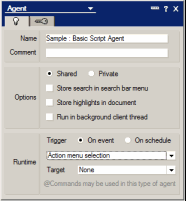
and include the DskMgrSubLib library:
Option Declare
Use "DskMgrSubLib"

Sub Initialize
      Dim session As New NotesSession
      Dim db_dskmgr As NotesDatabase
      Dim db_dskmgruser As NotesDatabase
      Dim db_cache As NotesDatabase
      Dim doc_user As NotesDocument
      Dim doc_install As NotesDocument

      ' # Open All Desktop Manager databases (DskMgr, DskMgrUser and Cache)
      Call GetAllDskMgrDatabase(session, session.CurrentDatabase, db_dskmgr, db_dskmgruser, db_cache)
      If (db_dskmgr Is Nothing) Or (db_dskmgruser Is Nothing) Then Exit Sub

      ' # Get User and Install documents from Desktop Manager User (or Cache) database
      Set doc_user = GetUserDocument (session, db_dskmgruser, db_cache)
      If doc_user Is Nothing Then Exit Sub
      Set doc_install = GetInstallDocument (session, db_dskmgruser, db_cache, doc_user)
      If doc_install Is Nothing Then Exit Sub

      ' ## Delete local Sales2008.nsf database
      Call dm_DeleteDatabase (Nothing,"","","Sales\Sales2008.nsf",Nothing,doc_user,doc_install,0)
End Sub
The first function to call in a Script is the DskMgrSubLib library's GetAllDskMgrDatabase function . It will be used to locate and open Desktop Manager databases:
- The DskMgr database includes the application's Settings documents (Reference, Setup, Profile, Template, Hook, Task...).
- The DskMgrUser database includes user Audit documents (User, Install, ...).
- The Cache database is the local Desktop Manager database (DskMgrStart.nsf) that contains a copy of the various documents.
If the multi-database architecture is not activated, the DskMgr (db_dskmgr) and DskMgrUser databases (db_dskmgruser) are actually one same database. If the agent runs from the local database (DskMgrStart.nsf), the DskMgr (db_dskmgr) and DskMgrUser (db_dskmgruser) databases are actually the current DskMgrStart.nsf database and the Cache (db_cache) database is not used (Nothing).
Remarks:
- In automatic mode (Full or Silent mode), the agents are running from the local database (DskMgrStart.nsf). If a user opens the Desktop Manager database on the server (DskMgr.nsf), the agents will run from the server database.
- The current database (session.CurrentDatabase) is not necessarily the DskMgr database since agents including the LotusScript code may be run from the local database (DskMgrStart.nsf).
The User and Install documents are loaded using the GetUserDocument and GetInstallDocument functions from the DskMgrSubLib library. These high level functions will search for these documents and will select the closest ones (if possible from the local Cache, or in the Desktop Manager User database on the server). A similar function exists (GetSetupDocument) to get the in-use Setup document.
To run this agent, you have to add the name it in a Task or Profile document, in the Execute Script section:


If the agent name is not available in the field list, think about refreshing the Reference document of the database (click on Refresh Reference button from the Setup view). If later, you have to modify the code of the agent, aways refresh the Reference document after the modification in order to guarantee a good synchronization with the local database (DskMgrStart.nsf).
You can also run it manually (very efficient for debugging purposes), from the Desktop Manager database, if you select it in the Actions menu.
3. Move / Launch LotusScript agents to / from DskMgrStart.nsf local database |
|
|
LotusScript agents are created into the Desktop Manager database (DskMgr.nsf) on the server. Once the Reference document has been refreshed, they will be displayed in the Agent Script tab:
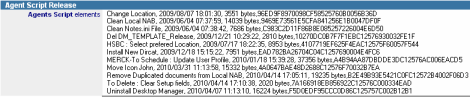
If the agents require dedicated LotusScript libraries, those libraries have also to be copied into the server Desktop Manager database (DskMgr.nsf) and the Reference document has to be updated. The LotusScript libraries which are not part of the core Desktop Manager product are displayed in the DskMgr Extra librairies table of the Reference document:

During the background synchronization process, between the local Desktop Manager database (DskMgrStart.nsf) and the server Desktop Manager database (DskMgr.nsf), agents and LotusScript libraries are created into the local database (if they weren't there before) or updated (if a newer version is available in the server database). This is an automatic process, there is nothing to parameter to make it work. You have just to manually refresh the Reference document every time an agent or a LotusScript library is created or modified in the server Desktop Manager database (DskMgr.nsf).
During the automatic startup of Desktop Manager on the user's desktop, the Desktop Manager Starter local database (DskMgrStart.nsf) will launch LotusScript agents defined in Tasks and Profiles documents. The agents will run on the user's desktop, using documents (User, Notes Install, Setup, Audit results...) available in the local Desktop Manager Starter database (DskMgrStart.nsf), with no access to the server Desktop Manager databases (DskMgr.nsf and DskMgrUser.nsf). With no access required to a server, the agents will run faster and under any circumstance (disconnected mode). On the other hand, if the agent need to access to specific resource (views, parameter documents...), they will have to be copied into the local database or the agent will have to open them directly on the server.
4. List of functions of Desktop Manager LotusScript API |
|
|
In order to simplify the usage of API functions, they have been organized into functional groups (all functions handling the Cache.ndk file have been put together) and the common parameters (doc_user, doc_install, check_fixup) do not receive anymore their data type in the function declaration. Further more, the first (usually empty) parameters have been replaced with constant values:
Conventional declaration:
Sub dmDeleteDatabase(doc_ui As NotesDocument, field_name As String, language As String,
db_name As String,
doc_task As NotesDocument,
doc_user As NotesDocument, doc_install As NotesDocument, check_fixup As Integer)
Basic declaration:
Sub dmDeleteDatabase(Nothing, "", "", db_name As String, Nothing, doc_user, doc_install, check_fixup)
db_name : Chemin de la base Notes à supprimer.
Cette fonction supprime du disque une base Notes locale.
Categories |
|
|
Workspace |
|
|
|
Function Name |
|
Definition |
| dmDesktopPreference | Modify display preferences for the Notes Workspace | |
| dmDesktopChangeString | Modify the path of the databases available on the Workspace. | |
| dmCompactDesktop | Compact the Notes Workspace of the user. | |
| dmBackupDesktop | Backup the current desktop.ndk file content and add date to this backup file. | |
| dmRestoreDesktop | Restore the desktop.ndk file content for a specified date. | |
| dmDeleteDesktop | Delete the desktop.ndk file from the user's hard drive. | |
| dmAddDbIcon | Add a Notes database icon on the Workspace. | |
| dmMoveDbIcon | Move a Notes database icon available on the workspace to a new location. | |
| dmRemoveDbIcon | Remove the icons of Notes databases available on the Workspace. | |
| dmCreatePage | Create a new Page on the Notes Workspace or change its color / move to other position. | |
| dmRenamePage | Rename an existing Workspace Page. | |
| dmRemovePage | Remove a Page from the Notes workspace. | |
| dmGetDesktopPath | Returns the full path of the desktop.ndk file. | |
| dmGetDBReplicaIDFromWorkspace | Returns the ReplicaID of a database whose icon can be present in the workspace. |
Sub dmDesktopPreference(Nothing, "", "", preference As Integer, doc_user, doc_install)
preference : 16 = Do not display server names, 18 = Display server names, 32 = Do not stack icons, 36 = Stack icons, 8 = Do not display unread, 9 = Display unread.
Modify display preferences for the Notes Workspace (display server names, stack replica icons, display unread). It is possible to modify several options in one call by adding the numeric values (44=36+8 : Stack icons + Do not display unread).This action is performed by DskMgr.exe program, when Notes client is not running.
Call dmDesktopChangeString(Nothing, "", "",string_src As String, string_dst As String, doc_user, doc_install)
string_src :Source sub-string ("CN=King/O=Cooperteam!!Sales\Sales.nsf" or "Sales\Sales.nsf" or "King").
string_dst : Replace sub-string ("CN=Queen/O=Cooperteam!!Sales\Sales.nsf" or "Sales2008\Sales.nsf" or "Queen").
Modify the path of the databases available on the Workspace. The database name contains the name of the server if it are hosted on a Domino server (<server_name>!!<database_name>) or the path of the database (<database_path>) if it is a local database. This action is performed by DskMgr.exe program, when Notes client is not running.
Sub dmCompactDesktop (Nothing, "", "")
Compact the Notes Workspace of the user. This action is performed when the Desktop Manager database is (automatically) closed.
Sub dmBackupDesktop (Nothing, "", "", desktop_file_path As String, history_period As Integer, doc_user)
desktop_file_path : Full path of the desktop.ndk file.
history_period : Maximum duration (in days) to keep backup files. Beyond this limit date, all the older backup files will be removed.
Backup the current desktop.ndk file content and add date to this backup file. The file is stored in the Temporary folder of the user. This action is performed by DskMgr.exe program, when Notes client is not running.
Sub dmRestoreDesktop (Nothing, "", "", desktop_file_path As String, file_date As String, doc_user)
desktop_file_path : Full path of the desktop.ndk file.
file_date : Date of the backup file. The date is under format YYYYMMDD (ex : 20080325 for the March 25th)
Restore the desktop.ndk file content for a specified date. Of course, this action requires the availability of the backup file (in the Temporary file) for the wished date. This action is performed by DskMgr.exe program, when Notes client is not running.
Sub dmDeleteDesktop (Nothing, "", "", doc_user, doc_install)
Delete the desktop.ndk file from the user hard drive. This action is performed by DskMgr.exe program, when Notes client is not running.
Sub dmAddDbIcon (Nothing, "", "", db_fullname As String, check_fixup)
db_fullname : Full Path to the local database (ex : c:\Notes\Data\Sales\Sales.nsf), relative path to the Notes data directory (ex : Sales\Sales.nsf) or relative path with the server name (ex : CN=King/O=Cooper!!Sales.nsf) for a database hosted on a Domino server.
Add a Notes database icon (local or hosted on a server) on the Workspace.
Sub dmMoveDbIcon (Nothing, "", "", db_name As String, page_name As String, x As String, y As String, doc_user, doc_install)
db_name : Path of the Notes database (with or without server name) as it is recorded in the desktop.dsk file.
page_name : Name of the workspace Page where to move the icon.
x : X coordinate where to move the icon ("1" or more).
y : Y coordinate where to move the icon ("1" or more)
Move a Notes database icon available on the workspace to a new location. If an icon is already at the wished location, it will be moved lower. This action is performed by DskMgr.exe program, when Notes client is not running.
Sub dmRemoveDbIcon (Nothing, "", "", db_fullname As String, doc_user, doc_install)
db_fullname : Path of the database (with or without server name) as it is recorded in the desktop.ndk file. You can use joker character * to specify a set of databases.
Remove the icons of Notes databases available on the Workspace. This action is performed by DskMgr.exe program, when Notes client is not running.
Sub dmCreatePage (Nothing, "", "", page_name As String, color As String, position As String, doc_user, doc_install)
page_name : Name of the Page on the workspace. To specify the Xth page, just enter Page #x (eg: "Page #1" for first page).
color : New color code for the Page (between "1" and "240").
position : New position for the Page (between "1" end "32").
Create a new Page on the Notes Workspace or change its color / move to other position. This action is performed by DskMgr.exe program, when Notes client is not running.
Sub dmRenamePage (Nothing, "", "", page_name_src As String, page_name_dst As String, doc_user, doc_install)
page_name : Name of the current Page on the workspace. To specify the Xth page, just enter Page #x (ex : "Page #1" for first page).
page_name_dst : New name for the Workspace Page.
Rename an existing Workspace Page. This action is performed by DskMgr.exe program, when Notes client is not running.
Sub dmRemovePage (Nothing, "", "", page_name As String, doc_user, doc_install)
page_name : Name of the Page on the workspace. To specify the Xth page, just enter Page #x (ex : "Page #1" for first page).
Remove a Page from the Notes workspace. This action is performed by DskMgr.exe program, when Notes client is not running.
Function dmGetDesktopPath As String
Return the full path of the desktop.ndk file (ex : c:\Lotus\Notes\data\desktop6.ndk).
Function dmGetDBReplicaIDFromWorkspace (doc_install, server_name As String, database_name As String) As String
server_name : Server name ("" for a local database).
database_name : Path of the server database or path of the local database relative to the Notes Data folder.
Returns the ReplicaID of a database whose icon can be present in the workspace. If the database is not present, the function returns an empty string (""). This function was optimized so that it can very quickly answer to many requests. It is the quickest way to know whether a database is present on the user workspace.
Cache.ndk file |
|
|
|
Function Name |
|
Definition |
| dmSetCacheSize | Set a new maximum size to the Cache.ndk file. | |
| dmDeleteCache | Remove the Cache.ndk from the hard drive. | |
| dmGetCachePath | Return the full path of the Cache.ndk file. |
Sub dmSetCacheSize (Nothing, "", "", cache_size As String, doc_user, doc_install)
cache_size : Maximum size (in MB) for the Cache.ndk file.
Set a new maximum size to the Cache.ndk file. This action is performed by DskMgr.exe program, when Notes client is not running.
Sub dmDeleteCache (Nothing, "", "", doc_user, doc_install)
Remove the Cache.ndk from the hard drive. This action is performed by DskMgr.exe program, when Notes client is not running.
Function dmGetCachePath As String
Return the full path of the Cache.ndk file (ex : E:\Program Files\IBM\Notes\data\cache.ndk).
Bookmark.nsf file |
|
|
|
Function Name |
|
Definition |
| dmAddBookmarkWorkspace | Add the Workspace icon in the left navigator of the screen, under the Replicator icon. | |
| dmAddBookmarkEntry | Add a Notes database to the Bookmark. | |
| dmDeleteBookmarkEntry | Remove the bookmark entry for a Notes database. |
Sub dmAddBookmarkWorkspace (Nothing, "", "", caption_name As String, is_default As String, Nothing, check_fixup)
caption_name : Label displayed when the mouse is moved on the icon, on the left navigator.
is_default : "1" to define the Workspace page as Notes welcome page, "" if not.
Add the Workspace icon in the left navigator of the screen, under the Replicator icon. You can also define the Workspace as Notes welcome page.
Sub dmAddBookmarkEntry (Nothing, "", "", database_name As String, position As String, is_default As String, Nothing, check_fixup)
database_name : Full Path to the local database (ex : c:\Notes\Data\Sales\Sales.nsf), relative path to the Notes data directory (ex : Sales\Sales.nsf) or relative path with the server name (ex : CN=King/O=Cooper!!Sales.nsf) for a database hosted on a Domino server.
position : "1" to insert the database in the Database folder, "2" to put the database icon on the left navigator.
is_default : "1" to define the database as Welcome page, "" if not.
Add a Notes database to the Bookmark, in the Database folder (Database) or in the left navigator of the screen (Root). It is also possible to define a database as the Welcome page for the Notes client.
Sub dmDeleteBookmarkEntry (Nothing, "", "", database_name As String, Nothing, check_fixup)
database_name : Full Path to the local database (ex : c:\Notes\Data\Sales\Sales.nsf), relative path to the Notes data directory (ex : Sales\Sales.nsf) or relative path with the server name (ex : CN=King/O=Cooper!!Sales.nsf) for a database hosted on a Domino server.
Remove the bookmark entry for a Notes database.
Notes.ini file |
|
|
|
Function Name |
|
Definition |
| dmChangeNotesIniVariable | Set a new value to a Notes.ini variable. | |
| dmAddNotesIniLine | Append a line at the end of the Notes.ini file. | |
| dmRemoveNotesIniLine | Remove a line from the Notes.ini file. | |
| GetNotesIniPath | Return the full path of the Notes.ini file. |
Sub dmChangeNotesIniVariable (Nothing, "", "", variable_name As String, variable_value As String)
variable_name : Name of the variable to modify / create.
variable_value : Value to set to the variable.
Set a new value to a Notes.ini variable.
Sub dmAddNotesIniLine (Nothing, "", "", file_line As String, doc_user, doc_install)
file_line : Line to add to the Notes.ini file.
Append a line at the end of the Notes.ini file. This is convenient to add lines other than the ones formated like <variable>=<value>. This action is performed by DskMgr.exe program, when Notes client is not running.
Sub dmRemoveNotesIniLine (Nothing, "", "", file_line As String, doc_user, doc_install)
file_line : Line of the Notes.ini file to remove.
Remove a line from the Notes.ini file. This is usefull to remove lines other than the ones formated like <variable>=<valeur>. This action is performed by DskMgr.exe program, when Notes client is not running.
Function GetNotesIniPath As String
Return the full path of the Notes.ini file (ex : E:\Program Files\lotus\notes\data\notes.ini).
Database Replication |
|
|
|
Function Name |
|
Definition |
| dmCreateReplica | Create a local replication stub for the database hosted on a server. | |
| dmCreateCheckReplica | Check if a local replica of a server hosted database already exists. | |
| dmReplicateDatabaseWithServer | Force a replication between a local database and its replica on a server. | |
| dmChangeReplication | Change replication options for a local database. | |
| dmChangeReplicaID | Change the replica ID of a local database. | |
| dmModifyReplicationHistory | Modify server and database names in the replication history of a local database. | |
| dmClearReplicationHistory | Remove replication history of a local database. | |
| dmChangeServerInReplicators | Search / Replace the name of a server in the Replicator pages with a new one. | |
| dmChangeDatabaseInReplicators | Search / Replace the name of a database in the Replicator pages with a new one. | |
| dmUpdateReplicator | Modify the options available in the Replicator tabs' entries for a local database. | |
| dmRemoveDbFromReplicator | Remove from the Replicator pages of the Location documents, the entries for a local database. | |
| dmChangeReplicationFormula | Duplicate, in a local database, an already existing replication Formula for a new server. | |
| dmGetLastReplicate | Return the server name used by a local database during its latest replication. | |
| dmGetDatabaseReplicatorSettings | Extracts one of the settings from all replicator pages for a local Notes database. | |
| dmChangeDbPositionInReplicator | Change a database position in the Replicator page of the Location documents. | |
| dmSetManagedReplica | Modify the Managed Replica setting of the Notes client. |
Sub dmCreateReplica (Nothing, "", "", server_path As String, local_path As String, formula As String, flags As String, stack_icon As Integer, replicate As Integer, Nothing, doc_user, check_fixup)
server_path : Full path of the database on the server, including server name and database name (ex : CN=King/O=Cooper!!Sales.nsf).
local_path : Path of the local replica of the database (ex : Sales\Sales.nsf).
formula : Selection formula used to add documents in the local replica.
flags : Encryption flag for the local replica, if needed (EncryptSimple, EncryptMedium or EncryptStrong).
stack_icon : 1 to have the local database icon on the top of the icon stack, 2 to have the server one on the top of the stack.
replicate : 1 if we want to replicate the database right now, 0 if the database has to be replicated in the background, through the replicator page.
Create a local replication stub for the database hosted on a server. The icons of both databases (the local one and the server hosted one) are added to the workspace.
Sub dmCreateCheckReplica (Nothing, "", "", server_path As String, local_path As String, formula As String, flags As String, stack_icon As Integer, replicate As Integer, Nothing, doc_user, check_fixup)
server_path : Full path of the database on the server, including server name and database name (ex : CN=King/O=Cooper!!Sales.nsf).
local_path : Path of the local replica of the database (ex : Sales\Sales.nsf).
formula : Selection formula used to add documents in the local replica.
flags : Encryption flag for the local replica, if needed (EncryptSimple, EncryptMedium or EncryptStrong).
stack_icon : 1 to have the local database icon on the top of the icon stack, 2 to have the server one on the top of the stack.
replicate : 1 if we want to replicate the database right now, 0 if the database has to be replicated in the background, through the replicator page.
Check if a local replica of a server hosted database already exists. If not, the replica stub is created and the icons are added to the workspace.
Sub dmReplicateDatabaseWithServer (Nothing, "", "", db_name As String, server_name As String, Nothing, check_fixup)
db_name : Full path for the local database (ex : c:\Notes\Data\Sales\Sales.nsf) or relative path to the Notes Data directory (ex : Sales\Sales.nsf).
server_name : Server name (ex : CN=Queen/O=Cooperteam).
Force a replication between a local database and its replica on a server. This is convenient to add the server name (as latest used server) in the replication history of a database.
Sub dmChangeReplication (Nothing, "", "", db_name As String, command_replication As String, Nothing, check_fixup)
db_name : Full path for the local database (ex : c:\Notes\Data\Sales\Sales.nsf) or relative path to the Notes Data directory (ex : Sales\Sales.nsf).
command_replication : Command line used for the replication options modification (cf User Tasks to get full available options list).
Change replication options for a local database.
Sub dmChangeReplicaID (Nothing, "", "", db_name As String, replica_id As String, Nothing, check_fixup)
db_name : Full path for the local database (ex : c:\Notes\Data\Sales\Sales.nsf) or relative path to the Notes Data directory (ex : Sales\Sales.nsf).
replica_id : New replica id for the database (ex : "C1256E38:A52189A2"). You can use keyword "@Now" to ask for a random replica id.
Change the replica ID of a local database.
Sub dmModifyReplicationHistory (Nothing, "", "", db_name As String, src_server_database As String, dst_server_database As String, Nothing, check_fixup)
db_name : Full path for the local database (ex : c:\Notes\Data\Sales\Sales.nsf) or relative path to the Notes Data directory (ex : Sales\Sales.nsf).
src_server_database: Server name !! database name we want to search & replace (ex : CN=King/O=Cooperteam!!Sales.nsf).
dst_server_database: New server name !! database name (ex : CN=Queen/O=Cooper!!Sales\Sales.nsf).
Modify server and database names in the replication history of a local database.
Sub dmClearReplicationHistory (Nothing, "", "", db_name As String, Nothing, check_fixup)
db_name : Full path for the local database (ex : c:\Notes\Data\Sales\Sales.nsf) or relative path to the Notes Data directory (ex : Sales\Sales.nsf).
Remove replication history of a local database.
Sub dmChangeServerInReplicators (Nothing, "", "", location_name As String, database_name As String, server_src_name As String, server_dst_name As String, Nothing, check_fixup)
location_name : Names list of Location documents to process. You can user joker character * to specify that you want to process all location documents.
database_name : Path of the local database. If you let this parameter empty (""), the server name will be searched / replaced in all the entries of the replicator page.
server_src_name : Server name to search (ex : CN=King/O=Cooperteam). You can use Joker character (*).
server_dst_name : New server name (ex : CN=Queen/O=Cooperteam).
Search / Replace the name of a server in the Replicator pages with a new one.
Sub dmChangeDatabaseInReplicators (Nothing, "", "", location_name As String, database_src_name As String, database_dst_name As String, Nothing, check_fixup)
location_name : Names list of Location documents to process. You can user joker character * to specify that you want to process all location documents.
database_src_name : Database name to search (ex : mail\archive.nsf).
database_dst_name : New database name (ex : archive\archive_2010.nsf).
Search / Replace the name of a database in the Replicator pages with a new one.
Sub dmUpdateReplicator (Nothing, "", "", location_name As String, database_name As String, checked_flag As String, replicate_flag As String, server_name As String, direction As String, trunc As String, trunc_limit_doc As String, trunc_limit_file As String, Nothing, check_fixup)
location_name : Names list of Location documents to process. You can user joker character * to specify that you want to process all location documents.
database_name : Local database path (ex : Sales\Sales.nsf)
checked_flag : "X" to activate the replication, "" to un-activate it.
replicate_flag : Choice for replication server ("1" = Any available, "2" = Try first or "3" = Only with).
server_name : Server name used for the replication (ex : CN=Queen/O=Cooperteam), if replicate_flag is "2" or "3".
direction : Direction for the replication flow ("<-->" = both directions, "-->" : send to server, "<--" : receive from server, or "X" = no flow).
trunc : Truncation of what is received ("0" = Full, "1" = Summary or "2" = Partial or "3" = Smallest First).
trunc_limit_doc : Maximum Size of received documents (in KB) if truncis set to "2".
trunc_limit_file : Maximum Size of received attached files (in KB) if trunc is set to "2".
Modify the options available in the Replicator tabs' entries for a local database.
Sub dmRemoveDbFromReplicator (Nothing, "", "", location_name As String, database_name As String, Nothing, check_fixup)
location_name : Names list of Location documents to process. You can user joker character * to specify that you want to process all location documents.
database_name : Path of the local database to remove (ex : Sales\Sales.nsf).
Remove from the Replicator pages of the Location documents, the entries for a local database.
Sub dmChangeReplicationFormula (Nothing, "", "", database_name As String, server_src_name As String, server_dst_name As String, Nothing, check_fixup)
database_name : Full path for the local database (ex : c:\Notes\Data\Sales\Sales.nsf) or relative path to the Notes Data directory (ex : Sales\Sales.nsf).
server_src_name : Server name (ex : CN=King/O=Cooperteam) existing in the database in a Replication Formula design element.
server_dst_name : New server name (ex : CN=Queen/O=Cooperteam).
Duplicate, in a local database, an already existing replication Formula for a new server. So the database will replicate with the new server with the same options (replication formula, options...) than with the old one.
Function dmGetLastReplicate (db_name As String, check_fixup) As String
db_name : Full Path to the local database (ex : c:\Notes\Data\Sales\Sales.nsf), relative path to the Notes data directory (ex : Sales\Sales.nsf) or relative path with the server name (ex : CN=King/O=Cooper!!Sales.nsf) for a database hosted on a Domino server.
Return the server name used by a local database during its latest replication.
Function dmGetDatabaseReplicatorSettings (database_name As String, setting_name As String) As String
| database_name | Local database path | |
| setting_name | Name of the setting to retrieve | |
| "Location Name" | Location document name | |
| "Check" | Specifies if the database is checked ("X" if checked, "" if unchecked) | |
| "Database Path" | Database path | |
| "Replica ID" | Database ReplicaID | |
| "Type" | Entry type ("Database", "MailBox", "Template", "Call Server", "Hangup", "Schedule", "Sched Req" or "Other") | |
| "Direction" | Replication direction ("<-->", "-->", "<--" or "X") | |
| "Truncature" | Document truncation ("Full documents", "Partial documents", "Summary only", "Smallest first" or "???") | |
| "Trunc Doc" | Document maximum size (in KB) if the "Partial documents" option is selected | |
| "Trunc File" | File maximum size (in KB) if the "Partial documents" option is selected | |
| "Prefered Server" | Server selection for replication ("Try last successful", "Try first", "Only" or "???") | |
| "Server Name" | Server name if the server selection is "Try first" or "Only" | |
Extracts one of the settings from all replicator pages for a local Notes database. The result is sent as a list of values, separated by the ';' character. This function allows for instance to check if a database is present on one of the replicator pages and to get the list of servers with which one can replicate. This function was optimized so that it can very quickly answer to many requests. It is the quickest way to know whether a database is present on one of the replicator pages
Sub dmChangeDbPositionInReplicator (Nothing, "", "", location_name As String, database_name As String, database_position As String, Nothing, check_fixup)
location_name : Names list of Location documents to process. You can user joker character * to specify that you want to process all location documents.
database_name : Path of the local database to remove (ex : Sales\Sales.nsf).
database_position : New database position (1 - N) in the Replicator Page.
Change a database position in the Replicator Page of the Location documents.
Sub dmSetManagedReplica (session, Nothing, "", "", preference As String, Nothing)
preference : value (1, 3, 7 ou 8) defining the Managed Replica setting for the Notes client :
1 - Create a local replica of the user's mail file. If a local managed replica exists, convert it to a standard local replica.
3 - Create a local managed replica of the user's mail file. If a local replica already exists, do nothing.
7 - Create a local managed replica of the user's mail file. If a local replica already exists, convert it to a managed replica.
8 - Delete the local replica of the user's mail file (managed or not).
Change Notes Client preference regarding the Managed Replica setting.
Processing Functions for Notes databases |
|
|
|
Function Name |
|
Definition |
| dmCompactDatabase | Compacts a Notes database. | |
| dmFixupDatabase | Performs a Fixup on a Notes database. | |
| dmRebuildView | Rebuilds view indexes of a Notes database. | |
| dmRebuildFT | Rebuilds the Full Text index of a Notes database. | |
| dmDeleteFT | Removes the Full Text index of a Notes database. | |
| dmUpdatePrivateView | Updates the design of database private views. | |
| dmPurgeLogDatabase | Remove outdated documents from the local Log.nsf database. | |
| dmClearLocationHiddenField | Remove, in Location documents hidden fields, any reference to a value. | |
| dmCopyDatabase | Creates a new local database by copying an existing Notes database. | |
| dmCreateDatabaseFromTemplate | Creates a new database from a Template. | |
| dmDeleteDatabase | Removes a Notes database, also removing its icon from the workspace. | |
| dmChangeString | Searches / Replaces or Assigns a text string into Notes database documents. | |
| dmCopyDocument | Copies a set of documents from a source database to a destination database. | |
| dmSynchronizeDocument | Performs a one-to-one synchronization of fields in a set of documents from a source database to an other. | |
| dmDeleteDocument | Removes a set of documents from a Notes database. | |
| dmChangeDatabaseOption | Modifies Notes database options. | |
| dmSetQuota | Changes or sets the Quota assigned to a Notes database. | |
| dmRefreshDesign | Refreshes the design of a Notes database with a Template database hosted on a server. | |
| dmReplaceDesign | Replaces the design of the Notes database with a local or server hosted Template database. | |
| dmChangeACL | Modifies the ACL of a Notes database. | |
| dmEncryptDatabase | Encrypt or decrypt a local database. | |
| dmIsDatabaseEncrypted | Returns 1 if the database is encrypted, 0 if it is not encrypted and 2 if the database is not available. | |
| dmGetDocumentNumber | Returns the number of documents in a Notes database. | |
| dmGetDatabasePathFromReplicaID | Gets the Notes database path from its ReplicaID. | |
| dmMoveDatabase | Reconfigure the user desktop when the accessed database was moved from one server to another. | |
| GetRelativePath | Gets the Notes database path relative to the Data directory. | |
| dmDeleteDeletionStubs | Remove all Deletion Stubs from a Notes database. |
Sub dmCompactDatabase (Nothing, "", "", db_name As String, Nothing, 0, check_fixup)
db_name : Path of the database that can either be local (ex : Tools\Sales\Sales.nsf) or on a server (ex : CN=King/O=Cooperteam!!Tools\Sales\Sales.nsf).
Compacts a Notes database. If the database cannot be compacted immediately and if it is not encrypted, it will be compacted later with DskMgr.exe.
Sub dmFixupDatabase (Nothing, "", "", db_name As String, Nothing, 0, "")
db_name : Path of the database that can either be local (ex : Tools\Sales\Sales.nsf) or on a server (ex : CN=King/O=Cooperteam!!Tools\Sales\Sales.nsf).
Performs a Fixup on a Notes database.
Sub dmRebuildView (Nothing, "", "", db_name As String, Nothing, 0, data_folder As String, check_fixup)
db_name : Path of the database that can either be local (ex : Tools\Sales\Sales.nsf) or on a server (ex : CN=King/O=Cooperteam!!Tools\Sales\Sales.nsf).
data_folder : Notes Data folder path.
Rebuilds view indexes of a Notes database.
Sub dmRebuildFT (Nothing, "", "", db_name As String, Nothing, 0, data_folder As String, check_fixup)
db_name : Path of the database that can either be local (ex : Tools\Sales\Sales.nsf) or on a server (ex : CN=King/O=Cooperteam!!Tools\Sales\Sales.nsf).
data_folder : Notes Data folder path.
Rebuilds the Full Text index of a Notes database.
Sub dmDeleteFT (Nothing, "", "", db_name As String, Nothing, check_fixup)
db_name : Path of the database that can either be local (ex : Tools\Sales\Sales.nsf) or on a server (ex : CN=King/O=Cooperteam!!Tools\Sales\Sales.nsf).
Removes the Full Text index of a Notes database.
Sub dmUpdatePrivateView (Nothing, "", "", db_name As String, Nothing, check_fixup)
db_name : Path of the database that can either be local (ex : Tools\Sales\Sales.nsf) or on a server (ex : CN=King/O=Cooperteam!!Tools\Sales\Sales.nsf).
Updates the design of database private views.
Sub dmPurgeLogDatabase (Nothing, "", "", Nothing, period_purge As Long, check_fixup)
period_purge : Period duration (in months) to keep local Log.nsf document (ex : 3 = delete from database all documents older than 3 months).
Remove outdated documents from the local Log.nsf database.
Sub dmClearLocationHiddenField (Nothing, "", "", location_list As String, value_list As String, Nothing)
location_list : Names list of Location documents to process. You can user joker character * to specify that you want to process all location documents.
value_list : List of values to be removed from hidden fields (ex : CN=King/O=Cooperteam!!mail\rjohnson.nsf).
Remove, in Location documents hidden fields ($StackFileNames, $LastFileNames, ...), any reference to a value (database name, server name...).
Sub dmCopyDatabase (Nothing, "", "", server_path As String, local_path As String, Nothing, check_fixup)
server_path : Path of the local source database (ex : Tools\Sales\Sales.nsf) or the server hosted one (ex : CN=King/O=Cooperteam!!Tools\Sales\Sales.nsf).
local_path : Path of the local new database (ex : Sales\Sales.nsf).
Creates a new local database by copying an existing Notes database (local or server hosted one). The icon of the new database is added on the Workspace.
Sub dmCreateDatabaseFromTemplate (Nothing, "", "", db_path As String, db_template_path As String, db_title As String, inherit As Integer, Nothing)
db_path : Path of the database that can either be local (ex : Tools\Sales\Sales.nsf) or on a server (ex : CN=King/O=Cooperteam!!Tools\Sales\Sales.nsf).
db_template : Path of the Template database used to create the database. It can be local (ex : names.ntf) or hosted on a server (ex : CN=King/O=cooperteam!!names.ntf).
db_title : Title of the new database.
inherit : 1 to make the new database inherit of the template, 0 if not.
Creates a new database from a Template. The icon of the new database is added on the workspace.
Sub dmDeleteDatabase (Nothing, "", "", db_name As String, Nothing, doc_user, doc_install, check_fixup)
db_name : Path of the database that can either be local (ex : Tools\Sales\Sales.nsf) or on a server (ex : CN=King/O=Cooperteam!!Tools\Sales\Sales.nsf).
Removes a Notes database, also removing its icon from the workspace. This last action is performed by DskMgr.exe, when the Notes client is not in memory.
Sub dmChangeString (Nothing, "", "", db_name As String, formula_doc As String, fields_process As String, fields_exclude As String, source_string As String, replace_string As String, Nothing, check_fixup)
db_name : Path of the database that can either be local (ex : Tools\Sales\Sales.nsf) or on a server (ex : CN=King/O=Cooperteam!!Tools\Sales\Sales.nsf).
formula_doc : Notes selection formula to define the set of documents to modify (ex : Form = "Location").
fields_process : Fields names list where the text string will be searched / Replaced (ex : ServerName,DirectoryServer,SametimeServer). You can use joker character * to specify that all the fields should be processed.
fields_exclude : Fields names list to do not process (only if we have specified * to process all the fields).
source_string : Searched text value (* to indicate any value = we want to replace the existing value, no matter what it is)
replace_string : Replaced text value.
Searches / Replaces or Assigns a text string into Notes database documents.
Sub dmCopyDocument (Nothing, "", "", db_name_src As String, db_name_dst As String, formula_doc As String, Nothing, check_fixup)
db_name_src : Path of the source database that can either be local (ex : Tools\Sales\Sales.nsf) or on a server (ex : CN=King/O=Cooperteam!!Tools\Sales\Sales.nsf).
db_name_dst : Path of the destination database that can either be local (ex : Tools\Sales\Sales.nsf) or on a server (ex : CN=King/O=Cooperteam!!Tools\Sales\Sales.nsf).
formula_doc : Formula used to select documents in the source database (ex : Form = "Person").
Copies a set of documents from a source database to a destination database.
Sub dmSynchronizeDocument (Nothing, "", "", db_name_src As String, db_name_dst As String, formula_src As String, formula_dst As String, formula_key As String, delete_document As Integer, Nothing, check_fixup)
db_name_src : Path of the source database that can either be local (ex : Tools\Sales\Sales.nsf) or on a server (ex : CN=King/O=Cooperteam!!Tools\Sales\Sales.nsf)
db_name_dst : Path of the destination database that can either be local (ex : Tools\Sales\Sales.nsf) or on a server (ex : CN=King/O=Cooperteam!!Tools\Sales\Sales.nsf)..
formula_src : Formula used to select documents in the source database (ex : Form = "Person")
formula_src : Formula used to select documents in the destination database (ex : Form = "Person")
formula_key : Name of field or @Formula Notes used to set the synchronization key (ex : "FullName").
delete_document : Specifies if document deletion is allowed in the destination database (1: allowed, 0: forbidden).
Performs a one-to-one synchronization of fields in a set of documents from a source database to a destination database.
Sub dmDeleteDocument (Nothing, "", "", db_name As String, formula_doc As String, Nothing, check_fixup)
db_name : Path of the database that can either be local (ex : Tools\Sales\Sales.nsf) or on a server (ex : CN=King/O=Cooperteam!!Tools\Sales\Sales.nsf).
formula_doc : Notes selection Formula to define the set of documents to remove (ex : Form = "Location" & Name = "Office")
Removes a set of documents from a Notes database.
Sub dmChangeDatabaseOption (Nothing, "", "", db_name As String, command_option As String, Nothing, check_fixup)
db_name : Path of the database that can either be local (ex : Tools\Sales\Sales.nsf) or on a server (ex : CN=King/O=Cooperteam!!Tools\Sales\Sales.nsf).
command_option : Command line for the options modification (cf User Tasks to get the list of available options).
Modifies Notes database options.
Sub dmSetQuota (Nothing, "", "", db_name As String, warning As String, max_size As String, Nothing, check_fixup)
db_name : Path of the database that can either be local (ex : Tools\Sales\Sales.nsf) or on a server (ex : CN=King/O=Cooperteam!!Tools\Sales\Sales.nsf).
warning : Warning size (in MB).
max_size : Maximum size of the database (in MB).
Changes or sets the Quota assigned to a Notes database.
Sub dmRefreshDesign (Nothing, "", "", db_name As String, template_server As String, Nothing, check_fixup)
db_name : Path of the database that can either be local (ex : Tools\Sales\Sales.nsf) or on a server (ex : CN=King/O=Cooperteam!!Tools\Sales\Sales.nsf).
template_server : Server name hosting the Template database.
Refreshes the design of a Notes database with a Template database hosted on a server.
Sub dmReplaceDesign (Nothing, "", "", db_name As String, template_name As String, Nothing, check_fixup)
db_name : Path of the database that can either be local (ex : Tools\Sales\Sales.nsf) or on a server (ex : CN=King/O=Cooperteam!!Tools\Sales\Sales.nsf).
template_name : Name of the local Template database (ex : names.ntf) or server hosted one (ex : CN=King/O=Cooperteam!!names.ntf).
Replaces the design of the Notes database with a local or server hosted Template database.
Sub dmChangeACL (Nothing, "", "", db_name As String, command_acl As String, Nothing, check_fixup)
db_name : Path of the database that can either be local (ex : Tools\Sales\Sales.nsf) or on a server (ex : CN=King/O=Cooperteam!!Tools\Sales\Sales.nsf).
command_acl : Command line for the ACL change (cf Appendix 3 : Syntax of ChangeACL commands)
Modifies the ACL of a Notes database (entries, roles, options...).
Sub dmEncryptDatabase (Nothing, "", "", db_name As String, encrypt_flag As String, Nothing, 0, data_folder As String, check_fixup)
db_name : Full path for the local database (ex : c:\Notes\Data\Sales\Sales.nsf) or relative path to the Notes Data directory (ex : Sales\Sales.nsf).
encrypt_flag : Level of encryption (EncryptSimple, EncryptMedium ou EncryptStrong) or decryption (EncryptNone),
data_folder : Full path of the Notes data folder.
Encrypt or decrypt a local database. The database has to be compacted after encryption / decryption.
Function dmIsDatabaseEncrypted (db_name As String) As Integer
db_name : Full path for the local database (ex : c:\Notes\Data\Sales\Sales.nsf) or relative path to the Notes Data directory (ex : Sales\Sales.nsf).
Returns 1 if the database is encrypted, 0 if it is not encrypted and 2 if the database is not available.
Function dmGetDocumentNumber (db_name As String, check_fixup) As Long
db_name : Path of the database that can either be local (ex : Tools\Sales\Sales.nsf) or on a server (ex : CN=King/O=Cooperteam!!Tools\Sales\Sales.nsf).
Returns the number of documents in a Notes database (0 if the database cannot be accessed).
Function dmGetDatabasePathFromReplicaID (server_name As String, replica_id As String) As String
server_name : Name of the server hosting the database ("" for a local database).
replica_id : Database ReplicaID.
Gets the Notes database path (relative to the Data folder) from its ReplicaID.
Sub dmMoveDatabase (Nothing, "", "", session, doc_user, doc_install, old_server_name As String, old_database_name As String, new_server_name As String, new_database_name As String, is_mail_file As Integer, doc_log As NotesDocument, field_name_log As String, Nothing)
old_server_name : Name of the previously used server
old_database_name : Path of the database on its previously used server.
new_server_name : Name of the new server.
new_database_name : Database path on its new server.
is_mail_file : Specifies if the database is the user's Mail database (1) or not (0).
doc_log : Log document receiving process progress status messages (Nothing if no document is provided).
field_name_log : Name of the field receiving process progress status messages ("" if no Log document is provided)
High level function used to reconfigure the user desktop (workspace icons, bookmark, Notes.ini, replicator, local replica...) when the accessed database was moved from one server to another.
Function GetRelativePath (session As NotesSession, db As NotesDatabase) As String
db : Notes database.
Gets the Notes database path, relative to the Data folder.
Function dmDeleteDeletionStubs (Nothing, "", "", db_name As String, Nothing, check_fixup) As String
db_name : db_name : Path of the database that can either be local (ex : Tools\Sales\Sales.nsf) or on a server (ex : CN=King/O=Cooperteam!!Tools\Sales.nsf).
Remove the Deletion Stubs from a Notes database.
Execution Control list |
|
|
|
Function Name |
|
Definition |
| dmChangeECLAccess | Change ECL access mode for the User. | |
| dmRefreshECL | Refresh the ECL of the Notes client with the administration ECL or with a Named ECL. | |
| dmAddECLEntry | Add a new entry to the ECL of the user desktop. | |
| dmModifyECLEntry | Modify existing entry in the ECL of the user desktop. | |
| dmDeleteECLEntry | Remove existing entry from the ECL of the user desktop. | |
| dmDeleteECL | Delete the ECL of the user desktop. |
Sub dmChangeECLAccess (Nothing, "", "", access_mode As String, Nothing)
access_mode : "2" to prevent the user to modify the l'ECL, "3" to let the user modifiy the ECL.
Change ECL access mode (read only or modify) for the User.
Sub dmRefreshECL (Nothing, "", "", doc_user, ecl_name As String, ecl_server As String,ecl_database As String)
ecl_name : Name of the ECL to apply on the desktop (empty for the administration ECL).
ecl_server : Server hosting the database containing the ECL (the NAB for administration ECL, Desktop Manager database for Named ECL).
ecl_database : Database containing the ECL (the NAB for administration ECL, Desktop Manager database for Named ECL).
Refresh the ECL of the Notes client with the administration ECL (available in the NAB) or with a Named ECL (available in the Desktop Manager database). This action is performed when the Desktop Manager database is (automatically) closed
Sub dmAddECLEntry (Nothing, "", "", entry_name As String, entry_flags As String, ecl_workstation As Integer, ecl_java As Integer, ecl_javascript As Integer, Nothing)
entry_name : Name of the entry, using canonical format (CN=.../OU=.../O=...).
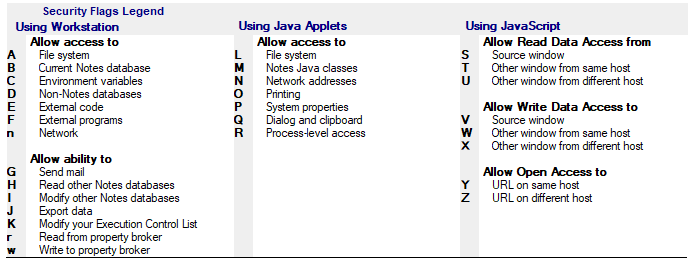
entry_flags : Security options for the new entry (see below for option list)
ecl_workstation : 1 to add the entry to the Workstation part of the ECL, 0 if not.
ecl_java : 1 to add the entry to the Applet Java part of the ECL, 0 if not.
ecl_javascript : 1 to add the entry to the Javascript part of the ECL, 0 if not.
Add a new entry to the ECL of the user desktop. If the entry already exists, it won't be modified.
Sub dmModifyECLEntry (Nothing, "", "", entry_name As String, entry_flags As String, ecl_workstation As Integer, ecl_java As Integer, ecl_javascript As Integer, Nothing)
entry_name : Name of the entry, using canonical format (CN=.../OU=.../O=...). You can modify several entries by using the wildcard character * (ex : CN=*/O=CooperDev).
entry_flags : Security options to change in the entry (see below for option list). By adding a + character to the front of the option letter, you add the option. By adding a - character, you remove the option (ex : +A+B-n)
ecl_workstation : 1 to modify the entry in the Workstation part of the ECL, 0 if not.
ecl_java : 1 to modify the entry in the Applet Java part of the ECL, 0 if not.
ecl_javascript : 1 to modify the entry the Javascript part of the ECL, 0 if not.
Modify existing entry in the ECL of the user desktop. If the entry doesn't exist, it won't be created.
Sub dmDeleteECLEntry (Nothing, "", "", entry_name As String, ecl_workstation As Integer, ecl_java As Integer, ecl_javascript As Integer, Nothing)
entry_name : Name of the entry, using canonical format (CN=.../OU=.../O=...). You can delete several entries by using the wildcard character * (ex : CN=*/O=CooperDev).
ecl_workstation : 1 to remove the entry from the Workstation part of the ECL, 0 if not.
ecl_java : 1 to remove the entry from the Applet Java part of the ECL, 0 if not.
ecl_javascript : 1 to remove the entry from the Javascript part of the ECL, 0 if not.
Remove existing entry from the ECL of the user desktop. You can't delete -Default- nor -NoSignature- entries from ECL.
Sub dmDeleteECL (Nothing, "", "", ecl_workstation As Integer, ecl_java As Integer, ecl_javascript As Integer, Nothing)
ecl_workstation : 1 to remove the Workstation part of the ECL, 0 if not.
ecl_java : 1 to remove the Applet Java part of the ECL, 0 if not.
ecl_javascript : 1 to remove the Javascript part of the ECL, 0 if not.
Delete the ECL of the user desktop. You can only remove some parts (workstation, java, javascript) of the ECL.
Security Flags for ECL entries
Cross Certificates |
|
|
|
Function Name |
|
Definition |
| dmDeleteCrossCertificate | Remove one or several Notes CrossCertificates documents from the local NAB of the user. |
Sub dmDeleteCrossCertificate (Nothing, "", "", certificate_name As String, certificate_type As String, Nothing)
certificate_name : Name of CrossCertificates documents to remove. You can use the joker character * to specify several ones (ex : O=Cooper*).
certificate_type : Type of certificates documents ("0" for Notes CrossCertificates, "1" for Internet CrossCertificates).
Remove one or several Notes CrossCertificates documents from the local NAB of the user.
Script Execution |
|
|
|
Function Name |
|
Definition |
| dmLaunchAgent | Runs a LotusScript or @Formula agent located in the Desktop Manager database. | |
| dmLaunchForeignAgent | Executes a LotusScript ou @Formula agent located that is either local or hosted on a server. | |
| dmLaunchProgram | Launch an executable program on the user PC. | |
| dmLaunchNotesTask | Launch, in background, a program linked to Notes environment like local administration tasks | |
| dmLaunchNotesTaskWait | Launch a program linked to Notes environment like local administration tasks and wait for its completion | |
| dmPostRunProgram | Launch an executable program on the user PC. |
Sub dmLaunchAgent (Nothing, "", "", agent_name As String, db_dskmgr As NotesDatabase, Nothing)
agent_name : Name of the agent to run.
db_dskmgr : Desktop Manager database where the agent is located.
Runs a LotusScript or @Formula agent located in the Desktop Manager database.
Sub dmLaunchForeignAgent (Nothing, "", "", server_name As String, database_name As String, agent_name As String, Nothing)
server_name : Name of server hosting the database containing the agent ("" if the database is local).
database_name : Name of the database containing the agent.
agent_name : Name of the agent to execute.
Executes a LotusScript ou @Formula agent located in a Notes database that is either local or hosted on a server.
Sub dmLaunchProgram (Nothing, "", "", command_line As String, sequence As Integer, Nothing)
command_line : Full path of the executable program to launch and its parameters (ex : c:\Windows\Win32\Notepad.exe c:\data\file.txt).
sequence : 1 if we wish to wait until the end of the program execution before continuing the execution of the next actions, 0 if we want to chain all the next actions without waiting.
Launch an executable program on the user PC.
Sub dmLaunchNotesTask (Nothing, "", "", task_path As String, task_param As String, Nothing)
task_path : Full Path of the executable to launch (ex : c:\Lotus\Notes\ncompact.exe).
task_param : Parameters of the executable.
Launch, in background, a program linked to Notes environment like local administration tasks (compact, fixup...).
Sub dmLaunchNotesTaskWait (Nothing, "", "", task_path As String, task_param As String, timeout_delay As Integer, Nothing)
task_path : Full Path of the executable to launch (ex : c:\Lotus\Notes\ncompact.exe).
task_param : Parameters of the executable.
timeout_delay : Maximum Delay (in seconds) while Desktop Manager waits for the Task completion before continuing its execution.
Launch, in background, a program linked to Notes environment like local administration tasks (compact, fixup...). Desktop Manager waits for the completion of the Task before continuing its execution.
Sub dmPostRunProgram (command_line As String, sequence As Integer, doc_user)
command_line : Full path of the executable program to launch and its parameters (ex : c:\Windows\Win32\Notepad.exe c:\data\file.txt).
sequence : 1 if we wish to wait until the end of the program execution before continuing the execution of the next actions, 0 if we want to chain all the next actions without waiting.
Launch an executable program on the user PC. This action is performed by DskMgr.exe program, when Notes client is not running.
Files on disk |
|
|
|
Function Name |
|
Definition |
| dmAttachFile | Get an existing file from the hard drive of the user. | |
| dmDetachFile | Extract on the hard drive of the user a file attached in a Notes document. | |
| dmCopyFile | Copies a file present on the user desktop. | |
| dmCopyMultiFile | Copies a set of files available in a Source folder to a Destination folder. | |
| dmUpdateMultiFile | Synchronizes a set of files available in a Source folder to a Destination folder. | |
| dmMoveFile | Moves or renames a file or a folder on the user desktop. | |
| dmDeleteFile | Removes file(s) from the user's hard drive. | |
| dmZipFile | Zip a file available on the hard drive of the user. | |
| dmZipMultiFile | Zip a set of files available in a Source folder into a zip file. The files folder-tree is re-created in the Zip file. | |
| dmUnzipFile | Un-zip a file available on the hard drive of the user, in the specified folder. | |
| dmGetFileChecksum | Computes a checksum for a file. | |
| dmCreateFolder | Creates a folder and all required sub-folders. | |
| dmDeleteFolder | Deletes a folder if it is empty. |
Sub dmAttachFile (Nothing, "", "", db_dskmgr As NotesDatabase, db_cache As NotesDatabase, file_path As String, zip_it As Integer, doc_user)
db_dskmgr : Desktop Manager database.
db_cache : Local DskMgrStart.nsf cache database, if it exists.
file_path : Full path of the file to retrieve.
zip_it : 1 if we want to zip the file before attaching it in the Notes document, 0 if not.
Get an existing file from the hard drive of the user and attach it into a new 'Audit Results File' Notes document, in the Desktop Manager database.
Sub dmDetachFile (Nothing, "", "", doc_task As NotesDocument, Nothing, file_field_name As String, local_path As String)
doc_task : Notes document containing the attach file.
file_field_name : Name of the Rich Text field containing the attach file.
local_path : Full path of the location where to extract the file (folder + file name).
Extract on the hard drive of the user a file attached in a Notes document.
Sub dmCopyFile (Nothing, "", "", src_path As String, dst_path As String, Nothing)
src_path : Source file path.
dst_path : Destination file path.
Copies a file present on the user desktop.
Sub dmCopyMultiFile (Nothing, "", "", src_folder_path As String, dst_folder_path As String, copy_list As String, exclusion_list As String, recursive As Integer, Nothing)
src_folder_path : Full path of Source folder.
dst_folder_path : Full path of Destination folder.
copy_list : Files or folders list to copy (wildcard character '*' may be used). The multi-value separator character is ',' (comma).
exclusion_list : Files or folders list NOT to copy (wildcard character '*' may be used). The multi-value separator character is ',' (comma).
recursive : '1' if the search of files or folders to be copied is performed under the sub-folders of the Source folder.
Copies a set of files available in a Source folder to a Destination folder. The files folder-tree is re-created under the Destination folder.
Sub dmUpdateMultiFile (Nothing, "", "", src_folder_path As String, dst_folder_path As String, copy_list As String, exclusion_list As String, recursive As Integer, Nothing)
src_folder_path : Full path of Source folder.
dst_folder_path : Full path of Destination folder.
copy_list : Files or folders list to synchronize (wildcard character '*' may be used). The multi-value separator character is ',' (comma).
exclusion_list : Files or folders list NOT to synchronize (wildcard character '*' may be used). The multi-value separator character is ',' (comma).
recursive : '1' if the search of files or folders to be synchronized is performed under the sub-folders of the Source folder.
Synchronizes a set of files available in a Source folder to a Destination folder. The files folder-tree is re-created under the Destination folder. The only copied Source files are the ones where latest modification date is greater than the Destination file (copy only is if newer).
Sub dmMoveFile (Nothing, "", "", src_path As String, dst_path As String, Nothing)
src_path : Source file path.
dst_path : Destination file path.
Moves or renames a file or a folder on the user desktop.
Sub dmDeleteFile (Nothing, "", "", file_path As String, doc_user)
file_path : Full path of the file(s) (use *) to remove.
Removes file(s) from the user's hard drive.
Function dmZipFile (src_file_path As String, file_name As String, zip_file_path As String) As Integer
file_name : Full path of the file to be zipped.
zip_file_path : full path of the zip file to create.
Zip a file available on the hard drive of the user.
Sub dmZipMultiFile (Nothing, "", "", src_folder_path As String, zip_file_path As String, zip_list As String, exclusion_list As String, recursive As Integer, Nothing)
src_folder_path : Full path of Source folder.
zip_file_path : Full path of Zip file to create.
zip_list : Files or folders list to zip (wildcard character '*' may be used). The multi-value separator character is ',' (comma).
exclusion_list : Files or folders list NOT to zip (wildcard character '*' may be used). The multi-value separator character is ',' (comma).
recursive : '1' if the search of files or folders to be zipped is performed under the sub-folders of the Source folder.
Zip a set of files available in a Source folder into a zip file. The files folder-tree is re-created in the Zip file.
Function dmUnzipFile (zip_file_path As String, unzip_folder_path As String) As String
zip_file_path : Full path of the zip file to unzip.
unzip_folder_path : Full path of the folder where to unzip the file (is the value is empty, the file will be unziped in the same folder than the zip file one).
Un-zip a file available on the hard drive of the user, in the specified folder. The path of the unziped file is returned by the function.
Function dmGetFileChecksum (file_path As String, length_kb As Long) As String
file_path : Full path of the file.
length_kb : Length of the file (in kb) used to compute the checksum. Use 0 to compute the checksum for the whole file.
Compute the checksum for a file. Return "" is the compute fails (file does not exist...).
Sub dmCreateFolder (Nothing, "", "", folder_path As String, doc_user)
folder_path : Path of the folder to create.
Creates a folder and all required sub-folders.
Sub dmDeleteFolder (Nothing, "", "", folder_path As String, empty_folder As Integer, doc_user)
folder_path : Path of the folder to delete
empty_folder : 1 to delete the folder content, 0 not to delete anything
Deletes a folder if it is empty. It is possible to empty it before deletion.
Post Actions |
|
|
|
Function Name |
|
Definition |
| dmPostCopyFile | Make a new copy of an existing file available on the hard drive of the user. | |
| dmPostCopyMultiFile | Copy a set of files available in a Source folder to a Destination folder. | |
| dmPostMoveFile | Move a file (or a folder) available on the hard drive of the user. | |
| dmPostModifyFile | Modifies the content of a file by searching / replacing a value. | |
| dmPostDeleteFile | Deletes file(s) from the user's hard drive. | |
| dmPostZipFile | Zips a file present on the user's hard drive. | |
| dmPostUnzipFile | Unzips a file available on the user's hard drive, in the specified folder. | |
| dmPostCreateFolder | Creates a folder and all required sub-folders. | |
| dmPostDeleteFolder | Deletes a folder if it is empty. | |
| dmPostMountVolume | Creates a mounting point for a drive volume. | |
| dmPostUpdateFile | Copies a file only if the source has been modified. | |
| dmPostUpdateMultiFile | Copies a set of files available in a Source folder to a Destination folder. |
Sub dmPostCopyFile (src_file_path As String, dst_file_path As String, doc_user)
src_file_path : Full path of the source file.
dst_file_path : Full path of the new copy to create.
Make a new copy of an existing file available on the hard drive of the user. This action is performed by DskMgr.exe program, when Notes client is not running.
Sub dmPostCopyMultiFile (src_folder_path As String, dst_folder_path As String, copy_list As String, exclusion_list As String, recursive As Integer, doc_user)
src_folder_path : Full path of Source folder.
dst_folder_path : Full path of Destination folder.
copy_list : Files or folders list to copy (wildcard character '*' may be used). The multi-value separator character is ',' (comma).
exclusion_list : Files or folders list NOT to copy (wildcard character '*' may be used). The multi-value separator character is ',' (comma).
recursive : '1' if the seach of files or folders to be copied is performed under the sub-folders of the Source folder.
Copy a set of files available in a Source folder to a Destination folder. The files folder-tree is re-created under the Destination folder. This action is performed by DskMgr.exe program, when Notes client is not running.
Sub dmPostMoveFile (src_file_path As String, dst_file_path As String, doc_user)
src_file_path : Full path of source file (or folder) to be moved.
dst_file_path : Full path of destination file (or folder).
Move a file (or a folder) available on the hard drive of the user. This action is performed by DskMgr.exe program, when Notes client is not running.
Sub dmPostModifyFile (file_path As String, src_value As String, dst_value As String, doc_user)
file_path : Full path of the file to modify
src_value : Searched value, in Hex Ascii format (ex : 0xC125A987)
dst_value : Replacement value, in Hex Ascii format and with the same length as the source value.
Modifies the content of a file by searching / replacing a value. This action is performed by DskMgr.exe, when the Notes client is not in memory.
Sub dmPostDeleteFile (file_path As String, doc_user)
file_path : Full path of the file(s) (use *) to delete.
Deletes file(s) from the user's hard drive. This action is performed by DskMgr.exe, when the Notes client is not in memory.
Sub dmPostZipFile (file_path As String, file_name As String, zip_file_path As String, doc_user)
file_name : Full path of the file to zip.
zip_file_path : Full path of the zip file to create.
Zips a file present on the user's hard drive. This action is performed by DskMgr.exe, when the Notes client is not in memory.
Sub dmPostUnzipFile (zip_file_path As String, unzip_folder_path As String, doc_user)
zip_file_path : Full path of the zip file to unzip.
unzip_folder_path : Full path of the folder where to unzip the file (is the value is empty, the file will be unziped in the same folder than the zip file one).
Unzips a file available on the user's hard drive, in the specified folder. This action is performed by DskMgr.exe, when the Notes client is not in memory.
Sub dmPostCreateFolder (folder_path As String, doc_user)
folder_path : Path of the folder to create.
Creates a folder and all required sub-folders. This action is performed by DskMgr.exe, when the Notes client is not in memory.
Sub dmPostDeleteFolder (folder_path As String, empty_folder As String, doc_user)
folder_path : Path of the folder to delete
empty_folder : 1 to delete the folder content, 0 not to delete anything
Deletes a folder if it is empty. It is possible to empty it before deletion. This action is performed by DskMgr.exe, when the Notes client is not in memory.
Sub dmPostMountVolume (volume_name As String, mount_point As String, doc_user)
volume_name : PAth of the volume to mount.
mount_point : Full path of the mount point to create.
Creates a mounting point for a drive volume. This action is performed by DskMgr.exe, when the Notes client is not in memory.
Sub dmPostUpdateFile (src_file_path As String, dst_file_path As String, doc_user)
src_file_path : Full path of the source file.
dst_file_path : Full path of the new copy to create.
Make a new copy of an existing file available, only if latest modification date is greater than the Destination file (copy only is if newer). This action is performed by DskMgr.exe program, when Notes client is not running.
Sub dmPostUpdateMultiFile (src_folder_path As String, dst_folder_path As String, copy_list As String, exclude_list As String, recursive As Integer, doc_user)
src_folder_path : Full path of Source folder.
dst_folder_path : Full path of Destination folder.
copy_list : Files or folders list to synchronize (wildcard character '*' may be used). The multi-value separator character is ',' (comma).
exclusion_list : Files or folders list NOT to synchronize (wildcard character '*' may be used). The multi-value separator character is ',' (comma).
recursive : '1' if the seach of files or folders to be synchronized is performed under the sub-folders of the Source folder.
Synchronizes a set of files available in a Source folder to a Destination folder. The files folder-tree is re-created under the Destination folder. The only copied Source files are the ones where latest modification date is greater than the Destination file (copy only is if newer). This action is performed by DskMgr.exe, when the Notes client is not in memory.
XML Files |
|
|
|
Function Name |
|
Definition |
| dmModifyXMLFile | Modify the variable value of a XML file. |
Sub dmModifyXMLFile (Nothing, "", "", file_path As String, variable_name As String, variable_value As String, key_name As String, key_value As String, is_attribute As String, update_only As String, Nothing)
file_path : Full path of the XML file to modify.
variable_name : Path of the variable on the tree of the XML file (ex : providerConfig.communities.community.name).
variable_value : New value.
key_name : Optional key name.
key_value : Optional key value.
is_attribute : "1" if this variable is an attribute, "" if not.
update_only : "1" if we only modify already existing variable values, "" if we can create new variables.
Modify the variable value of a XML file (.XML). See Profile or Task documentation for full details about variable and key usage.
PREFS Files |
|
|
|
Function Name |
|
Definition |
| dmModifyPreferenceFile | Modify the variable value of a Preference file. |
Sub dmModifyPreferenceFile (Nothing, "", "", file_path As String, variable_name As String, variable_value As String, clear_empty As String, update_only As String, Nothing)
file_path : Full path of the Preference file to modify.
variable_name : Name of the variable.
variable_value : New value.
clear_empty : "1" if we have to remove from the file a variable if its value is empty, "" if we let the empty variable in the file.
update_only : "1" if we only modify already existing variable values, "" if we can create new variables.
Modify the variable value of a Preference file (.PREFS).
Windows Registry |
|
|
|
Function Name |
|
Definition |
| dmGetRegistryKey | Return the value of a Windows Registry key. | |
| dmSetRegistryKey | Modify / Create a key in the Windows registry. | |
| dmDeleteRegistryKey | Delete a key in the Windows registry. |
Function dmGetRegistryKey (Nothing, "", "", reg_root As String, reg_sub As String, reg_name As String, Nothing) As String
reg_root : Root of the key HKEY_CLASSES_ROOT, HKEY_CURRENT_CONFIG, HKEY_CURRENT_USER, HKEY_LOCAL_MACHINE ou HKEY_USERS.
reg_sub : Full path of the key in the registry tree structure (ex : Software\Microsoft\Windows\CurrentVersion\Explorer\Shell Folders).
reg_name : Key name (empty if we wish to get the default value).
Return the value of a Windows Registry key.
Sub dmSetRegistryKey (Nothing, "", "", reg_root As String, reg_sub As String, reg_name As String, reg_type As String, reg_value As String, Nothing)
reg_root : Root of the key HKEY_CLASSES_ROOT, HKEY_CURRENT_CONFIG, HKEY_CURRENT_USER, HKEY_LOCAL_MACHINE ou HKEY_USERS.
reg_sub : Full path of the key in the registry tree structure (ex : Software\Microsoft\Windows\CurrentVersion\Explorer\Shell Folders).
reg_name : Key name (empty if we wish to modify the default value).
reg_type : Value data type (REG_DWORD, REG_EXPAND_SZ ou REG_SZ).
reg_value : Key value.
Modify / Create a key in the Windows registry.
Sub dmDeleteRegistryKey (Nothing, "", "", reg_root As String, reg_sub As String, Nothing)
reg_root : Root of the key HKEY_CLASSES_ROOT, HKEY_CURRENT_CONFIG, HKEY_CURRENT_USER, HKEY_LOCAL_MACHINE ou HKEY_USERS.
reg_sub : Full path of the key in the registry tree structure (ex : Software\Microsoft\Windows\CurrentVersion\Explorer\Shell Folders).
Delete a key in the Windows registry.
Environment variables |
|
|
|
Function Name |
|
Definition |
| dmGetEnvironmentVariable | Returns the value of a desktop environment variable. | |
| dmSetEnvironmentVariable | Modifies the value of a desktop environment variable. |
Function dmGetEnvironmentVariable (variable_name As String)
variable_name : Name of the environment variable.
Returns the value of a desktop environment variable.
Function dmSetEnvironmentVariable (variable_name As String, variable_value As String)
variable_name : Name of the environment variablet.
variable_value : New value of the variable.
Modifies the value of a desktop environment variable.
Data Transfer Functions |
|
|
|
Function Name |
|
Definition |
| dmFTPGetFile | Download a file from a FTP server. | |
| dmFTPPutFile | Upload a file to a FTP server. | |
| dmFTPDeleteFile | Remove a file from a FTP server. | |
| dmFTPGetLargeFile | Download a large file from a FTP server. | |
| dmGetFileByHTTP | Download a File or HTML Page from a Web site. | |
| dmGetLDAPEntry | Get all entry attributes from a LDAP directory. |
Function dmFTPGetFile (hostname As String, port As String, login As String, password As String, remote_file_path As String, transfer_type As String, local_file_path As String)
hostname : IP Address or Hostname of the FTP server
port : FTP port number, usually "21"
login : user name ("" if no login required)
password : user password ("" if no password required)
remote_file_path : file path on the FTP server
transfer_type : transfer type ("0" = Binary, "1" = Ascii)
local_file_path : local file path for the file to be downloaded
Download a file from a FTP server.
Function dmFTPPutFile (local_file_path As String, hostname As String, port As String, login As String, password As String, remote_file_path As String, transfer_type As String)
local_file_path : local file path to be uploaded
hostname : IP Address or Hostname of the FTP server
port : FTP port number, usually "21"
login : user name ("" if no login required)
password : user password ("" if no password required)
remote_file_path : file path on the FTP server
transfer_type : transfer type ("0" = Binary, "1" = Ascii)
Upload a file to a FTP server.
Function dmFTPDeleteFile (hostname As String, port As String, login As String, password As String, remote_file_path As String)
hostname : IP Address or Hostname of the FTP server
port : FTP port number, usually "21"
login : user name ("" if no login required)
password : user password ("" if no password required)
remote_file_path : file path on the FTP server
Delete a file from a FTP server.
Function dmFTPGetLargeFile (hostname As String, port As String, login As String, password As String, remote_file_path As String, transfer_type As String, local_file_path As String, quota_mb As String)
hostname : IP Address or Hostname of the FTP server
port : FTP port number, usually "21"
login : user name ("" if no login required)
password : user password ("" if no password required)
remote_file_path : file path on the FTP server
transfer_type : transfer type ("0" = Binary, "1" = Ascii)
local_file_path : local file path where the file has to be downloaded
quota_mb : maximum size (in MB) to transfer whenever the function is called
Download a large file from a FTP server. Copy can be staggered over several days (only copying X MB of data at each call).
Function dmGetFileByHTTP (url As String, login As String, password As String, target_file_path As String, is_text_file As String)
url : HTML Page url or File url
login : user name ("" if no login required)
password : user password ("" if no password required)
target_file_path : local file path where the Page or the File has to be downloaded
is_text_file : transfer type ("0" = Binary, "1" = Ascii)
Download an HTML Page or a File from a Web site.
Function dmGetLDAPEntry (hostname As String, port As String, login As String, password As String, dn As String, result_file_path As String)
hostname : IP Address or Hostname of the LDAP directory
port : LDAP port number, usually "389"
login : user name ("" if no login required)
password : user password ("" if no password required)
dn : dn of the LDAP entry
result_file_path : local file path where file containing the LDAP entry attributes has to be created
Create a Text file containing all the attributes from an LDAP entry.
Misc |
|
|
|
Function Name |
|
Definition |
| dmBuildFullString | Replaces, in a string, all keywords with their contextual values, and returns the new string. | |
| dmBuildFullDatabasePath | Builds the full path of a Notes database by providing a database name and a server name. | |
| dmRestartNotes | Forces the restart of the Notes client at the end of the execution of Desktop Manager. | |
| dmGetStartupPath | Returns the full path of the user's Windows Startup folder. | |
| GetNotesPath | Returns the full path of the user's Notes Program folder. | |
| GetNotesDataPath | Returns the full path of the user's Notes Data folder. | |
| dmGetTemporaryPath | Return the full path of the Windows Temporary folder of the user. | |
| dmGetIPAddress | Return the IP Address list of the user's PC. | |
| dmGetBitValue | Retrieves the value of an integer bit. | |
| dmSetBitValue | Modifies the value of an integer bit. | |
| dmIsVirtualComputer | Check if Notes is running under a Virtual session (CITRIX...). | |
| dmIsLaptopComputer | Check if the computer is a laptop. | |
| dmIsUserAdmin | Check if the user is administrator of Windows. | |
| dmGetComputerName | Get computer host name. |
Function dmBuildFullString (src_string As String, doc_user) As String
src_string : String containing (or not) some keywords (ex : @NotesDataFolder\DM\).
Replaces, in a string, all keywords (@Keywords, #Keywords#, %Keywords%) with their contextual values, and returns the new string.
Function dmBuildFullDatabasePath (db_full_path As String, server_name_param As String) As String
db_full_path : Path or ReplicaID of the local database (ex: Sales.nsf or C1256E38:A52189A2) or on a server (CN=SRV1/O=Corp!!Sales.nsf or CN=SRV1/O=Corp!!C1256E38:A52189A2).
server_name_param : Name of the server if it is not specified yet in the db_full_path setting (empty if no server).
Builds the full path of a Notes database (<server name>!!<database name> or <database name>) by providing a database name (or a ReplicaID) and a server name.
Sub dmRestartNotes (session As NotesSession, Nothing, "", "", with_dskmgr As Integer, doc_user, doc_setup, Nothing)
with_dskmgr : 1 to restart Notes with Desktop Manager (through the DskMgrStart.nsf database), 0 without the execution of Desktop Manager at startup.
Forces the restart of the Notes client at the end of the execution of Desktop Manager. Is it possible to restart with or without the execution of Desktop Manager.
Function dmGetStartupPath As String
Returns the full path of the user's Windows Startup folder.
Function GetNotesPath As String
Returns the full path of the user's Notes Program folder.
Function GetNotesDataPath As String
Returns the full path of the user's Notes Data folder.
Function dmGetTemporaryPath As String
Return the full path of the Windows Temporary folder of the user.
Function dmGetIPAddress As String
Return the IP Adress list of the user's PC (the values are separated with ',' character).
Function dmGetBitValue (integer_string As String, bit_position As Integer, byte_number As Integer) As Integer
integer_string : Character string standing for an integer (ex: -2147464079).
bit_position : Number of the bit whose value should be retrieved (0 --> (byte_number*8-1)).
byte_number : Number of bytes on which the value is represented (usually 4).
Retrieves the value (0/1) of an integer bit. Useful to decode the options of the Preferences variable in the Notes.ini file.
Function dmSetBitValue (integer_string As String, bit_position As Integer, bit_value As Integer, byte_number As Integer) As String
integer_string : Character string standing for an integer (ex: -2147464079).
bit_position : Number of the bit whose value should be retrieved (0 --> (byte_number*8-1)).
bit_value : New bit value (0 or 1).
byte_number : Number of bytes on which the value is represented (usually 4).
Modifies the value (0/1) of an integer bit. Useful to decode the options of the Preferences variable in the Notes.ini file
Function dmIsVirtualComputer As Integer
Return 1 if Notes is running under a Virtual session (Citrix...), 0 if not.
Function dmIsLaptopComputer As Integer
Return 1 if the computer is a Laptop, 0 if not.
Function dmIsUserAdmin As Integer
Return 1 if the user is administrator of Windows, 0 if not.
Function dmGetComputerName As String
Get computer Hostname.
5. Appendix 1 : Test and Debug LotusScript agents |
|
|
You can launch manually the LotusScript agents from the Desktop Manager database located on the server:
- Modify Runtime parameter to select Action menu Selection / None.
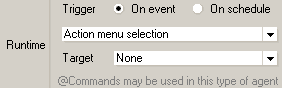
- Check that the agent's Hidden Options are NOT checked :
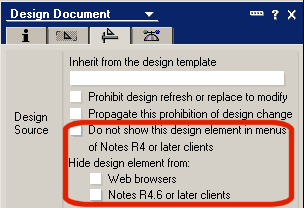
- In the agent code, search all references to Cache database (db_cache) and replace them with keyword Nothing (this will force Desktop Manager to use documents located in the server database):
Set doc_user = GetUserDocument (session, db_dskmgruser, db_cache)
Set doc_install = GetInstallDocument (session, db_dskmgruser, db_cache, doc_user)
devient
Set doc_user = GetUserDocument (session, db_dskmgruser, Nothing)
Set doc_install = GetInstallDocument (session, db_dskmgruser, Nothing, doc_user)
- Click the Desktop Manager database icon (
 ) on the workspace. You don't have to open the database, just select it.
 - Select the name of the Agent from the Actions pull down menu to start it.
6. Appendix 2 : Modify DskMgrUser document from LotusScript agent |
|
|
You can easily access the DskMgrUser document from a LotusScript agent by calling the function:
Set doc_user = GetUserDocument (session, db_dskmgruser, db_cache)
If you want to modify the fields of this document, you have to warn Desktop Manager because it is also using DskMgrUser document to store some data (Audit Results, Log, Execution dates...). In order to prevent any loss of data, you have to check the following option in the Tasks or Profiles document used to launch the agent modifying the field of the DskMgrUser document:
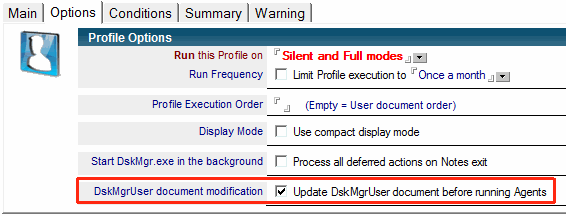
So Desktop Manager will update DskMgrUser document before launching the agents from this Task or Profile and it will reload DskMgrUser document after the execution of the agents, in order to get any data updates.
Beware about specific fields:
- If you want to modify one of the parameter fields used by Desktop Manager:
| ShortKey | Profile | Language | NumberMailSent | ||||
| KeywordUser1 | KeywordUser2 | KeywordUser3 | LastReminderTime | ||||
| BackupFolderPath | RoamingFolderPath | DskMgrServer | DskMgrDatabase | ||||
| FMFrequency | FMFrequencyDay | SMFrequency | SMFrequencyDay | ||||
| Start | XTR_* |
you have to create an extra field with suffix New:
' # Change Language value to DE
doc_user.Language = "DE"
doc_user.LanguageNew = "DE"
so, during the synchronization step with the Desktop Manager database located on the server, the new value of the parameter field will be take into account (and the field New will be removed). These parameter fields are not supposed to be synchronize from local DskMgrStart database to the server. Because they are parameters, they usually go from the server database (where the administrator modify them) to the local one.
- If you want to modify the parameter field Profile which defines the list of Profile documents applied to the user, you have of first to create the ProfileNew field (see below) but also a (Text List) field named ProfileDelta where we find the operations (add/remove) you want to perform over the Profile field:
+<Profile name> for the Profiles we want to add (plus sign '+')
-<Profile name> for the Profiles we want to remove (minus sign '-')
Example of removal of Profile PROFILE DESKTOP from existing Profiles:
Dim profiles As Variant
ReDim profiles(0)

' # Build new Profile list without Profile 'PROFILE DESKTOP'
profiles = doc_user.Getitemvalue("Profile")
ForAll p In profiles
 If p = "PROFILE DESKTOP" Then p = ""
End ForAll
profiles = FullTrim(ArrayUnique(profiles))

' # Change Profile field content
doc_user.Profile = profiles
doc_user.ProfileNew = profiles
doc_user.ProfileDelta = "-PROFILE DESKTOP" ' There is a minus sign '-' in front of the name of the Profile
During the next synchronization with the Desktop Manager database located on the server, the new value for Profile field will be taken into account (fields ProfileNew and ProfileDelta will be removed).
Comments
0 comments
Article is closed for comments.