
After the extraction of a database, when validating the display of data, it is possible to discover that some data and metadata are not displayed correctly.
In this case, the first thing to do is to open the mask associated with the documents and check if there are masking formulas for certain fields or text zones.
By comparing the Notes form with the mask generated by the extraction (present in the DESIGN\FORM_xxx.xsl sub-folder), you will certainly have to modify the XSL form to apply the masking formulas.
The best practice is to follow these 3 steps:
- Copy the Notes hidden formula into a comment, example :
< !-- Notes hidden formula : insert formula here -->
Concrete example below using the following masking formula:
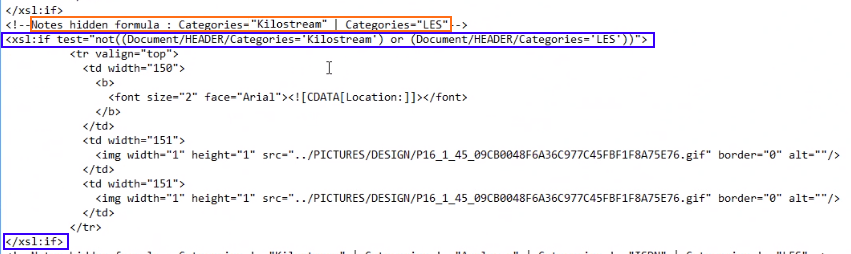
< !-- Notes hidden formula : Categories="Kilostream" | Categories="LES" -->
- Add a new line to insert an if in xsl above the block conditioned by a masking formula, as:
<xsl:if test="insert the reworked masking formula">
Description to rework the masking formula in XSL format, make the following adjustments:
- Replace double quotes in the Notes form with single quotes, example :
Categories="Kilostream" becomes Categories='Kilostream' - Replace the Boolean signs by writing their equivalent in English, examples :
& becomes and ; | becomes or. - Change the name of the field by adding the location of the XML node in front of the field, example:
Categories becomes Document/HEADER/Categories. - Always insert a not() around the reworked masking formula.
Example : here is the complete line to insert for the formula quoted in example above:
<xsl:if test="not((Document/HEADER/Categories='Kilostream') or (Document/HEADER/Categories='LES'))">
3. End by closing the if below the conditional block by adding </xsl:if>
Graphical example:
Comments
0 comments
Article is closed for comments.