
Pre-requisite
1. IBM/HCL Notes Environment (source)
IBM/HCL Notes databases (extension .nsf) must be identified as databases to be converted.
The Cooperteam "Notes Extractor" solution consists of a Notes database (NotesExtractor.nsf) and an executable (NotesExtractor.exe). The executable is set up in the NotesExtractor.nsf database by creating Setup documents from the Configuration / Export Setup view.
The account used for the installation must be an administrator of Notes Domino servers as well as having access to Domino servers remotely remote.
2. Target Environment
The Cooperteam "Notes Extractor" solution generates a folder for each processed database.
The product can be used on a Domino server or a Notes client machine. In any case, the XML / HTML / XSL files produced are created on the hard disk of the machine hosting the executable.
3. Elements needed for installation
You must have in your possession the following elements:
- The Cooperteam solution "Notes Extractor" (provided by Cooperteam)
- The list of all the databases to be converted, with the name of the Domino server (s) hosting the databases.
- Determine whether you want to run the checkout process on a workstation or on the Domino servers.
4. Technical prerequisites
The Cooperteam Notes Extractor solution usually installs on an Domino server in the enterprise. The following table shows the Domino server versions supported by the application:
Domino versions:
| OS / Domino | 5.x | 6.x | 7.x | 8.x | 9.x | 10.x | 11.x |
| Windows 32 bits | X | X | X | X | |||
| Windows 64 bits | X | X | X | X |
Notes versions:
The Notes release 8 (or higher) is mandatory to use the new features linked to the conversion of Rich Text. Users can install NotesExtractor on their desktop by using a Notes Client.
The following tab show the supported versions:
| OS / Domino | 5.x | 6.x | 7.x | 8.x | 9.x | 10.x | 11.x |
| Notes client (Win) | X | X | X | X |
5. Architecture
Principle of operation:
All components (NotesExtractor.nsf database and NotesExtractor.exe executable) must be installed on the Domino server or the Notes client computer.
The NotesExtractor process will read the contents of the Notes database to determine the list of documents to convert. Each Notes document is extracted into a set of files (an XML + an HTML by Rich Text or Mime field + attached files):
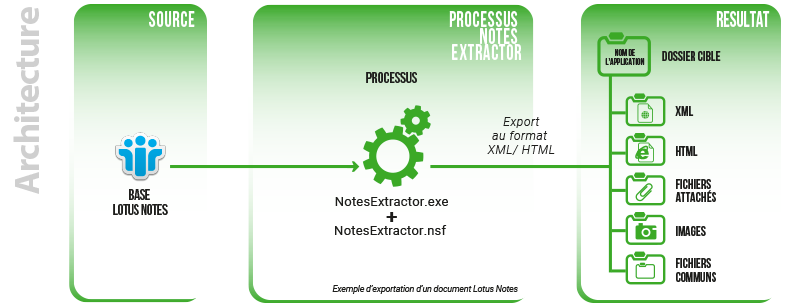
Data Conversion
1. Launching Notes Extractor
Before you can launch the NotesExtractor application, it must be correctly installed and set:
- Creating the NotesExtractor.nsf database on the Domino server (if launched from the server), or on your Notes client (if launched locally, note that you need a minimum Notes 8.0 client).
- Installing the NotesExtractor.exe executable in the Program directory of either the Domino server or the Notes client
- Creating a Settings document in the NotesExtractor.nsf database
There are several methods to launch the application:
- Manual launch from the NotesExtractor.nsf database
From the Configuration / Export Setup view of the NotesExtractor database, simply select the desired Setup document and click on the button: 
 : The NotesExtractor.exe executable is installed locally on the user's computer.
 : The NotesExtractor.exe executable is installed on the server hosting the NotesExtractor.nsf database.
To ensure that the Task starts correctly, check the presence of a Log document in the Configuration / Export Log view.
- Manual launch from the server console
From the server console, just run the following command:

load NotesExtractor NotesExtractor.nsf MAIN
where
NotesExtractor is the name of the NotesExtractor.exe executable
NotesExtractor.nsf is the path of the NotesExtractor.nsf database on the server
MAIN is the name of the Setup document you want to use (be careful, the value is case-sensitive).
If the server console is active, it will return a message close to this one:
10/02/2021 10:59:53 NotesExtractor(c) CooperTeam, 2002-2021.
to indicate that the task has started successfully.
Note: If the NotesExtractor.nsf database is placed in a subdirectory of the Data directory whose name would contain a space, consider adding quotation marks ("") around the base's name on the command line:
load NotesExtractor "Admin Databases\NotesExtractor.nsf" MAIN
- Automatic launch from a Program Document from the Address Book
In order to schedule an automatic launch of the Task once a week, simply create in the Server Address Book a Program document:
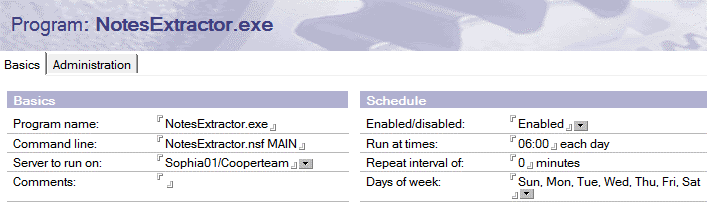
where
NotesExtractor.exe is the name of the NotesExtractor executable.
NotesExtractor.nsf MAIN is the command line to launch the application (NotesExtractor database path + Setup document name).
The other parameters are classic:
- Name of the server hosting the executable
- Start date / time of the Task.
Note: If the NotesExtractor.nsf database is placed in a subdirectory of the Data directory whose name would contain a space, consider adding quotation marks ("") around the base's name on the command line:
"Admin Databases \ NotesExtractor.nsf" MAIN
- Automatic launch from ServerTasks = lines of Notes.ini
To start the task at the same time as the server (ServerTasks =) or at a specific time of the day (ServerTasksAt =), simply place the command line of the NotesExtractor Task at the end of the corresponding line in the file. Server Notes.ini:
ServerTasks=Update,Replica,Router,AMgr,AdminP,NotesExtractor NotesExtractor.nsf MAIN
where
NotesExtractor is the name of the NotesExtractor.exe executable
NotesExtractor.nsf is the path of the NotesExtractor.nsf database on the server
MAIN is the name of the Setup document you want to use (be careful, the value is case-sensitive).
Note: If the NotesExtractor.nsf database is placed in a subdirectory of the Data directory whose name would contain a space, consider adding quotation marks ("") around the base's name on the command line:
NotesExtractor "Admin Databases\NotesExtractor.nsf" MAIN
2. Finalizing the data conversion
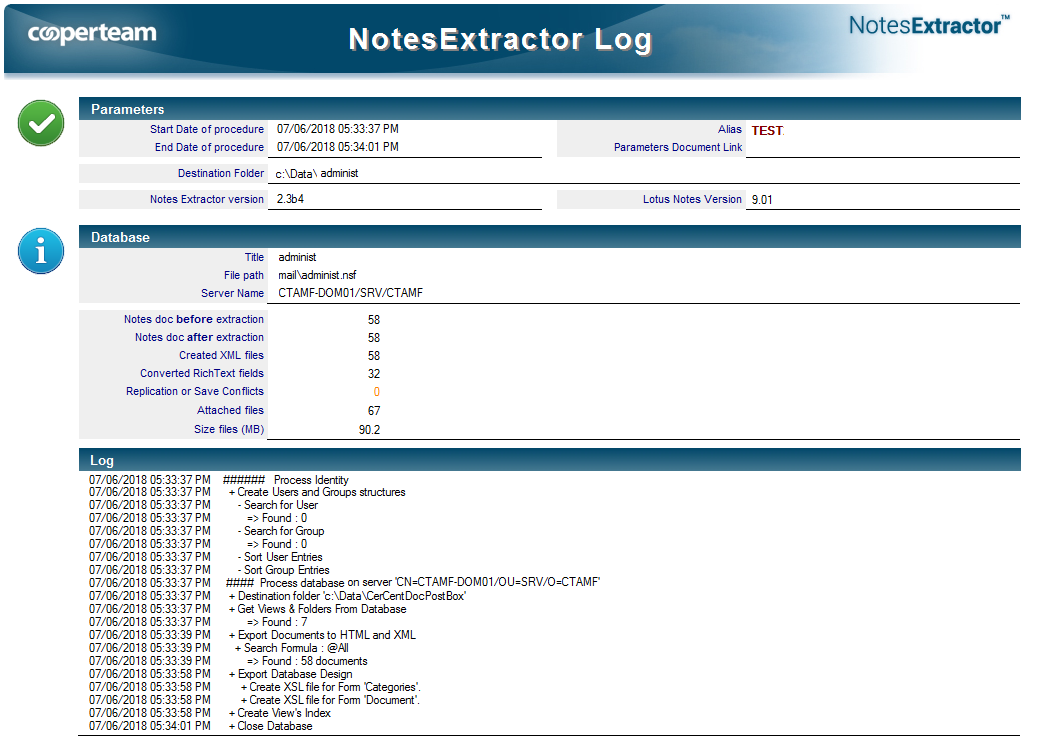
At the end of processing, you can check the conversion result by looking at the log files. Example:

|
Note : A log file is kept to verify the correct data conversion. |
Comments
0 comments
Article is closed for comments.