
The automatic archiving solution operates through a server task named ArchiveOnDB.exe  running on the company's Domino server(s). This task binary comes with a Notes database named ArchiveOnDB.nsf
  that provide the list of mail databases to process, and providing administrators to follow the progress of the archive jobs.
The server task is designed to achieve the following goals:
- In the ArchiveOnDB.nsf database, it creates a repository for all the server’s mail databases, creating one Database document per mail database found on the messaging server(s).
- It creates archive databases if they do not exist (one archive database per user and per year) and add a link in the mailfile database.
- It identifies and moves documents from the mail database to the archive databases (for a defined period, as per defined in Profile document).
- It creates pointer documents in the mail database to provide immediate access to newly archived documents.
- It deletes old pointer documents in the mail database (on a defined period).
- It provides a detailed log of the work achieved (savings, transfer time...).
The following diagram displays the various components at stake in the solution architecture :
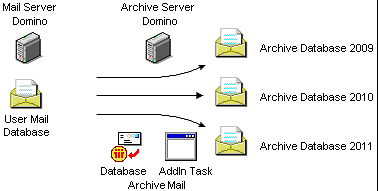
The mail server hosts the user mail databases, the ArchiveOnDB.nsf database, It can also host the ArchiveOnDB.exe. The AddIn Task Archive databases may be located on the mail server or on another Notes server, such as a server dedicated to data archiving. If the ArchiveOnDB.exe task is not used on the Mail server, it will be advisable to check that the Domino Server hosting the task has the rights to access/manage the Mail databases.
The mail server hosts the user mail databases. The archive server (another Domino server) host the ArchiveOnDB.nsf database and the ArchiveOnDB.exe Addin Task that is used to automatically transfer documents from the mail database to user archive databases (one archive database per year). The archive server must have read/write access on the Mail server databases. Archive databases are created on the Archive Server.
The AddIn Task regularly reads the ArchiveOnDB.nsf database in order to retrieve the list of mail databases to archive. Archived databases are databases with an Archive Profile associated to them (document specifying sliding periods for document archiving, creation and deletion of pointer documents). The database archiving process triggers the opening of the user's mail database, the location of messages to be archived and their transfer to the archive databases corresponding to the years these documents were created. If necessary, pointer documents are created on behalf of moved documents. Old pointer documents are also removed from the mail database after some time.
The various periods that are taken into account during the process are shown through an example in the following graphic :
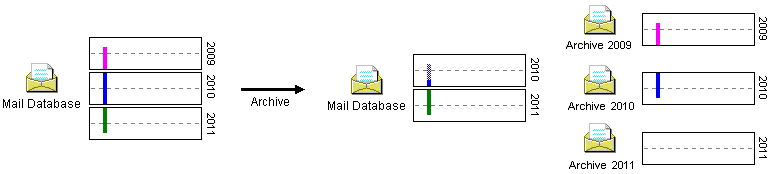
The left side of this scheme shows the content of a user mail database before the archive process begins. This database exists since April 2009 and includes 7 months of documents created in 2009 (in pink: April / December), 1 year of documents created in 2010 (in blue: January / December) and 8 months of documents created in 2011 (in green: January / October). As we assume here that the current date is set to October 2011, the latest documents in the mail database were saved at this time.
The archive process is run with an Archive Profile set up as follows :
- 12 sliding months for document backup
- 6 sliding months to keep document links
The right side of the graphic shows the following result after process completion :
- The mail database only stores documents over the last 12 months (in blue and green: October 2010 / October 2011). For the six previous months (in blue dotted line: April 2010 / September 2010), pointer documents have replaced original documents.
- Archive databases have been created (one per year: 2009, 2010 and 2011). Archive database 2009 gets all documents created in 2009 in the mail database. Archive database 2010 gets the documents created in 2010 that were archived. Some of these documents are associated with a document link in the user mail database. Archive database 2011 does not get any document at this stage.
The automatic archiving process is set up so that the user mail database stores documents over 1 year in a sliding mode, in addition to 6 months of document links. Therefore, right after the completion of an archive process, the user mail database should include the following:
- documents over 1 year
- document links over 6 months.
When browsing through his/her mailbox, the user will then see messages stored over 1 year and a half (6 months of document links and 1 year of original documents).
The archive process supports the creation of the archive database (one per year), the document compliance with the folders in which they were originally stored in the mail database and the creation of a link towards archive databases in the user mail database (database links).
The periods of time mentioned here are provided for example purposes and are totally user-defined. The database may store documents over a period of 2 years as it may keep only 1 month of document links. Archive periods (as defined in the Archive Profile document) may vary according to users within the company. The setup of message history defining which messages should be stored in the mail database will allow evaluating the size of each mailbox.
Once the archiving is complete, statistics are available in a Log document to check the number of archived documents, the free space gained with these removals, the required time for the process, etc.
Documents are transferred in archive databases corresponding to their creation year.
A document is eligible for archiving if it has not been modified since the last X months, X being the number of months over which documents are stored. Thus, a document modified on a weekly basis will never be archived. For Calendar documents, in case of regular meetings, it is the latest date that will be taken into account in order to determine if the document can be archived (See Profile Document for more information).
Comments
0 comments
Article is closed for comments.