

Overview
MailFlow Analyzer is a flow analysis tool that has been specifically designed for administrators who need accurate information on the functioning of their Domino messaging system. As enterprise messaging is a key process in the current business environment, this tool perfectly meets the need for relevant indicators in terms of flow, volume, usage and service level. Mail Flow Analyzer provides administrators with accurate indicators that are currently not directly available in Lotus Domino, so that they can evaluate, modify or adjust their messaging system.
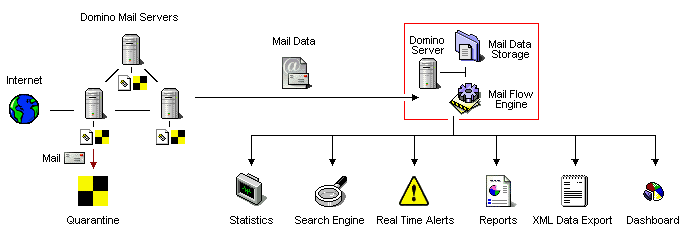
Mail Flow Analyzer collects data (Mail Data) on all messages passing through the Domino infrastructure. These data are stored on a dedicated computer (Mail Data Storage), in order to be processed by the application (Mail Flow Engine).They are used to produce real-time statistics, which are accessible through a Notes database (Statistics Database) or displayed as summary reports for printing (Reports). As message data are stored in the dedicated computer, a search engine is provided (Search Engine) in order to query the database thus created for specific messages (Mail Tracking, problem searching, etc.). As it may be interesting to process the collected data with an approach different from the one proposed by the software, a module (XML File Export) is provided to export message data as XML files.
In addition to the collect part as well as the data processing of messages routed trought the Domino infrastructure, Mail Flow Analyzer contains an analysis engine of the mail traffic to move in Quarantine all messages that should not be routed. Messages can be blocked into quarantine before being released later (to respect authorized hours for sending messages) or can be definitely blocked (messages that do not meet criteria set out in the Messagering Rules of Mail Flow).
Statistics
MailFlow Analyzer provides accurate statistics on messaging flows. They are grouped into several categories :
- Infrastructure statistics : This category allow a global view of messages flows inside the whole messaging infrastructure as well as the related key indicators (number of processed messages, volume of messages traffic, origin and destination of messages, delivery time average of messages, kinds of exchanged files, security options,...).
- Statistics for Populations users groups: These populations are defined in a uniform manner (by geographical location, by work type, by business unit, by language...) using information from Person documents of the Domino server address book or connecting to a third party database (like a human resources address book...). Populations statistics allow you to study the nature of the exchanges of a group of persons (number of messages, volume of messages, origin / destination of messages, file types exchanged,...), apart from technical criteria normally adopted (by Mail server, by Group from the NAB, by Notes Domains...). The Populations are dynamic in nature because if a single person is moving to a new geographical localization, he should be immediately integrated in a new Population covering his new location.
- Statistics regarding the flow between Populations. This category allow to understand the nature of the mail exchanges between the 2 Populations (number of messages, volume of messages, kinds of exchanged files, trends...)
- Statistics by Server : This category helps evaluating the performance of each messaging server in the system. The collected data provide good indicators in terms of load and performance (number of messages, volume of messages, origin and destination of messages, number of message received via server tasks like SMTP / HTTP / TRAVELER, number of messages dispatched in mail database of the particular selected server...). Data collected also help to compare the server load between them.
- Statistics of the Servers flows : The aim of this category is to evaluate the flows exchanges between servers (number of messages, exchanged volume, messages origin, destination of the messages, distribution of the exchanges during a day,...).
- Statistics by Users or Groups of Users : Each user of the company has a document gathering information on the use of the messaging system sur son usage de la messagerie which has been put ay his disposal (number of sent messages, number of received messages, exchanged volume, security options used, origin of the received messages, destination of sent messages, number of recipients in sent messages, exchanged files types, infrastructure impact, ...). They provide an opportunity to highlight the top consumers of the messagering system (both in terms of number and volume), but also to detect any under-utilization (unused account , unused group from the Address Book).
For each category analysed (with the exception of Users Statistics), The Mail Flow Analyzer solution generates statistics for the follow time period :
- Daily with hourly breakdown (retention period : 7 sliding days)
- Weekly (retention period : 4 sliding weeks)
- Monthly (retention period : 12 sliding months)
- Yearly (retention period : 5 ans sliding years)
- Fully consolidation without any time limitation.
Data access (tables, graphics) is performed through Notes documents that are directly accessible through dedicated views.The impact of modifications on the architecture or on the messaging rules can be quickly highlighted with variance indicators.
These statistics are used to evaluate the overall functioning of the messaging system. They consist therefore in aggregating the data coming from all the messages that have passed through the company IBM messaging servers. They provide a comprehensive report about message type and processed volumes, along with their destination and distribution :
- Global traffic (number and volume)
- Breakdown Sending and Receiving traffic between Internal and Internet (number and volume)
- Breakdown Sending and Receiving traffic between differents OU (Organization Unit)
- Breakdown Sending and Receiving traffic by internal/Internet Domains
- Delivery Time (SLA) of messages (average, min , max)
- Breakdown into hourly day time with number of messages and exchanged volume
- Monitoring on the working hours versus non-working hours.
- Breakdown by number of recipients, impact monitoring for messages with a large number of recipeints
- Nature and volume of attached file for either Sending and Receiving messages exchanged internaly and for the Internet
- Messages Type (Memo, Reply, Forward, non-delivery Messages...)
- Messages Security Options (encryption, signed messages)
- Delivery Options of messages (acknowledged receipt, priority, used format, ...)
Statistics are presented in a comprehensive manner in a Notes database (accessible through a Notes client and with a Web client). This is a dynamic mode of display, as they are updated in real time.
Search engine
Mail Flow Analyzer has also a search engine that allows querying the message database at any time. Users may check the status of a specific message through a simple query, according to various criteria (sender, recipient(s), subject, attached document name, etc.). This tool helps detect routing or delivery errors, as well as validate internal or Internet message delivery, in terms of service level provided by a Help Desk. It can supersede the Mail Tracking function included in Domino. It is also used by Security Officiers to trace any suspicious exchange.
Real time Alerts
Mail Flow Analyzer analyze in real time all messages through the messaging infrastructure and can then raise an Alert as soon as a message fullfill the declared criteria in the Alerts Setup. Alerts can trigger based on either the content of a message (sender or recipeint names, message size, nature of attached files, keywords in the subject, delivery options, ...), or if a delivery time is too long (SLA) or simply linked to a statistifcs value from documents available in the statistics databases. This last case allow to detect unusual behaviour inside the messaging infrastructure (important number of messages suddenly coming from a SMTP gateway, unusual volume sent by a user, ...). Alerts can notify administrators by mail, by SNMP or via a new entry in the Log database of Mail Flow Analyzer.
Reporting
The reporting module included in Mail Flow Analyzer allow to automatically create Word or Excel files containing desired statistics. The creation of reports can be scheduled (daily, weekly, monthly, yearly) to provide key indicators of the messaging system to management or any person that may need accurate numbers on a clear date (also contrasting with the numbers seen in real time in the statistics databases) and covering a specific period of time (1 week, 1 month, 1 year...). Reports can be automatically sent by mail to chosen recipeints or simply published in any Notes database. As to the choice of the chosen file format (Word ou Excel), the modification of the reports layout (like add a new number, insert the company logo, creation of a graphic) is very simple.
Data Export to XML format
Data related to messages that have passed through the Notes infrastructure (name of sender and recipients, message size, subject, name of attached documents, etc.) may be stored for many years in the software. A querying interface allows extracting these data from MailFlow Analyzer in XML format. This way, the collected data may be exported at any time outside MailFlow Analyzer for various purposes (create additional statistics, interface with report generation tools such as Crystal Report, transfer to other databases, etc.).
Dashboard
The Dashboard module presents Data into a Web page, updated in real time, where key indicators of the messaging infrastructure can be seen (like the messages number and volume, SLA, trends...) aggregated as tables or graphs (bar charts, pie charts and curves). Such information is not only available for the messaging administrators (which have access to all statistics databases), but can be shared with external people.
Comments
0 comments
Article is closed for comments.